Choosing business software used to be relatively straightforward. You needed a system to send invoices, track expenses, reconcile bank transactions and prepare financial reports.
Today, many Australian businesses need much more.
A growing retailer may need to manage online and in-store sales, warehouse inventory, purchasing and accounting. A manufacturer might require production planning, bills of materials, stock traceability and financial reporting. A professional services company may want its sales pipeline, projects, invoicing and customer support connected.
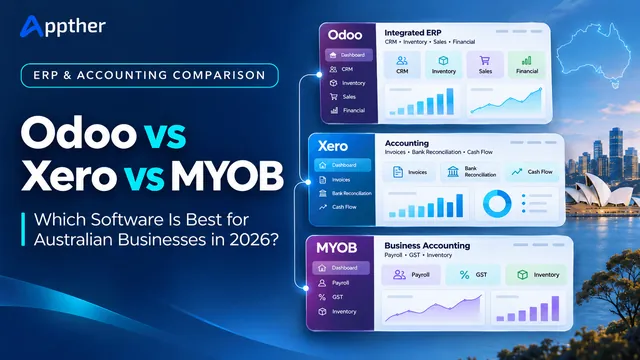
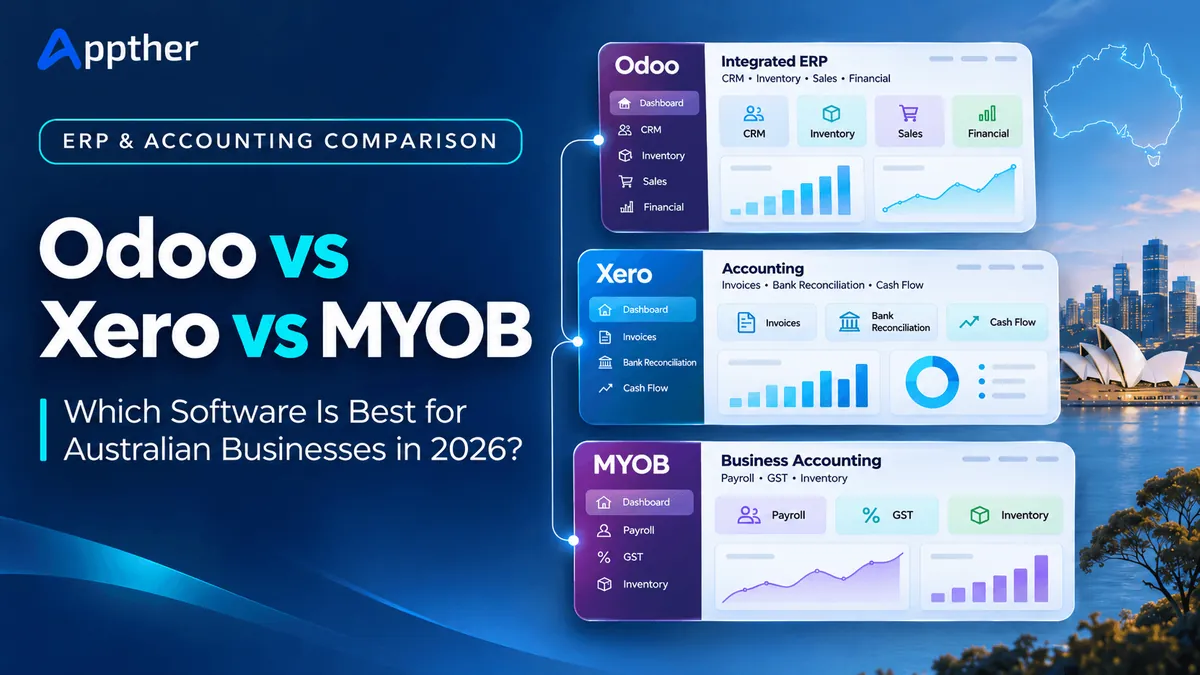
This is where the decision between Odoo vs Xero vs MYOB becomes important.
All three platforms can support financial management, but they differ significantly in their architecture, operational coverage, pricing and implementation requirements.
- Odoo is an integrated ERP platform for businesses that want accounting, inventory, sales, CRM, manufacturing and other operations in a connected system.
- Xero is a cloud accounting platform particularly suited to businesses prioritising bookkeeping, bank reconciliation, invoicing, payroll and financial visibility.
- MYOB Business is an Australian-focused accounting solution with invoicing, payroll, GST/BAS functionality and inventory features that vary by plan.
MYOB also offers MYOB Acumatica, a separate ERP platform for more complex mid-market businesses.
So, which option makes sense for your organisation?
This guide compares Odoo, Xero and MYOB in the Australian market, examining features, pricing, local requirements, scalability and migration considerations.
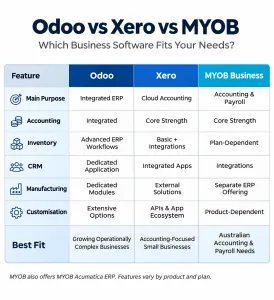
Odoo vs Xero vs MYOB: Quick Comparison
The key difference is that Odoo is designed to connect operational processes across the business, while Xero and MYOB Business primarily focus on financial administration.
However, Xero and MYOB Business offer integrations and additional features that may be sufficient for many small businesses.
| Feature | Odoo ERP | Xero | MYOB Business |
|---|---|---|---|
| Primary focus | Integrated business management | Cloud accounting | Accounting and local business administration |
| Accounting and invoicing | Yes | Yes | Yes |
| Australian GST/BAS | Australian localisation; configuration required | Supported | Supported |
| Payroll | Australian localisation; validate suitability | Available, plan-dependent | Available, plan-dependent |
| CRM | Dedicated application | Through integrated apps | Through integrations or other products |
| Inventory | Extensive ERP inventory functionality | Basic stock tracking and integrated apps | Plan-dependent, including AccountRight |
| Manufacturing | Dedicated manufacturing modules | Typically third-party software | Typically separate ERP |
| Purchasing | Integrated purchase management | Bills and purchase-related workflows | Purchasing features vary by product |
| eCommerce | Native website and eCommerce options | Integrations | Integrations |
| Customisation | Extensive, edition and plan-dependent | Mainly app integrations and APIs | Product and integration-dependent |
| Typical fit | Growing or operationally complex businesses | Small businesses and finance-led teams | Australian small and established businesses |
| Implementation complexity | Moderate to high, depending on scope | Usually lower | Low to moderate for Business; higher for ERP |
Capabilities vary by subscription, edition, configuration and additional integrations.
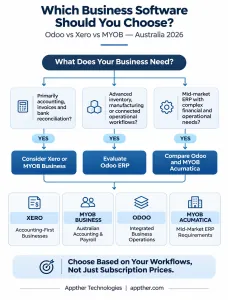
Quick recommendation: Choose Xero for accounting-first simplicity, MYOB Business when its Australian accounting, payroll and inventory features fit your needs, or Odoo when multiple business operations need to work together in a common ERP.
What Is Odoo ERP?
Odoo is an integrated business management platform with applications for accounting, CRM, sales, purchasing, inventory, manufacturing, projects, HR, point of sale, eCommerce and more.
Instead of relying on several separate systems, an organisation can connect its workflows through Odoo.
For example, consider a wholesale distributor:
- A salesperson prepares a customer quotation.
- The customer confirms the order.
- Available inventory is checked and reserved.
- Warehouse staff prepare the dispatch.
- Delivery details are recorded.
- The finance team issues an invoice.
- Management reviews sales and stock performance.
Odoo can connect these activities through related applications, reducing the need to repeatedly enter the same information into different systems.
Key Odoo ERP capabilities
- Accounting: Financial records, invoices, vendor bills, reconciliation and reporting.
- Sales and CRM: Lead management, opportunities, quotations and sales orders.
- Inventory: Stock movements, warehouses, locations, lots and serial numbers.
- Manufacturing: Bills of materials, manufacturing orders, work centres and production workflows.
- Purchasing: Supplier management, purchase orders and procurement workflows.
- eCommerce and POS: Digital storefronts and point-of-sale operations.
- Projects and services: Task tracking, time management and service workflows.
- Customisation and integrations: Configurable applications, modules and third-party connections.
The exact capabilities depend on the Odoo edition, subscription and implementation.
For Australian businesses evaluating an end-to-end ERP, Appther’s Odoo development services in Australia explain the implementation, integration and migration options available.
Where Odoo makes sense
Odoo is particularly worth considering when a company manages inventory across locations, operates manufacturing workflows, handles large numbers of sales orders or maintains customer and operational information in disconnected systems.
It can also be useful for businesses needing tailored workflows that standard accounting software cannot easily accommodate.
However, Odoo requires careful configuration, process mapping, training and testing. It is not automatically a better choice simply because it offers more features.
What Is Xero?
Xero is cloud accounting software designed to help businesses manage financial records, payments, expenses, payroll and reporting.
Its strength is providing accessible accounting workflows, including bank feeds, reconciliation and collaboration with accountants and bookkeepers.
Key Xero capabilities
- Online invoicing and quotations
- Bank feeds and transaction reconciliation
- Bills and expense management
- GST tracking and BAS preparation and lodgement
- Payroll on eligible Australian plans
- Financial dashboards and reporting
- Basic tracked inventory
- Integrations with specialised business applications
For many Australian sole traders, consultants and small service businesses, these capabilities cover their main operational requirements.
Where Xero makes sense
A business with relatively simple operations may not need a full ERP.
For example, a digital marketing agency with a small team could use Xero for invoicing, expenses, payroll and financial reporting while managing tasks in another application.
That can be a cost-effective arrangement when the applications work reliably and staff do not spend significant time reconciling information manually.
Xero’s limitations as an ERP alternative
Xero is not the same type of product as Odoo.
Although it supports inventory tracking and connects with a wide ecosystem of applications, businesses needing sophisticated manufacturing, warehouse operations or complex order orchestration will generally require additional systems.
Those integrated systems can be effective, but businesses should consider recurring app costs, data synchronisation, integration maintenance and reporting consistency.
What Is MYOB?
MYOB offers several business software products in Australia.
For this comparison, it is important to distinguish MYOB Business from MYOB’s full ERP offering.
MYOB Business Lite and Pro
MYOB Business Lite and Pro support small-business accounting functions, including invoicing, bank reconciliation, GST tracking and BAS-related workflows.
Payroll features and related charges depend on the selected plan.
MYOB Business Pro adds capabilities suited to businesses with more complex administrative requirements.
MYOB AccountRight
MYOB AccountRight Plus and Premier are designed for established businesses needing more extensive inventory, payroll and other accounting capabilities.
AccountRight can be a reasonable option for companies with more demanding accounting and stock-management requirements that do not need a complete ERP implementation.
MYOB Acumatica: The full ERP alternative
MYOB Acumatica, formerly MYOB Advanced, is a cloud ERP platform aimed at mid-market businesses.
It supports broader operational requirements, including financial management, inventory, distribution, projects and industry-specific workflows.
This distinction matters: An Australian manufacturer comparing Odoo with MYOB should evaluate MYOB Acumatica, not assume MYOB Business Lite represents the full capability of the MYOB product family.
MYOB Acumatica also has a different implementation and pricing model from MYOB’s small-business products.
Odoo vs Xero vs MYOB: Detailed Feature Comparison
The right choice depends on which business processes must be managed together.
1. Accounting and financial management
Accounting is a core requirement for all three platforms.
Xero is particularly accessible to organisations prioritising bookkeeping, bank reconciliation and accountant collaboration.
MYOB Business offers similar financial administration capabilities, with product options tailored to different levels of complexity.
Odoo combines accounting with operational modules such as sales, purchasing, inventory and manufacturing.
For example, a company using Odoo for purchasing and inventory can connect stock receipts, supplier bills and inventory valuation through configured processes.
This provides a different level of operational integration from a standalone accounting workflow.
Best fit:
- Xero: Accounting-first businesses.
- MYOB Business: Businesses prioritising Australian accounting and payroll workflows.
- Odoo: Businesses needing integrated operational and financial processes.
2. Inventory and warehouse management
Inventory requirements often determine when a company should consider an ERP.
Xero supports basic inventory tracking and provides integrations for businesses needing more specialised capabilities.
MYOB Business includes inventory functionality, while AccountRight offers more extensive inventory options.
Odoo’s Inventory application supports warehouse workflows, stock locations, barcode operations, replenishment, lot and serial tracking, and integrations with purchasing, sales and manufacturing.
A retailer with one small stockroom may be comfortable with an accounting product and simple inventory management.
A wholesaler managing multiple warehouses, backorders, stock transfers and thousands of products may benefit more from a dedicated inventory system or ERP.
Best fit: Odoo for complex, integrated warehouse workflows; Xero or MYOB for simpler needs, with appropriate add-ons where required.
3. Sales and CRM
Sales teams frequently need information beyond invoices and payments.
They may want to track leads, opportunities, quotations, customer communications and follow-up activities.
Odoo provides a dedicated CRM application that can connect with sales orders, subscriptions, invoicing and related operations.
Xero typically relies on integrated CRM applications for more advanced sales pipeline management.
MYOB Business focuses on accounting workflows and can connect with other systems; MYOB Acumatica offers broader ERP-level CRM capabilities.
For Australian businesses managing an active sales pipeline, Odoo CRM implementation may be worth evaluating.
4. Manufacturing and production
Manufacturing is one of the clearest reasons to choose a full ERP.
A manufacturer may need bills of materials, production orders, work-centre scheduling, procurement coordination and traceability.
Odoo offers dedicated manufacturing functionality.
Xero and MYOB Business are not designed to replace a complete manufacturing execution and planning environment without other applications.
MYOB Acumatica, however, provides ERP capabilities for manufacturing and distribution businesses and should be included in a formal shortlist.
Best fit: Compare Odoo with MYOB Acumatica when manufacturing is a major requirement.
5. Payroll and Australian compliance
Australian businesses must consider GST, BAS, Single Touch Payroll (STP), superannuation and applicable employee entitlements.
Xero supports Australian payroll and related reporting on eligible plans.
MYOB offers Australian payroll solutions, with functionality and pricing varying by product.
Odoo provides Australian accounting and payroll localisation, including documented support for STP Phase 2 and SuperStream-related workflows.
However, an Odoo implementation must validate the exact version, required modules, submission arrangements, payroll scenarios and ATO-related reporting processes.
A feature being available does not mean every configuration is automatically compliant.
Businesses should involve their accountant, payroll specialist and implementation team before replacing established payroll processes.
6. Customisation and integrations
Odoo offers extensive application customisation and integration capabilities, particularly through its Custom subscription and appropriate hosting arrangements.
Xero provides a substantial app ecosystem and APIs that enable businesses to connect finance with other software.
MYOB also offers integrations and different levels of customisation depending on the product.
The question is not which platform has the most integrations.
It is whether the business can maintain reliable, secure and auditable data flows between its chosen applications.
Odoo vs Xero vs MYOB Pricing in Australia (2026)
Software pricing is an important consideration, but monthly subscription fees do not represent the full cost of a business system.
The following figures reflect publicly available Australian pricing reviewed in November 2026. Promotions and subscription conditions may change.
Odoo ERP pricing
For Odoo’s paid cloud plans, Australian pricing reported in October 2026 included:
| Odoo plan | Indicative regular price |
|---|---|
| One App Free | A$0 for eligible single-app use |
| Standard | A$43 per user/month |
| Custom | A$80 per user/month |
Standard and Custom figures are based on annual billing, after introductory discounts, excluding GST. Odoo’s Australian pricing and eligibility rules should be reconfirmed before purchase.
The Standard plan provides access to Odoo’s applications within its supported hosted environment.
The Custom plan supports requirements such as Odoo Studio, external API access and custom modules, subject to the selected hosting model.
Custom modules, implementation, migration, training, additional hosting and ongoing support may increase the total cost.
See Odoo’s official pricing page and Appther’s Odoo implementation cost guide for Australia.
Xero pricing in Australia
Xero’s regular Australian prices in November 2026 include:
| Xero plan | Regular monthly price |
|---|---|
| Ignite | A$37 |
| Grow | A$78 |
| Comprehensive | A$107 |
| Ultimate 10 | A$143 |
Prices include GST. Xero also offers larger payroll plans and other options. Promotional rates are excluded from this table.
Plan limits, payroll allowances, add-ons and included functions must be checked before selecting a subscription.
See Xero’s Australian pricing.
MYOB Business pricing in Australia
MYOB’s published regular subscription pricing includes:
| MYOB product | Indicative regular price |
|---|---|
| Business Lite | A$35/month on monthly billing, or A$315/year |
| Business Pro | A$70/month |
| AccountRight Plus | A$165/month |
| AccountRight Premier | A$210/month |
Prices and billing terms vary by product. Confirm GST treatment, promotions and additional payroll charges directly with MYOB.
MYOB Acumatica uses a separate ERP pricing and implementation process, so businesses should request a project-specific quotation rather than compare it with MYOB Business Lite.
See MYOB’s official pricing page.
Why subscription prices alone can be misleading
Imagine two companies.
Company A has five employees, issues 40 invoices a month and needs basic payroll.
Company B has 35 employees, two warehouses, a sales team, purchasing operations and an online store.
Company A may be able to operate effectively with an accounting subscription.
Company B may need an ERP, or multiple well-integrated systems, even though that carries a higher initial investment.
For a meaningful comparison, evaluate the complete three-year cost.
Three-Year Total Cost of Ownership = Subscription Costs + Implementation + Migration + Integrations + Training + Support + Maintenance
Also consider operational impacts such as manual data entry, reconciliation effort, reporting delays and future system changes.
A lower subscription price does not always mean a lower total business cost.
Which Software Is Best for Different Australian Industries?
Different industries have different operational requirements.
| Industry | Recommended starting point | Reason |
|---|---|---|
| Freelancers and sole traders | Xero or MYOB Business | Financial management without unnecessary ERP complexity |
| Accounting-led service businesses | Xero or MYOB Business | Invoicing, expenses, payroll and reporting |
| Small retail businesses | Xero or MYOB with suitable inventory setup | Accounting and straightforward stock workflows |
| Multi-warehouse wholesalers | Odoo or another inventory-capable ERP | Integrated stock, purchasing and sales |
| Manufacturing companies | Odoo or MYOB Acumatica | Production, procurement, traceability and finance |
| Construction contractors | Depends on job costing and operational complexity | Accounting tools or industry-specific ERP |
| Growing eCommerce businesses | Odoo or accounting software with integrated commerce tools | Depends on order volume and stock complexity |
| Multi-entity businesses | Odoo or an enterprise-grade system | Consolidation and cross-business process requirements |
These recommendations are starting points, not universal rankings.
A business should always validate its most important processes through demonstrations and realistic scenarios.
When Should You Move from Xero or MYOB to Odoo?
A business may have outgrown its accounting software when managing operations requires multiple disconnected tools and increasing manual effort.
Here are seven signs worth investigating.
1. Inventory information is frequently inconsistent
If stock quantities differ between the warehouse, online store and finance records, integration or process improvements may be necessary.
2. Teams enter the same information repeatedly
Copying customer details and orders between CRM, accounting and inventory applications can create unnecessary work and errors.
3. Manufacturing processes are difficult to coordinate
Production planning, material requirements and procurement may require more structured workflows.
4. Management cannot see business performance in one place
Disconnected reporting can make it harder to understand order status, inventory, revenue and costs together.
5. Existing software struggles with business-specific processes
A company may require approval flows, specialised pricing, complex purchasing or custom operational rules.
6. Integration costs and maintenance are increasing
Maintaining numerous app subscriptions and synchronisation processes can become expensive or unreliable.
7. Business growth creates operational complexity
Expansion into new warehouses, sales channels, locations or business entities may justify reconsidering the software architecture.
Important: None of these signs automatically requires replacing Xero or MYOB.
Sometimes the more practical solution is improving integrations, upgrading a product plan or implementing a separate operational system.
Can Odoo Integrate with Xero or MYOB?
Yes, integration is possible, subject to the relevant products, available APIs, connectors and technical requirements.
A business does not always need to migrate its entire accounting function immediately.
For example, it might use Odoo for CRM, sales and inventory while retaining Xero as its accounting system.
A carefully designed integration could synchronise selected customer records, approved invoices, payments or other required information.
However, integration must define:
- Which system owns each type of data
- Which records should synchronise
- Whether the flow is one-way or two-way
- How GST codes, account mappings and tax rules are handled
- How duplicates and failed transactions are detected
- What happens when records are corrected or deleted
- How financial balances are reconciled
An integration should never create financial entries in two systems without a clearly defined reconciliation process.
Businesses considering this approach can explore Appther’s Odoo ERP integration and development services.
How to Migrate from Xero or MYOB to Odoo
Migrating accounting and operational data is more involved than exporting a spreadsheet and importing it into another application.
A structured migration should include the following stages.
Step 1: Review existing business processes
Document how sales, purchasing, inventory, accounting and reporting currently work.
Identify which processes need to move and which systems may remain.
Step 2: Define migration scope
Determine whether the project includes customer records, supplier records, products, opening balances, outstanding invoices, stock quantities and historical transactions.
Historical transaction migration is not always necessary or practical.
Step 3: Map financial and operational data
Align account codes, tax codes, customers, suppliers, product identifiers, payment terms and other fields.
Engage an Australian accounting professional to validate accounting mappings and balances.
Step 4: Configure Odoo
Set up the relevant modules, accounting localisation, permissions, company details and workflows.
Validate GST, BAS, payroll and other applicable requirements before go-live.
Step 5: Run a trial migration
Import representative data and verify quantities, balances, documents and transaction references.
Test real business scenarios rather than checking only whether imported records are visible.
Step 6: Reconcile and obtain approval
Compare opening balances, accounts receivable, accounts payable and inventory valuation against the source system.
Any differences should be investigated and resolved.
Step 7: Plan cutover and go-live
Define data-freeze dates, responsibilities, rollback procedures, staff training and initial support arrangements.
Maintain access to historical records in accordance with applicable retention obligations.
For further guidance, read Appther’s Odoo migration guide.
Example: An Australian Wholesale Business Evaluating ERP
Consider a hypothetical wholesale company based in Brisbane.
It has 20 employees, two warehouses and an online ordering channel.
The company currently uses accounting software alongside spreadsheets and a separate stock-management application.
As order volumes grow, several challenges appear:
- Sales teams cannot always see accurate available stock.
- Warehouse staff receive updates from multiple systems.
- Purchasing decisions require manual checks.
- Customer invoices sometimes need additional reconciliation.
- Management lacks a consolidated view of orders and stock.
Option A: Retain Xero or MYOB and improve integrations
The company could keep its accounting software and introduce a specialist inventory system with reliable synchronisation.
This may be a good solution if the finance team is comfortable with its existing software and the new integrations address the main issues.
Option B: Implement Odoo ERP
The company could evaluate Odoo Sales, Inventory, Purchase and Accounting, with appropriate integrations for its online ordering channel.
This approach may reduce the number of separate operational systems and provide more connected workflows.
However, it would also require data migration, process design, training, testing and ongoing support.
Which approach is better?
The company should compare the total cost, workflow reliability, reporting requirements, operational risks and future expansion plans.
A short discovery and proof-of-concept exercise can reveal whether the benefits of ERP consolidation justify the implementation investment.
How to Choose the Right ERP or Accounting Software
Before signing a subscription or implementation contract, Australian businesses should answer these questions.
- Do we only need accounting software, or do we need to manage multiple connected operations?
- Which workflows cause the greatest delays or manual effort today?
- Do we require manufacturing, multiple warehouses, advanced purchasing or other ERP-level capabilities?
- What Australian GST, BAS, payroll and industry-specific requirements apply?
- Can our existing software integrate reliably with other applications?
- What is the realistic three-year total cost?
- How much historical data needs to migrate?
- What training and business disruption will implementation involve?
- Can the platform support likely business growth?
- Who will maintain and support the system after launch?
The answers should form the basis of a documented requirements assessment and vendor shortlist.
A live demonstration should use real business scenarios, such as processing a customer order, purchasing stock, issuing an invoice or preparing relevant reports.
How Appther Helps Australian Businesses Implement Odoo ERP
Selecting an ERP system is only one part of a successful implementation.
The greater challenge is configuring it around actual business workflows and ensuring information moves correctly between departments and connected systems.
Appther Technologies provides Odoo development, implementation, migration, customisation and integration services for Australian businesses.
Our Odoo ERP services support organisations that need to evaluate or implement capabilities such as:
- Odoo ERP requirements assessment and implementation planning
- Accounting, CRM, sales, purchasing and inventory configuration
- Manufacturing and operational workflow customisation
- Data migration from existing business systems
- Xero, MYOB and third-party integration assessment and development
- Reporting dashboards and process automation
- User training, testing and post-launch support
- AI-enabled workflows and document processing where appropriate
Appther works as an independent Odoo implementation company, with project scopes and implementation requirements defined before development begins.
For Australian businesses, we can also assess suitable cloud hosting, data access and integration requirements as part of the architecture.
Whether your organisation is moving beyond basic accounting software or planning a wider ERP transformation, our team can help evaluate the technical requirements and implementation approach.

Final Verdict: Odoo vs Xero vs MYOB, Which Should Australian Businesses Choose?
There is no single best platform for every Australian business.
Choose Xero if: Your main priority is cloud accounting, invoices, bank reconciliation, payroll and financial reporting, with specialist tools added where needed.
Choose MYOB Business if: You want Australian-focused accounting and payroll functionality, with plan-dependent inventory and business management features.
Choose Odoo if: Your business needs connected accounting, CRM, sales, inventory, manufacturing, purchasing or other operational processes, and you are prepared to invest in implementation.
Consider MYOB Acumatica if: Your organisation requires a more comprehensive mid-market ERP and values its Australian and New Zealand product ecosystem.
The right decision depends on your business processes, future plans, budget and internal capabilities.
Before replacing an accounting platform, compare a well-integrated accounting solution with a full ERP implementation. Both can be valid choices.
For businesses with growing operational complexity, the long-term objective should be to create reliable workflows, accurate data and effective management visibility, not simply to install more software.
Planning to move from Xero or MYOB to Odoo?
Contact Appther Technologies to discuss your requirements, integration options, migration approach and Odoo implementation roadmap.
Frequently Asked Questions
1. Is Odoo better than Xero for Australian businesses?
Odoo may be a better fit for businesses requiring integrated inventory, CRM, manufacturing and operational workflows. Xero may be more practical for organisations that mainly need accounting, payroll and financial reporting.
2. Is Odoo cheaper than Xero in Australia?
Not necessarily. Odoo generally uses per-user licensing for its paid plans and may require a substantial implementation investment. Xero typically charges a subscription at the organisation level, with feature limits and possible add-on costs. Compare total costs rather than basic monthly prices.
3. Can Odoo replace MYOB?
Odoo can replace many MYOB accounting and operational functions when correctly configured and validated. Businesses should assess payroll, GST, BAS, historical records and reporting before deciding to migrate.
4. What is the main difference between Odoo and Xero?
Odoo is an integrated ERP covering many operational functions alongside accounting. Xero primarily focuses on accounting and financial administration, using integrations to extend its capabilities.
5. Does Odoo support Australian GST and BAS?
Odoo provides Australian accounting localisation that supports GST-related accounting and BAS reporting workflows. Businesses should verify the specific configuration, reports, submission processes and version requirements with their implementation team and accounting adviser.
6. Does Odoo support Australian payroll?
Odoo documents Australian payroll localisation, including STP Phase 2 and SuperStream-related support. Companies must confirm that the selected Odoo version, integration and payroll configuration support their actual legal and reporting requirements.
7. Can Xero and Odoo work together?
Yes. Businesses can integrate selected financial and operational workflows using appropriate supported APIs, connectors or custom integrations. Data ownership and reconciliation must be clearly defined.
8. Is MYOB a full ERP system?
MYOB Business is primarily accounting software. MYOB also offers MYOB Acumatica, a full ERP platform for more complex businesses.
9. Which ERP is best for Australian manufacturing companies?
Odoo and MYOB Acumatica are both worth evaluating for manufacturing operations. The best choice depends on production workflows, inventory requirements, reporting, integration needs and total cost.
10. How long does it take to migrate from Xero or MYOB to Odoo?
Timelines depend on data complexity, modules, integrations, reporting and training. A small, well-defined implementation may take weeks, while larger or more customised ERP projects can require several months.
11. Can a small Australian business use Odoo?
Yes. Odoo can support small businesses as well as more complex organisations. However, smaller companies should consider whether the benefits of integrated workflows justify the implementation and maintenance effort.
12. Should a company migrate its accounting system and inventory simultaneously?
Not always. A phased implementation may reduce disruption, particularly when accounting and inventory requirements are complex. The migration sequence should be determined through process mapping, data reconciliation and implementation planning.