AI voice agents are rapidly changing how businesses handle customer support, appointment scheduling, sales, collections, lead qualification, internal operations, and other voice-based workflows.
Unlike traditional IVR systems that ask callers to “press 1” or “press 2,” modern AI voice agents can listen to natural speech, understand intent, retrieve business information, execute actions through APIs, and respond using increasingly natural synthetic voices.
But building a production-ready AI voice agent is very different from connecting a speech-to-text API to an LLM.
A real-world system must handle:
- real-time audio streaming
- speech recognition
- interruptions and barge-in
- conversational context
- tool and API execution
- hallucination prevention
- authentication and authorization
- CRM and ERP integration
- human escalation
- call recording and transcription
- latency optimization
- monitoring and evaluation
- security and compliance
- infrastructure and operating costs
This guide explains how to build an AI voice agent in 2026, from architecture and technology selection to deployment, integrations, costs, and real-world business scenarios.
What Is an AI Voice Agent?
An AI voice agent is a software system that can conduct spoken conversations with users and perform actions based on those conversations.
A simplified interaction looks like this:
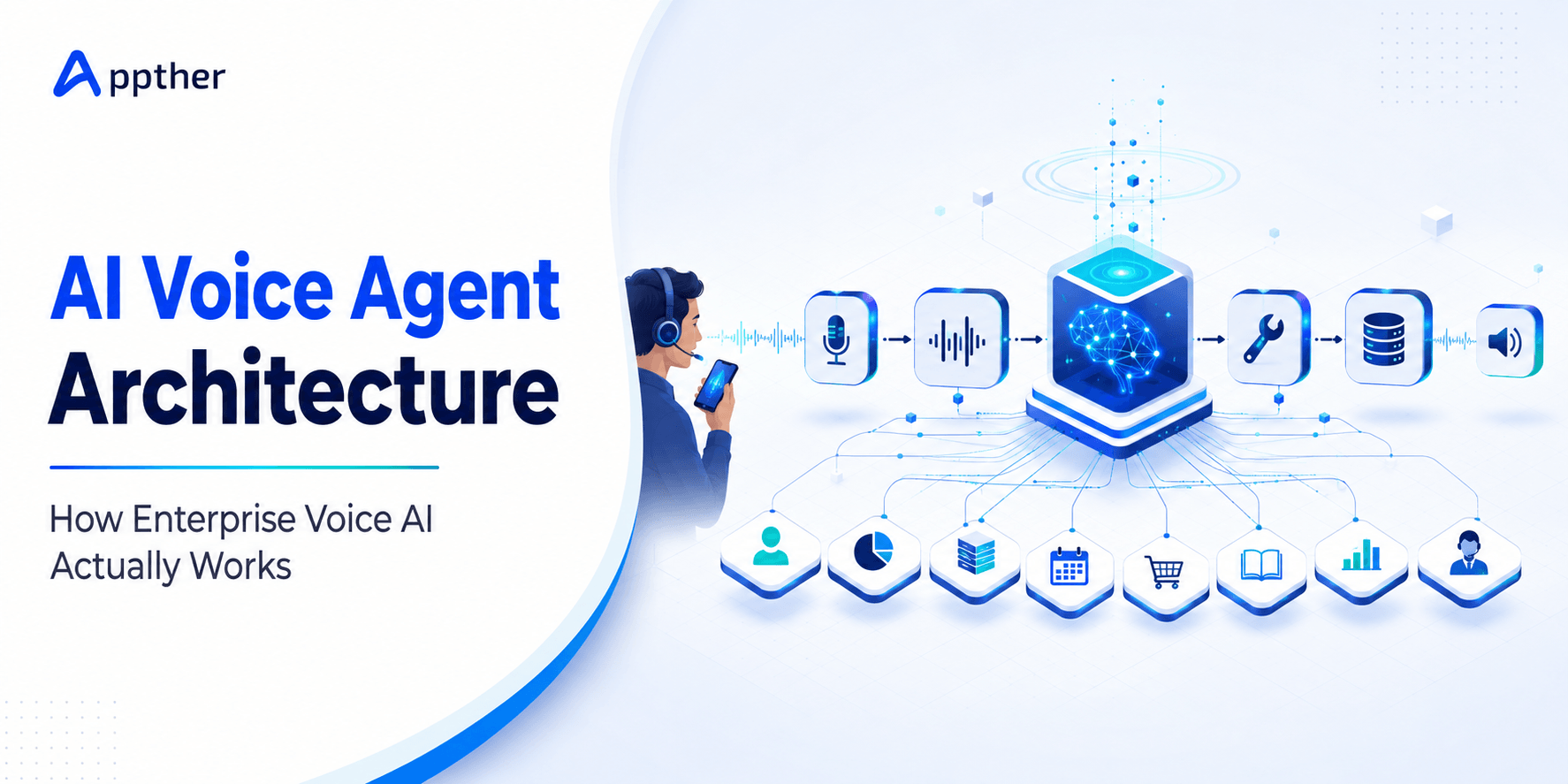
Caller → Speech-to-Text → AI/LLM → Business Tools → Text-to-Speech → Caller
Consider a healthcare appointment call. A patient might say:
“I need to see a cardiologist sometime next Tuesday afternoon.”
Instead of following a fixed IVR menu, the voice agent can understand the request, identify the specialty, determine the preferred date and time, query the scheduling system, retrieve available appointments, confirm the patient’s choice, create the appointment, update the patient or CRM record, and verbally confirm the booking.
The important difference is action. A production AI voice agent doesn’t simply answer questions. It can interact with business systems and complete workflows.
AI Voice Agent vs IVR vs Voice Bot
| Capability | Traditional IVR | Basic Voice Bot | AI Voice Agent |
|---|---|---|---|
| Menu navigation | Yes | Yes | Optional |
| Natural conversation | No | Limited | Yes |
| Context awareness | No | Limited | Yes |
| LLM reasoning | No | Sometimes | Yes |
| API/tool execution | Limited | Limited | Advanced |
| CRM/ERP integration | Basic | Possible | Core capability |
| Dynamic responses | No | Limited | Yes |
| Multi-step workflows | Limited | Limited | Yes |
| Human escalation | Yes | Yes | Context-aware |
| Generative AI | No | Sometimes | Yes |
The biggest shift is from conversation automation to workflow automation.
Reference Architecture for an AI Voice Agent
A production architecture usually contains several layers.
1. Telephony / Voice Channel
The interaction begins through channels such as PSTN phone calls, SIP, web calling, mobile applications, WhatsApp calling where supported, and contact-center infrastructure. Platforms such as Twilio, Vonage, Amazon Connect, or other telephony providers can connect the phone network to the AI application.
2. Real-Time Audio Streaming
Instead of waiting for an entire recording, modern voice agents process audio continuously. The audio stream is sent to the speech recognition layer while the caller is speaking. This is essential for reducing response latency.
3. Speech-to-Text (STT)
Speech-to-Text converts incoming audio into text that the AI system can understand. Common options include OpenAI speech models, Deepgram, Google Cloud Speech-to-Text, Azure Speech, and AWS Transcribe.
STT selection should consider more than transcription accuracy. Important factors include streaming support, word error rate, language support, accent handling, background-noise performance, endpointing, transcription latency, domain vocabulary, and pricing.
For industries such as healthcare, finance, logistics, or manufacturing, domain terminology can significantly affect transcription accuracy.
4. Conversation Orchestration Layer
This is effectively the brain coordinating the voice interaction. The orchestration layer maintains conversation state, user intent, session memory, business rules, prompt context, available tools, authentication state, workflow state, and escalation conditions.
Frameworks and platforms may include technologies such as Python, FastAPI, Node.js, LangChain, LangGraph, or purpose-built voice AI orchestration platforms.
For complex enterprise implementations, Appther typically recommends keeping critical business logic outside the LLM. The LLM can determine what needs to happen, while deterministic application logic controls whether and how an action is allowed to happen.
5. LLM and Reasoning Layer
The LLM interprets the conversation and determines the appropriate response or action. Depending on the application, models may be used for intent understanding, conversational reasoning, information extraction, response generation, tool selection, summarization, and classification.
The model should not automatically be treated as the source of truth. Business information should come from controlled sources such as CRM, ERP, EHR/EMR, knowledge base, database, product catalog, scheduling platform, and approved documentation. This distinction becomes critical when preventing hallucinations.
6. Knowledge / RAG Layer
Many voice agents need access to organization-specific knowledge, for example, “Does my insurance plan cover this procedure?” or “What is your warranty policy for this product?” Instead of relying on information stored in the base LLM, the system can retrieve relevant information from an approved knowledge base.
A RAG architecture may use:
Documents → Parsing → Chunking → Embeddings → Vector Database → Retrieval → LLM
Possible knowledge sources include FAQs, product documentation, SOPs, policy documents, website content, healthcare information, internal documentation, and service manuals.
7. Tool and API Layer
Tools transform a conversational assistant into an agent. The AI might have tools such as check_customer(), get_available_slots(), create_appointment(), lookup_order(), create_crm_lead(), update_opportunity(), check_invoice(), create_support_ticket(), and transfer_to_agent().
The LLM identifies the required action, but the application layer should validate parameters, permissions, and business rules before execution.
8. Enterprise Integration Layer
Voice AI becomes considerably more valuable when connected to existing systems. Typical integrations include Salesforce, HubSpot, Odoo, Microsoft Dynamics, SAP, Zoho CRM, EHR/EMR platforms, scheduling systems, payment gateways, ticketing platforms, databases, and internal APIs. This enables the agent to move beyond answering questions and actually complete business processes.
9. Text-to-Speech (TTS)
Once the AI generates an approved response, the TTS engine converts it into speech. Common considerations include voice naturalness, first-audio latency, streaming, pronunciation, language availability, voice consistency, emotional range, and cost. Providers may include ElevenLabs, OpenAI, Azure Speech, Google Cloud TTS, and Amazon Polly.
End-to-End AI Voice Agent Architecture
The overall flow can be represented as:
Customer / Caller ↓
Telephony / SIP / WebRTC ↓
Streaming Audio ↓
Speech-to-Text ↓
Conversation Orchestrator ↓
LLM + Guardrails + Business Rules ↓
RAG / Knowledge Base ↓
Tool & API Gateway ↓
CRM / ERP / EHR / Database / Scheduling / Payments ↓
Response Generation ↓
Text-to-Speech ↓
Streaming Voice Response ↓
Customer
Supporting the entire architecture should be another operational layer containing logging, monitoring, call recording, transcripts, analytics, security, and human escalation.
Why Latency Can Make or Break a Voice AI Agent
Latency is one of the biggest differences between building a chatbot and building a voice agent. A chatbot user may tolerate waiting several seconds for an answer. A caller usually won’t.
Long silence makes users wonder whether the connection has failed, the system heard them, the AI is processing something, or they should repeat themselves. Voice-agent latency is cumulative. A simplified calculation is:
Total Response Latency ≈ Endpoint Detection + STT + LLM Processing + Tool Execution + TTS First Audio
| Component | Example Latency |
|---|---|
| Endpoint detection | 200–500 ms |
| STT | 150–400 ms |
| LLM | 300–1,000+ ms |
| API/tool | 100–1,500+ ms |
| TTS first audio | 150–500 ms |
These numbers are illustrative rather than guaranteed targets, but they demonstrate an important architectural point: optimizing only the LLM will not necessarily make the conversation fast. The complete pipeline must be optimized.
Streaming Instead of Sequential Processing
A naive architecture works like this: listen → finish recording → transcribe → process → generate full response → synthesize → play. That produces noticeable delays.
A better real-time architecture streams multiple stages. STT processes audio while the user speaks. The LLM begins processing once sufficient intent is available. TTS begins generating audio before the entire response is complete. The caller hears the first part while later parts are still being synthesized. Streaming dramatically improves perceived responsiveness.
Interruption and Barge-In
Humans interrupt each other naturally. Voice agents must handle this too. Suppose the agent says:
“Your appointment options for Thursday are 10:30 AM, 12:00 PM and, ”
The caller interrupts: “10:30 works.” A poorly designed agent continues speaking. A properly designed voice agent should detect caller speech, stop TTS playback, capture the new utterance, preserve conversation context, understand the interruption, and continue from the updated state.
This capability is generally called barge-in. Without it, even a technically sophisticated voice agent can feel robotic.
Handling Hallucinations in Voice AI
Hallucinations are particularly dangerous in voice interactions because users may treat a confident spoken answer as authoritative. The LLM should therefore not be allowed to invent business-critical information.
Consider a caller asking: “What time is my appointment tomorrow?” The agent should not infer or generate an answer. Instead:
User Request → Identify Required Tool → Query Scheduling System → Validate Result → Generate Response
If the scheduling API fails, the system should say it cannot currently retrieve the appointment rather than inventing a time.
Recommended Guardrail Strategy
Use several layers: system instructions define what the agent can and cannot do; RAG retrieves answers from approved knowledge; tool-based responses use APIs for transactional or customer-specific information; output validation checks sensitive responses before they reach the caller; business rules keep important permissions and transaction logic outside the LLM; and human escalation transfers conversations when confidence or authorization is insufficient.
Human Escalation Is Part of the Architecture
A production voice agent should know when not to continue. Escalation conditions might include repeated misunderstanding, a caller requesting a person, low-confidence transcription, unsupported requests, payment disputes, complaints, sensitive healthcare questions, authentication failure, high-value sales opportunities, API failures, and compliance-sensitive situations.
Instead of simply transferring the call, the system can provide the human agent with caller identity, conversation transcript, detected intent, actions already attempted, the relevant CRM record, and an AI-generated conversation summary. This prevents customers from having to repeat the entire conversation.
CRM and ERP Integration
Integration is where AI voice agents often generate the strongest business ROI. Consider an inbound sales call. The agent can receive the call, identify the caller, search CRM, understand the requirement, qualify the lead, collect missing information, schedule a meeting, update the opportunity, assign a salesperson, send confirmation, and store the transcript and summary. This is the same pattern we cover in depth in our guide to AI voice agents with CRM integration.
Without CRM integration, the AI primarily handles conversation. With integration, it becomes part of the sales workflow.
Example: AI Voice Agent with Odoo
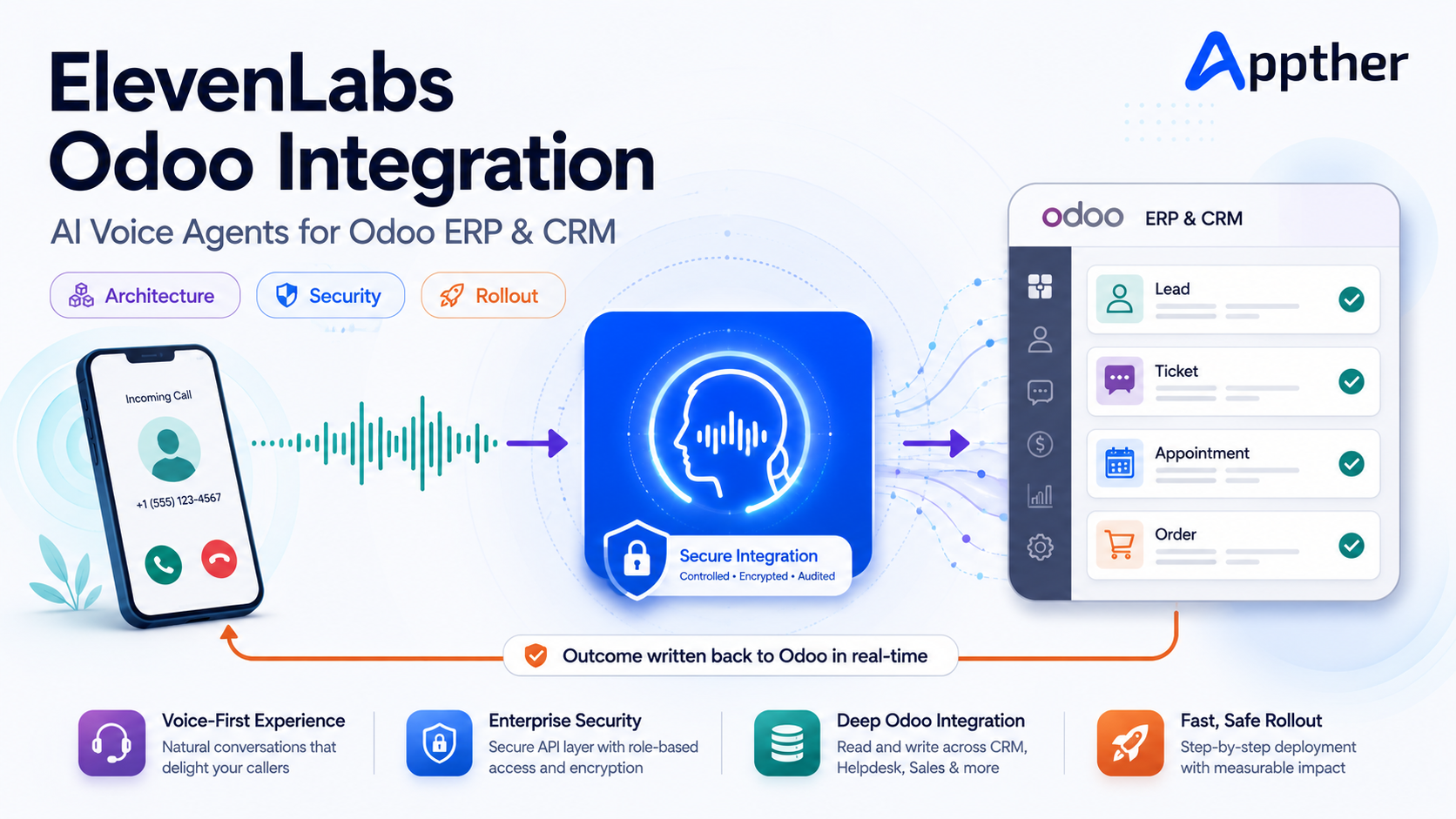
An AI voice agent can be connected with Odoo through APIs and controlled business workflows. Imagine a customer calls: “Can you check whether invoice INV-10452 has been paid?”
The system could identify or authenticate the customer, extract the invoice number, call the authorized Odoo service, retrieve the invoice status, generate an appropriate response, communicate the result, and record the interaction.
Another customer might say: “I want to speak with sales about 50 units of this product.” The agent could route this as:
Voice Call → AI Qualification → Odoo CRM Lead → Opportunity → Salesperson Assignment → Follow-Up Activity
Other potential Odoo voice AI workflows include CRM lead qualification, quotation status, order tracking, invoice inquiries, appointment scheduling, helpdesk ticket creation, customer follow-up, and sales activity creation. For a deeper look at connecting AI to Odoo modules, see our Odoo AI integration guide. The LLM should never receive unrestricted ERP access. A controlled API/tool layer should expose only permitted actions.
Example: Healthcare AI Voice Agent
Healthcare demonstrates why architecture and guardrails matter. Consider a patient calling a clinic: “I’d like an appointment with a dermatologist next Monday afternoon.”
The voice agent can identify intent, collect required information, check the scheduling API, retrieve dermatologist availability, present available slots, confirm the selection, create the appointment, send confirmation, and update the patient/CRM system.
However, if the patient asks “Should I double my medication today?” the system should not improvise medical advice. Depending on the approved workflow, it should provide a controlled response and route the patient to qualified clinical staff. We explore this clinic-specific design in our article on AI voice agents for clinics. The difference between these scenarios should be defined at the architecture and policy level, not left entirely to the LLM.
Example: CRM Lead Qualification Voice Agent
Voice AI can also automate outbound and inbound lead qualification. A typical workflow could be:
Lead List / Incoming Call → AI Voice Agent → Qualification Questions → Extract Budget / Requirement / Location / Timeline → Lead Scoring → CRM Update → Meeting Scheduling → Sales Representative
The agent can automatically store the call outcome, transcript, summary, customer requirements, qualification score, follow-up date, and meeting information. This gives sales representatives structured information instead of raw recordings.
Call Recording and Transcription
Recording and transcription are useful for quality assurance, compliance, agent evaluation, sales coaching, dispute investigation, conversation analytics, and model improvement. A typical post-call pipeline might be:
Call → Recording → Transcript → PII Redaction → Summary → Intent Classification → Quality Score → CRM Storage
Organizations should implement recording and retention policies according to applicable laws, jurisdictions, customer consent requirements, and internal policies.
How to Evaluate an AI Voice Agent
A successful pilot should not be evaluated simply by asking: “Does the AI sound human?” Business and engineering metrics matter more.
Technical Metrics
Speech Recognition Accuracy, measure transcription quality, particularly for names, numbers, addresses, product names, medical terminology, and industry terminology.
Response Latency, measure time between the end of user speech and the beginning of the agent response.
Tool Success Rate, how often did API/tool calls execute successfully?
Interruption Recovery Rate, how reliably does the agent handle barge-in?
Conversation Completion Rate, how many conversations successfully reach their intended outcome?
Business Metrics
Depending on the use case, measure call containment rate, first-call resolution, appointment booking rate, lead qualification rate, conversion rate, average handling time, escalation rate, cost per resolved call, customer satisfaction, and automation rate.
A voice agent that sounds impressive but fails to complete business workflows is not production-ready.
Technology Stack for AI Voice Agent Development
A modern stack might look like this:
| Layer | Technology Options |
|---|---|
| Telephony | Twilio, Amazon Connect, SIP providers |
| Real-Time Transport | WebSocket, WebRTC |
| STT | OpenAI, Deepgram, Google, Azure, AWS |
| LLM | OpenAI, Anthropic, Google or suitable open models |
| Orchestration | Python, FastAPI, Node.js, LangChain, LangGraph |
| RAG | Vector DB + embeddings + document pipeline |
| TTS | ElevenLabs, OpenAI, Azure, Google, Amazon Polly |
| CRM | Salesforce, HubSpot, Zoho, Odoo CRM |
| ERP | Odoo, SAP, Dynamics and custom ERP APIs |
| Database | PostgreSQL, MongoDB, Redis |
| Infrastructure | AWS, Azure, Google Cloud |
| Monitoring | Application logs, tracing and voice analytics |
There is no universally “best” stack. Technology selection depends on use case, geography, language, expected call volume, latency target, integration requirements, security requirements, compliance, and budget. Getting the cloud layer right early matters too, we cover this in our AWS infrastructure best practices guide.
Step-by-Step: How to Build an AI Voice Agent
Step 1: Define the Business Outcome
Don’t begin by selecting an LLM. Start with a measurable workflow. “Automate appointment scheduling calls” is much stronger than “Build an AI receptionist.” Define what the agent is allowed to accomplish.
Step 2: Map Conversation Scenarios
Document happy paths, alternative paths, interruptions, invalid information, silence, repeated questions, API failures, authentication failures, and escalation scenarios. Voice conversations are much less predictable than web forms.
Step 3: Define Agent Boundaries
Explicitly determine what the agent can answer, what it can execute, what requires authentication, what requires confirmation, and what must be escalated.
Step 4: Select STT and TTS
Test them using actual target users and environments. Do not select providers solely from online demos. Evaluate accents, noise, languages, industry terminology, telephone-quality audio, and latency.
Step 5: Select the LLM
Evaluate the model for reasoning, tool calling, latency, structured outputs, context requirements, cost, and security requirements.
Step 6: Build the Tool/API Layer
Create controlled functions for the operations the agent needs, find_customer, check_availability, create_booking, update_crm, create_ticket, transfer_call. Avoid giving the LLM direct database access.
Step 7: Implement RAG Where Needed
Use RAG for organization-specific knowledge rather than stuffing large quantities of information into prompts.
Step 8: Implement Guardrails
Protect transactions, customer information, regulated data, payments, healthcare workflows, and destructive actions.
Step 9: Add Barge-In and Conversation Recovery
Test real-world interruption patterns rather than scripted turn-taking.
Step 10: Implement Human Handoff
Define both automatic escalation and user-requested escalation. Transfer conversation context along with the call wherever the contact-center architecture supports it.
Step 11: Add Recording, Transcripts and Analytics
Create the observability required to understand why calls succeed or fail.
Step 12: Test with Real Conversations
Test different accents, noisy environments, short and long answers, interruptions, silence, ambiguous questions, API failures, unexpected questions, emotional callers, and repeated corrections.
Step 13: Deploy Gradually
A sensible rollout: Internal Testing → Limited Pilot → Selected Call Type → Percentage Rollout → Production. Avoid moving directly from a controlled demo to 100% production traffic.
How Much Does It Cost to Build an AI Voice Agent in 2026?
Development cost depends heavily on what the voice agent is expected to accomplish. A simple FAQ voice assistant is fundamentally different from an enterprise agent integrated with CRM, ERP, authentication, payments, analytics, and human contact-center infrastructure. Indicative development ranges might be:
| Voice AI Solution | Indicative Development Range |
|---|---|
| Voice AI POC | $5,000–$12,000 |
| FAQ / Knowledge Voice Agent | $8,000–$20,000 |
| Appointment / Booking Agent | $15,000–$35,000 |
| CRM-Integrated Voice Agent | $20,000–$50,000 |
| Advanced Workflow Voice Agent | $30,000–$75,000+ |
| Enterprise Voice AI Platform | $75,000–$250,000+ |
These are planning ranges rather than fixed quotations. Major cost drivers include conversation complexity, number of integrations, call volume, languages, compliance requirements, authentication, analytics, human handoff, contact-center integration, custom dashboards, infrastructure, and testing requirements.
How to Calculate AI Voice Agent Operating Cost
Development cost is only part of the economics. A useful simplified model is:
Monthly Voice AI Cost = Telephony + STT + LLM + TTS + Infrastructure + Monitoring + Integration/API Costs
You can also calculate Cost per Call = Total Monthly Voice AI Cost ÷ Number of Calls, and Cost per Resolved Call = Total Monthly Voice AI Cost ÷ Successfully Resolved Calls. The second metric is usually more useful. A cheap voice agent that fails most calls can be more expensive operationally than a higher-quality system.
Example Cost Calculation
Assume 20,000 calls/month at an average duration of 4 minutes. Total voice traffic: 20,000 × 4 = 80,000 voice minutes/month.
You would then add telephony cost, STT cost for approximately 80,000 minutes, TTS usage, LLM token consumption, server/infrastructure, and monitoring/storage to reach an estimated monthly operating cost. Because provider pricing changes frequently, production budgeting should use current vendor pricing rather than hard-coding per-minute rates into a long-lived architecture document.
Lessons from Building Real-World Voice and Conversational AI Systems
At Appther, our work across conversational AI, voice workflows, enterprise integrations, RAG systems, CRM workflows, healthcare scenarios, and ERP environments has reinforced several practical engineering principles.
- The Demo Is the Easy Part. Getting an AI to answer a phone call and produce a natural response is relatively straightforward. Production reliability is harder. Real users interrupt, change their minds, provide incomplete information, speak over the agent, use unexpected terminology, call from noisy environments, and ask questions outside the designed workflow. Production architecture must expect this behavior.
- Integration Often Matters More Than the Model. The business value frequently comes from what happens after the AI understands the caller. Can it create the appointment, update the CRM, check the ERP, generate the ticket, schedule the salesperson, and trigger the follow-up? The LLM is only one component.
- Keep Critical Business Logic Deterministic. Do not rely on prompts alone for important rules. Permissions, payments, sensitive actions, and workflow validation should be implemented through controlled application logic.
- Design Failure Paths Before Production. Ask what happens when STT is wrong, when an API times out, when the LLM cannot understand the request, when the caller asks for a human, and when authentication fails. Failure handling is part of the product.
- Measure Conversations Instead of Guessing. Call transcripts and structured analytics can reveal common failure points, unrecognized intents, slow integrations, escalation patterns, poor prompts, STT errors, and confusing conversation flows. Voice AI should improve continuously after deployment.
Security and Compliance Considerations
Production systems may process phone numbers, names, customer records, health information, financial information, call recordings, and authentication information. Architecture should therefore consider encryption in transit and at rest, role-based access, API authorization, secret management, audit logs, data retention, recording consent, PII redaction, vendor data policies, and applicable regulatory requirements.
Healthcare, financial, and other regulated deployments require additional controls based on jurisdiction and use case.
What Makes an AI Voice Agent Production-Ready?
A production-ready agent needs more than STT + LLM + TTS. Think instead: Voice AI = Conversation + Reasoning + Tools + Guardrails + Integrations + Observability + Human Backup.
Before deployment, ask: Can users interrupt naturally? Is latency acceptable? Are API actions validated? Can the system recover from failures? Are hallucinations controlled? Is sensitive information protected? Can conversations escalate to humans? Are calls measurable? Can we identify why failed calls failed? Can the infrastructure scale? If those questions do not have clear answers, the system is probably still a prototype.
Future of AI Voice Agents
Voice AI is moving beyond customer-support automation toward agentic voice systems capable of executing increasingly complex workflows. The evolution looks roughly like IVR → Voice Bot → Conversational AI → LLM Voice Agent → Agentic Voice AI → Multi-Agent Enterprise Workflows. If you want the broader context, see our overview of AI agents for the enterprise.
A future sales voice agent, for example, may communicate with specialized agents responsible for CRM, pricing, inventory, scheduling, payments, and follow-up. The customer still experiences one natural conversation, while multiple systems and agents coordinate behind the scenes.
Conclusion
Building an AI voice agent in 2026 is no longer primarily a speech-recognition problem. It is an enterprise systems engineering problem. The strongest solutions combine real-time voice, STT, LLM, RAG, tools, APIs, TTS, guardrails, enterprise integrations, human escalation, and analytics.
Organizations should therefore avoid evaluating voice AI only by how human the voice sounds. The better question is: can the agent reliably understand the customer, access the right information, execute the right business process, recover when something goes wrong, and deliver a measurable business outcome?
At Appther, we design and develop AI voice agents that integrate with business workflows, CRM platforms, ERP systems such as Odoo, healthcare platforms, APIs, and enterprise applications. Whether the requirement is an AI receptionist, healthcare appointment agent, sales qualification agent, customer-support voice agent, Odoo voice assistant, or custom enterprise Voice AI platform, the objective should be the same: move from impressive AI conversations to reliable business automation.
Ready to Build an AI Voice Agent?
From proof of concept and architecture to enterprise integration, testing, deployment, and optimization, Appther can help you build production-ready Voice AI.
Discuss Your Voice AI Project →
Frequently Asked Questions
How long does it take to build an AI voice agent?
A focused proof of concept may take a few weeks, while production systems with CRM/ERP integrations, authentication, analytics, human handoff, and compliance controls typically require significantly more engineering and testing.
What is the best technology stack for an AI voice agent?
There is no single best stack. A typical architecture combines telephony, streaming STT, an LLM, orchestration, business APIs, RAG where required, streaming TTS, databases, monitoring, and cloud infrastructure.
Can an AI voice agent integrate with Odoo?
Yes. A controlled integration layer can allow the agent to perform approved operations involving Odoo CRM, Sales, Invoicing, Helpdesk, appointments, orders, and other modules.
Can AI voice agents replace call-center agents?
They can automate many repetitive and structured conversations, but human agents remain important for complex, sensitive, exceptional, or high-value interactions. A hybrid architecture is often more effective than trying to automate every call.
How do AI voice agents prevent hallucinations?
Production systems combine prompts with RAG, tool/API calls, deterministic business rules, output validation, restricted actions, and human escalation.
What causes latency in an AI voice agent?
Latency can come from endpoint detection, speech recognition, LLM processing, external API calls, text-to-speech generation, network communication, and telephony infrastructure.
How much does an AI voice agent cost?
A focused proof of concept may start in the low thousands of dollars, while integrated enterprise implementations can range into tens or hundreds of thousands depending on integrations, compliance, scale, languages, analytics, and workflow complexity.
What should businesses measure after deployment?
Important metrics include response latency, transcription accuracy, task completion rate, tool success rate, containment rate, escalation rate, average handling time, conversion or booking rate, customer satisfaction, and cost per successfully resolved call.