Most Australian businesses spend AUD 6,000 to AUD 40,000 on an Odoo CRM implementation, on top of licensing of roughly AUD 40 to AUD 75 per user per month. A small team with a standard pipeline and one or two integrations lands near AUD 6,000 to AUD 15,000 and goes live in three to five weeks. A larger sales operation with lead scoring, WhatsApp capture, Xero or MYOB sync and custom dashboards sits between AUD 15,000 and AUD 40,000 over six to ten weeks.
Those figures cover CRM and Sales only. Adding accounting, inventory or manufacturing turns the project into a full ERP rollout with a different budget entirely, which is the distinction this guide is built around.
If you have priced Odoo before, you have probably seen one big ERP number. That number is not much use when all you want to fix is your sales pipeline. The Odoo implementation cost in Australia guide covers full ERP rollouts across accounting, inventory and manufacturing. This guide does something narrower and more practical. It prices an Odoo CRM implementation on its own.
That distinction matters commercially. A CRM-only project has a smaller scope, a shorter timeline and a much lower risk profile. Plenty of Australian businesses start there, prove the platform with their sales team, then expand into the rest of Odoo once the CRM is bedded in.
Below you will find licensing versus implementation costs, a line-by-line breakdown of the work, three worked budgets, a realistic timeline, a comparison against HubSpot, Zoho and Salesforce, and the hidden costs Australian buyers keep tripping over.
Odoo CRM licensing cost vs implementation cost
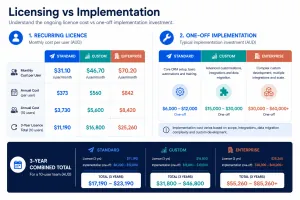
These are two separate bills and people mix them up constantly. Licensing is what you pay Odoo every month. Implementation is what you pay a partner once to make the software match how you actually sell.
What Odoo licensing costs in Australia
Odoo publishes three plans. At the time of writing, indicative Australian pricing looks like this.
| Plan | Indicative AUD per user per month | What you get | Where it breaks for CRM buyers |
|---|---|---|---|
| One App Free | $0 | One app only, unlimited users, Odoo Online hosting | CRM alone. The moment you add the Sales app for quotations, you are on a paid plan |
| Standard | $40 to $50, billed annually | All apps including CRM and Sales, Odoo Online hosting | No Odoo Studio, no external API, no multi-company |
| Custom | $60 to $75, billed annually | All apps, plus Odoo Studio, multi-company and external API access, hosted on Odoo Online, Odoo.sh or on-premise | Costs more per seat, but most real integrations need the API |
Two things catch Australian buyers out here.
- The free plan is genuinely free, but it is one app. CRM without Sales means no quotation templates, no pricelists and no order confirmation. Almost every real sales process needs both.
- External API access sits on the Custom plan. If you want a proper two-way sync with Xero or MYOB, or a connector to a phone system, budget for Custom from day one rather than discovering the jump halfway through the build.
Prices are quoted per user, billed annually, and exclude GST. Odoo adjusts plan pricing and inclusions from time to time, so confirm current rates with Odoo or your partner before you sign anything.
What Odoo CRM implementation costs
Implementation is the human work. Mapping your sales process, building the pipeline, wiring lead capture, migrating your contacts, connecting your accounting system, building reports and training the team.
Australian Odoo partners typically charge between AUD 120 and AUD 350 per hour. Offshore and hybrid teams sit lower. Most CRM projects are quoted as a fixed-scope package rather than hourly, which is what you want when the scope is this well defined.
| Project shape | Users | Implementation cost (AUD) | Timeline |
|---|---|---|---|
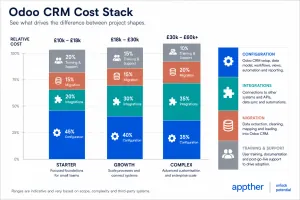
| Starter CRM | 3 to 10 | $6,000 to $15,000 | 3 to 5 weeks |
| Growth CRM and Sales | 10 to 30 | $15,000 to $40,000 | 6 to 10 weeks |
| Complex or multi-team CRM | 30+ | $40,000 to $90,000 | 10 to 16 weeks |
Compare that with a full Odoo ERP rollout, which usually starts around AUD 25,000 and runs well past AUD 80,000 once accounting, inventory and manufacturing are in scope. CRM on its own is a fraction of the commitment.
What a CRM-only Odoo implementation actually includes
Here is the honest scope of work, with indicative Australian pricing for each item. Use it to challenge any quote you receive. If a line is missing from a proposal, it is not free, it is just unscoped.
| Work item | Indicative cost (AUD) | What you are paying for |
|---|---|---|
| Discovery and sales process mapping | $1,200 to $4,000 | Workshops to document how leads arrive, who owns them, and what a won deal looks like |
| CRM and pipeline configuration | $1,500 to $5,000 | Teams, pipelines, stages, probability settings, lost reasons, activity types |
| Lead stages, scoring and assignment rules | $1,000 to $4,500 | Predictive lead scoring variables, round robin or rule based assignment, territory logic |
| Website form and email lead capture | $800 to $3,000 | Website forms mapped to CRM fields, catch-all sales aliases, live chat to lead |
| WhatsApp and telephony capture | $1,500 to $6,000 | WhatsApp Business setup, message templates, call logging against the opportunity |
| Sales automation and follow-up workflows | $1,500 to $6,000 | Automated activities, reminder cadences, stage-based emails, escalation rules |
| Quotation templates, pricelists and e-sign | $1,000 to $4,000 | Branded quote templates, product and pricelist setup, online acceptance and signature |
| Lead and customer data migration | $1,200 to $8,000 | Extract, clean, de-duplicate, map and import contacts, companies, open deals and history |
| Xero or MYOB integration | $2,500 to $12,000 | Contact and invoice sync, field mapping, error handling, reconciliation rules |
| Outlook or Google Workspace sync | $500 to $2,500 | Two-way calendar and email sync, meeting scheduling, tracked email threads |
| Custom dashboards and sales reports | $1,000 to $5,000 | Pipeline value, conversion by stage, activity reporting, forecast and rep performance views |
| User training | $800 to $3,500 | Role-based sessions, recorded walkthroughs, a short internal playbook |
| Go-live and hypercare | $1,000 to $4,000 | Cutover support, daily check-ins and fast fixes across the first two weeks |
| Ongoing support retainer | $500 to $3,000 per month | Tickets, small changes, version upgrade checks, admin backup |
Configuring the pipeline is where the value sits
The single biggest driver of whether an Odoo CRM implementation pays for itself is the pipeline design, not the software. A pipeline that mirrors how your team already sells gets adopted. One copied from a demo does not.
A good configuration phase settles a short list of questions. What counts as a qualified lead. Who owns a lead the moment it lands. What has to be true before a deal moves to the next stage. What lost reasons you will actually report on. Get those right and the rest of the build is mechanical.
Lead scoring and assignment rules
Odoo 19 includes predictive lead scoring. It reviews your historical won and lost data and assigns each new lead a conversion probability, updating as fields are filled in. Contact quality, source, country, state and tags all feed the model.
Two practical notes. First, scoring needs history to be useful, so it works better once you have migrated past deals rather than starting from an empty database. Second, scoring is only half the job. Assignment rules are what turn a score into action, by routing high-probability leads to your strongest closers and everything else into a nurture pipeline.
Budget AUD 1,000 to AUD 4,500 for this work. It is the piece most often left out of cheap quotes.
Lead capture: forms, email and WhatsApp
Every lead source you connect adds cost, so connect the ones that produce revenue and leave the rest.
- Website forms. Odoo’s form builder maps fields directly into CRM. Cheap and fast if your site is already on Odoo, more work if it is a separate build.
- Email aliases. A sales address that creates a lead automatically, with the original email threaded onto the record.
- Live chat. Chat transcripts converted into leads with the source preserved.
- WhatsApp. Odoo supports WhatsApp Business through Meta’s API. Setup involves a Meta business account, a verified number and approved message templates.
- Phone. Call logging against opportunities usually needs a telephony connector or an integration project.
If you are also considering an AI layer on top of lead capture, the AI voice assistant CRM integration guide covers how call handling and CRM records fit together.
Migrating your existing leads and customers
Data migration costs almost nothing when your data is clean and a lot when it is not. Most Australian SMEs arrive with contacts spread across a spreadsheet, an old CRM, an inbox and an accounting file.
Plan for three passes. Extract and profile the data to see what you actually have. Clean and de-duplicate it, which is the part clients underestimate. Then map, import and validate against a sample the sales team checks by hand.
A tidy list of 2,000 contacts and 200 open deals is usually a AUD 1,200 to AUD 2,500 job. Ten years of unstructured history across four systems can pass AUD 8,000. If you are also moving off an older Odoo version rather than a different CRM, the Odoo migration guide covers the version-upgrade path in detail.
Integrations Australian businesses actually ask for
| Integration | Typical cost (AUD) | What to watch |
|---|---|---|
| Xero | $2,500 to $9,000 | Decide early whether Odoo or Xero owns the customer record, or you will fight duplicates forever |
| MYOB | $3,500 to $12,000 | API coverage varies by MYOB product. Confirm which entities can sync before scoping |
| Outlook or Microsoft 365 | $500 to $2,500 | Calendar sync is straightforward. Shared mailbox rules need thought |
| Google Workspace | $500 to $2,000 | Similar scope to Outlook, usually slightly faster |
| Website or landing pages | $800 to $3,000 | Cost depends on whether your site is Odoo or an external build |
| Phone system | $1,500 to $6,000 | Depends entirely on the provider’s API quality |
| Marketing tools | $1,500 to $5,000 | Odoo Marketing Automation is often cheaper than syncing a third-party tool |
Two rules keep integration budgets sane. Pick one system of record per data type and stick to it. And sync only the fields you will actually use, because every extra field is another thing to map, test and maintain.
Dashboards, reports and training
Odoo ships with usable sales reporting out of the box. Most teams still want three or four views built for them: pipeline value by stage, conversion rates, activity volume per rep and a rolling forecast. That is a AUD 1,000 to AUD 5,000 piece of work.
Training is the cheapest line item with the highest return. Budget AUD 800 to AUD 3,500 for role-based sessions. Salespeople need thirty minutes on the pipeline and quoting. Managers need an hour on reporting. Your admin needs a half day.
Three worked Odoo CRM budgets
Example 1: professional services firm, 6 users
A Melbourne consultancy running its pipeline out of spreadsheets and a shared inbox.
| Line item | Cost (AUD) |
|---|---|
| Discovery and pipeline design | $1,500 |
| CRM and Sales configuration | $2,200 |
| Website form and email capture | $900 |
| Quotation templates and e-sign | $1,200 |
| Contact and deal migration | $1,400 |
| Outlook sync | $700 |
| Standard dashboards | $900 |
| Training and go-live support | $1,200 |
| Total implementation | $10,000 |
| Licensing (6 users, Standard, annual) | Approx. $3,200 per year |
Timeline: four weeks. Payback usually comes from quoting speed rather than headcount savings.
Example 2: trades and equipment supplier, 18 users
A Brisbane business with an inside sales team, field reps and MYOB running the books.
| Line item | Cost (AUD) |
|---|---|
| Discovery and process mapping | $3,200 |
| CRM and Sales configuration, two pipelines | $4,500 |
| Lead scoring and assignment rules | $2,800 |
| Website, email and WhatsApp capture | $3,600 |
| Sales automation and follow-up cadences | $3,000 |
| Quotation templates and pricelists | $2,400 |
| Data migration from spreadsheets and old CRM | $3,500 |
| MYOB integration | $5,500 |
| Custom dashboards and forecast reporting | $2,600 |
| Training, go-live and hypercare | $3,400 |
| Total implementation | $34,500 |
| Licensing (18 users, Custom, annual) | Approx. $14,600 per year |
Timeline: nine weeks. The MYOB integration and the WhatsApp setup are the two lines that move most.
Example 3: multi-brand group, 45 users
A group running three sales teams across separate entities, with a phone system and a partner referral channel.
| Line item | Cost (AUD) |
|---|---|
| Discovery across three business units | $7,000 |
| Multi-team CRM architecture and permissions | $9,500 |
| Custom scoring model and territory routing | $6,500 |
| Omnichannel lead capture including telephony | $8,500 |
| Automation, approvals and escalation workflows | $7,000 |
| Migration from two legacy CRMs | $9,000 |
| Accounting and phone system integrations | $11,000 |
| Executive dashboards and board reporting | $5,500 |
| Training programme and change management | $6,000 |
| Total implementation | $70,000 |
| Licensing (45 users, Custom, annual) | Approx. $36,500 per year |
Timeline: fourteen weeks, usually rolled out one team at a time rather than all at once.
Odoo CRM implementation timeline in Australia
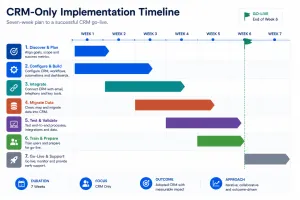
A CRM-only project is short. That is the main reason to separate it from an ERP rollout.
| Phase | Typical duration | What happens |
|---|---|---|
| Discovery and pipeline design | Week 1 | Process workshops, stage definitions, field list, integration decisions |
| Core configuration | Weeks 2 to 3 | Pipelines, stages, teams, permissions, scoring and assignment rules |
| Lead capture and integrations | Weeks 3 to 4 | Forms, email, WhatsApp, accounting and calendar connections |
| Automation and templates | Weeks 4 to 5 | Follow-up cadences, quote templates, pricelists, dashboards |
| Data migration | Week 5 | Clean, map, import, validate with the sales team |
| UAT and training | Week 6 | Real deals run end to end, role-based training, fixes |
| Go-live and hypercare | Weeks 6 to 7 | Cutover, daily support, reporting sign-off |
Small projects compress this to three or four weeks. Complex ones stretch to twelve or more, usually because of data quality or a slow integration counterpart, not because of Odoo.
Odoo CRM vs HubSpot, Zoho and Salesforce
The right comparison is not the monthly sticker price. It is three-year total cost plus how much of your business the CRM can eventually absorb.
| Platform | Entry cost per user | Strength | Where it gets expensive |
|---|---|---|---|
| Odoo CRM | Free for one app, then roughly AUD 40 to AUD 75 | One platform that can grow into full ERP later | Implementation work and per-seat licensing on the Custom plan |
| HubSpot | Free tier, paid tiers from roughly AUD 25 | Best-in-class marketing and nurture tooling | Professional and Enterprise tiers plus onboarding fees jump sharply |
| Zoho CRM | From roughly AUD 20 | Lowest entry price with strong feature depth | Add-ons across the Zoho suite accumulate quietly |
| Salesforce | From roughly AUD 35 | Deepest customisation and the largest partner ecosystem | Enterprise editions, add-ons and implementation cost the most of the four |
Published list prices change often and Australian pricing varies by billing currency and contract term, so confirm current rates directly with each vendor before you build a business case.
An illustrative three-year comparison for 10 users
| Scenario | Licensing over 3 years | Implementation | Indicative 3-year total |
|---|---|---|---|
| Odoo CRM and Sales, Custom plan | Approx. $23,000 | $18,000 | Approx. $41,000 |
| Zoho CRM Professional | Approx. $13,000 | $9,000 | Approx. $22,000 |
| HubSpot Sales Hub Professional | Approx. $50,000 | $8,000 | Approx. $58,000 |
| Salesforce Sales Cloud Enterprise | Approx. $88,000 | $25,000 | Approx. $113,000 |
Treat this as a shape, not a quote. It assumes list pricing with no negotiated discount, and enterprise buyers routinely negotiate meaningful reductions off Salesforce and HubSpot list rates.
The pattern still holds. Zoho wins on pure cost. HubSpot wins if marketing automation is the real problem. Salesforce wins at genuine enterprise complexity. Odoo wins when you want your CRM and the rest of your operations on one platform without paying enterprise licensing to get there.
For a wider view of the market, including which tools suit which industries, see our guide to the best CRM software for small business in Australia.
Hidden costs Australian businesses should plan for
- The Custom plan jump. Wanting a real Xero or MYOB sync usually means external API access, which sits on the higher plan. That is a per-seat cost, not a one-off.
- Third-party connector subscriptions. Apps Store connectors often carry annual fees and are version-specific, so an Odoo upgrade can mean re-buying or re-testing them.
- WhatsApp conversation fees. Meta charges for conversations. Those charges are separate from anything Odoo or your partner bills.
- Telephony costs. Numbers, minutes and the connector itself are three separate line items.
- Data cleaning. The single most common budget overrun. Profile your data before you sign a fixed price for migration.
- Re-permissioning your list. Under the Spam Act 2003, importing a list does not give you consent to email it. Some businesses need a re-consent campaign before they can use the migrated database.
- Automated decision-making disclosure. From 10 December 2026, Australian Privacy Act changes require organisations to disclose in their privacy policy where computer programs make or substantially assist decisions that significantly affect people. If you plan to use predictive lead scoring in a way that affects how customers are treated, factor a privacy policy review into the project.
- Documented security measures. APP 11.1 expects documented technical and organisational measures, not a one-line statement. Your CRM holds customer data, so this is in scope.
- Upgrade maintenance. Every customisation you add is something to retest on the next Odoo version. Budget a small annual allowance.
- Seat growth. Per-user pricing is fine at ten users and noticeable at fifty. Model your headcount two years out.
- Report rebuilds. Teams almost always want different reports three months after go-live, once they see real data.
- GST. Subscription and partner fees are quoted excluding GST more often than not.
How to keep your Odoo CRM implementation cost down
- Start with standard Odoo. Configure first, customise only where the standard behaviour genuinely blocks a sale.
- Cut your field list in half. Most CRM projects collect fields nobody ever reports on.
- Clean data before the migration quote, not after.
- Connect one accounting system and one calendar. Add other integrations in phase two, once people are using it.
- Go live with one pipeline. Second and third pipelines are easy to add later and expensive to design upfront.
- Train early and in short sessions. Adoption failure is the most expensive outcome available.
- Ask your partner for a fixed-scope CRM package with a written change-request rate. Open-ended hourly on a well-defined CRM build is a bad trade.
When to expand from CRM to full Odoo ERP
A CRM-first approach works well as a staged entry into Odoo. Once your sales team is running properly, the natural next steps are quoting to invoicing, then inventory, then everything else.
Move beyond CRM when double entry between systems starts costing real time, when stock availability affects what you can promise a customer, or when finance needs live data rather than a monthly export. At that point, read the Odoo implementation cost in Australia guide for full ERP budgets, or look at agentic AI in Odoo for where automation is heading.
Why choose Appther for your Odoo CRM implementation
Appther builds Odoo CRM and Sales implementations for Australian businesses, from a six-user starter build through to multi-entity rollouts. Our Odoo services team handles configuration, lead scoring, integrations, migration and training, and our CRM development team builds the custom pieces when standard Odoo does not fit.
We scope CRM projects as fixed-price packages with a written change-request rate, so you know the number before the work starts.
Frequently asked questions
How much does an Odoo CRM implementation cost in Australia?
Most Australian businesses spend AUD 6,000 to AUD 40,000 on implementation, plus licensing of roughly AUD 40 to AUD 75 per user per month. Small teams with a standard pipeline land at the lower end. Projects with lead scoring, accounting integration and custom dashboards sit higher.
Is Odoo CRM free?
The CRM app is free for unlimited users on Odoo’s One App Free plan. It stops being free the moment you add a second app, and almost every sales team needs the Sales app for quotations and pricelists.
How long does an Odoo CRM implementation take?
Three to five weeks for a small team, six to ten weeks for a mid-sized sales operation, and ten to sixteen weeks for a multi-team rollout. Data quality and integration partners cause most delays.
Do I need the Odoo Custom plan for CRM?
Not always. You need it for external API access, Odoo Studio and multi-company support. If you want a two-way sync with Xero or MYOB, budget for Custom from the start.
Can Odoo CRM integrate with Xero and MYOB?
Yes, through connectors or a custom integration. Expect AUD 2,500 to AUD 12,000 depending on which entities need to sync and how clean the field mapping is. Decide upfront which system owns the customer record.
Can I migrate leads and customers from HubSpot, Zoho or a spreadsheet?
Yes. Contacts, companies, open opportunities and basic history all migrate well. Cost depends on data quality more than data volume, so profile and de-duplicate before you agree a fixed price.
Is Odoo CRM cheaper than HubSpot or Salesforce?
Over three years, Odoo usually costs less than HubSpot Professional and much less than Salesforce Enterprise for the same team size, mainly because of licensing. Zoho is typically cheaper again. The tiebreaker is whether you want your CRM on the same platform as the rest of your operations.
Do I need the full Odoo ERP to use Odoo CRM?
No. CRM and Sales run perfectly well on their own, and many Australian businesses start exactly that way. You can add accounting, inventory or manufacturing later without rebuilding what you have.