Quick answer
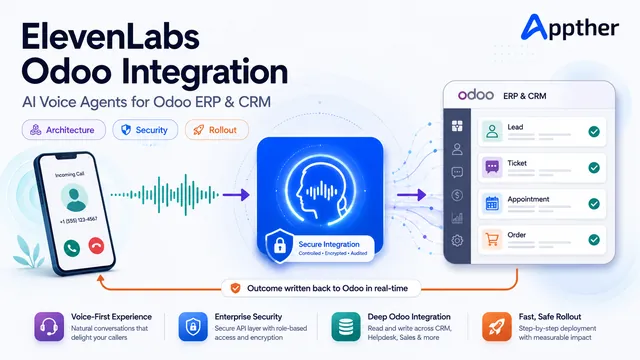
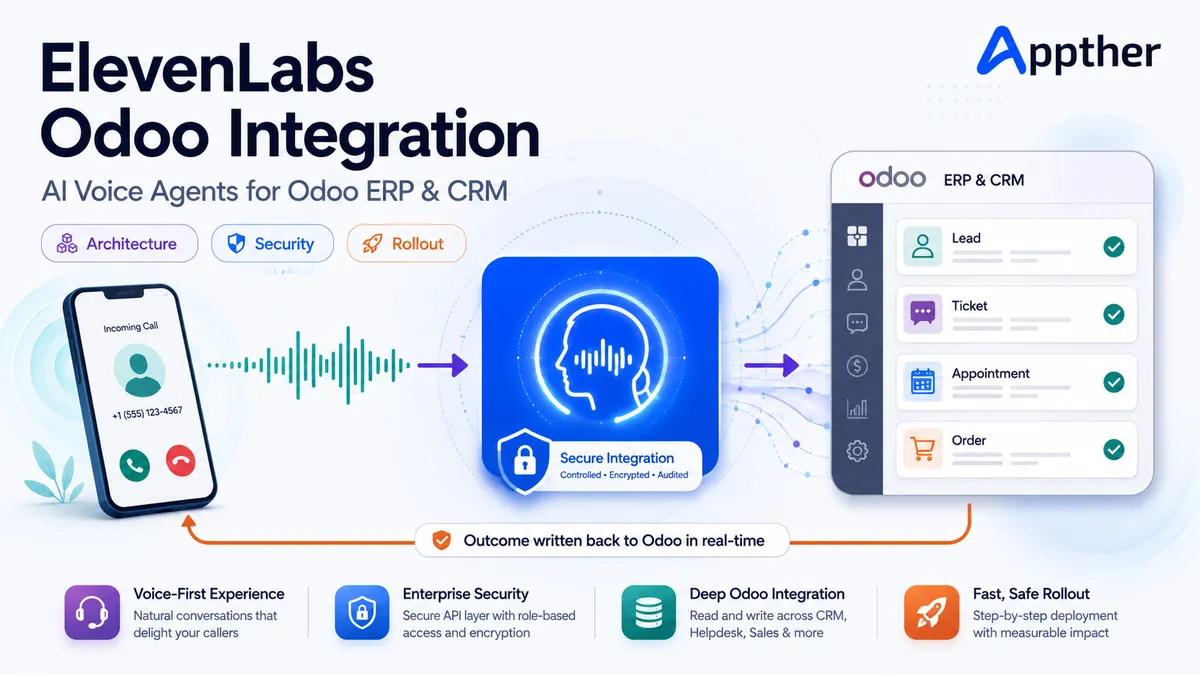
An ElevenLabs Odoo integration lets ElevenLabs handle the live phone conversation while Odoo stays the controlled system of record. The two connect through a secure middleware layer that exposes a small set of narrow, permission-checked operations such as find customer, get order status, create lead, create ticket and schedule follow-up, instead of giving the voice agent broad access to Odoo.
Your business already runs on Odoo. Customers, opportunities, quotations, support tickets, appointments and orders all live there. Yet many of the conversations that create or change those records still happen on the phone, and someone has to retype the outcome into the ERP afterwards.
An ElevenLabs Odoo integration closes that gap. The voice agent answers the call, understands what the caller needs, retrieves permitted information from Odoo, completes an approved action and writes the outcome back to the right record. It can also dial out for lead qualification, appointment confirmation, service reminders and customer follow-up.
Connecting a realistic AI voice to an ERP is not a text-to-speech project. A production system has to handle identity, permissions, latency, interruptions, ambiguous requests, failed API calls, audit trails and human escalation.
At Appther we treat this as an enterprise workflow integration: ElevenLabs owns the real-time conversation, and Odoo remains the controlled system of record. This guide explains how that architecture works, what can safely be automated, and what to decide before you deploy.
What is an ElevenLabs AI voice agent?
An ElevenLabs AI voice agent is a conversational system that listens to a caller, interprets the request, reasons about the next step, calls external tools and responds with generated speech.
It is not an IVR. A traditional IVR asks callers to press numbers and walk a fixed menu. A voice agent accepts natural language, including compound requests like:
“I need to know whether quotation Q-1042 has been approved, and I also want my account manager to call me tomorrow afternoon.”
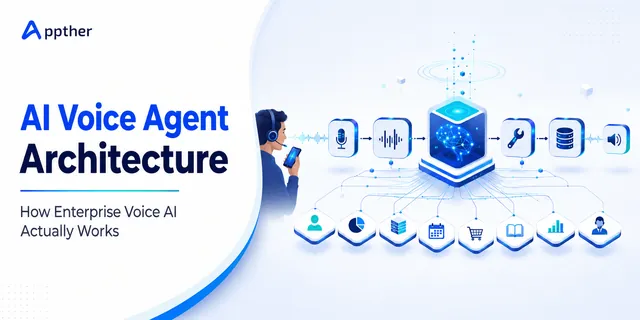
The agent has to spot two intents, retrieve the quotation status, interpret a relative time and create a follow-up activity for the correct owner. If you want the underlying mechanics in more depth, our guide to AI voice agent architecture breaks down each component of an enterprise voice stack.
ElevenLabs provides agent creation through its dashboard and APIs, external tool connections, dynamic caller variables, telephony integration and conversation analysis. Its platform supports both Twilio and SIP-based calling, and webhook tools connect an agent to external services.
For an Odoo deployment, ElevenLabs supplies the conversational layer while a secure integration service exposes a narrow, deliberately limited set of Odoo operations.
Why integrate ElevenLabs Voice AI with Odoo ERP?
Odoo already runs CRM, Sales, Helpdesk, Inventory, Accounting, Field Service and Appointments through our Odoo ERP services. Once the voice channel is wired into those modules, a phone call becomes part of the operational workflow instead of an isolated conversation that someone summarizes later.
| Business problem today | With an ElevenLabs Odoo integration |
|---|---|
| Call notes typed into Odoo hours later, often incomplete | Lead, ticket or activity created during the call with structured fields |
| Callers wait on hold while staff search screens | Approved order, ticket or appointment status returned in seconds |
| Every agent qualifies leads differently | One defined question set, one scoring rule, consistent Odoo fields |
| After-hours calls go to voicemail | Enquiry captured, issue logged, callback scheduled around the clock |
| No reliable data on why customers call | Call reason, outcome, sentiment and unresolved issues reported in Odoo |
1. Less manual data entry
The agent creates a lead, adds a CRM note, opens a support ticket or schedules an activity while the conversation is happening. After the call it stores the summary, disposition and extracted fields automatically.
2. Faster customer service
Instead of waiting for an employee to search several screens, the caller receives approved information such as order status, appointment availability or ticket progress during the conversation.
3. Consistent call handling
The agent follows defined qualification questions, escalation conditions and confirmation rules, which removes the variation you get when ten people handle the same request ten ways.
4. Availability outside business hours
A voice agent can take enquiries, log problems and schedule follow-ups when the human team is offline. It should never imply that an unavailable employee has already acted. It should state clearly what was recorded and what happens next.
5. Better operational data
Call reasons, outcomes, unresolved issues and follow-up commitments land in Odoo, giving managers real insight into demand, service quality and conversion. This is the same reporting advantage covered in our overview of AI integration in ERP systems.
ElevenLabs Odoo integration architecture
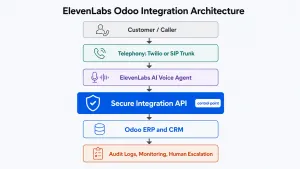
A reliable implementation has six layers. The integration layer in the middle is where most projects succeed or fail.
Customer or caller
|
Twilio, SIP trunk or existing telephony
|
ElevenLabs AI voice agent
|
Secure tool and integration API <– control point
|
Odoo ERP and CRM
|
Audit logs, monitoring, human escalation
Layer 1: Telephony
The telephony layer connects the public phone network or your enterprise phone system to the agent.
For most implementations Twilio is the most direct route. ElevenLabs supports inbound and outbound calls with Twilio numbers. A verified caller ID can be used for outbound calls, but it does not give you the same inbound capability, so check the number type before you plan the flow.
If you already run a PBX, contact center or telecom contract, evaluate SIP trunking instead. ElevenLabs supports inbound and outbound SIP calling with authentication and encrypted transport, and recommends TLS with encrypted media where supported.
Layer 2: ElevenLabs conversation layer
This layer handles speech recognition, turn-taking, reasoning, tool selection and voice output. Configuration normally covers:
- The agent’s role and boundaries
- First message and AI disclosure wording
- Language and voice selection
- Business terminology and pronunciation
- Tool definitions
- Confirmation requirements
- Escalation conditions
- Knowledge sources
- Call-success and data-extraction criteria
Dynamic variables personalize the call with permitted information such as the customer’s name, language, account type or assigned representative. ElevenLabs can also supply system variables including caller number, called number, conversation ID and call duration. Treat all of these as context, never as proof of identity.
Layer 3: Secure integration layer
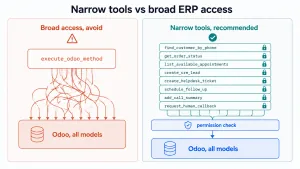
This is the most important part of the architecture, and the part demos usually skip.
The voice agent must not receive unrestricted access to Odoo models or an administrator credential. A middleware service should expose a small collection of purpose-built operations:
- find_customer_by_phone
- get_order_status
- list_available_appointments
- create_crm_lead
- create_helpdesk_ticket
- schedule_follow_up
- add_call_summary
- request_human_callback
Each operation validates its input, checks permissions, enforces business rules and returns only the data the conversation needs. This layer also shields Odoo from malformed requests, duplicate actions, call floods and prompt-driven attempts to reach unrelated data. Building it well is standard API development and integration work, not AI work.
Layer 4: Odoo business layer
Odoo stays authoritative for customer records and business transactions. Depending on the use case, the integration touches:
| Odoo area | Typical read | Typical write | Risk level |
|---|---|---|---|
| Contacts | Match caller by normalized phone | Create or update contact details | Low to medium |
| CRM leads and opportunities | Existing open leads | Create lead, add notes, set qualification fields | Low |
| Sales orders and quotations | Status, expected delivery | Rarely written by voice | Medium |
| Helpdesk tickets | Open tickets for verified customer | Create ticket, add structured notes | Low |
| Appointments and calendar | Available slots | Book, reschedule, cancel | Medium |
| Field service tasks | Visit status | Create or reschedule task | Medium |
| Invoices and payments | Due status only | Payment commitment note, never card data | High |
| Inventory | Availability | None | Low |
Odoo 19 provides an External JSON-2 API authenticated with an API key sent as a bearer token, and Odoo notes that external API access is limited to Custom pricing plans. Verify your deployment type and subscription before you commit to that route, and if you are still on an older release, read our Odoo 19 vs Odoo 17 upgrade guide first.
For Odoo.sh or on-premise deployments, a custom Odoo module can expose controlled endpoints and keep business logic close to the ERP. That module work sits inside normal custom ERP development. For Odoo Online, the available approach depends on your subscription and whether the customization is supported.
Layer 5: Post-call processing
Not everything needs to happen while the caller waits.
Immediate actions such as checking an order status must complete during the call. Heavier work such as storing a transcript, producing a detailed summary or running quality analysis belongs after the call. ElevenLabs post-call webhooks deliver conversation data that your integration service can use to update Odoo with the summary, outcome and full transcript against the right record.
Layer 6: Audit, monitoring and escalation
Every automated change needs a trail: what the caller asked, which tools ran, what Odoo changed and whether it succeeded. Pair that with live alerting on tool failure rates so a broken endpoint does not silently degrade one hundred calls before anyone notices.
Seven high-value use cases for ElevenLabs and Odoo
The best first use case is repetitive, measurable and bounded. It should create clear operational value without handing the agent broad authority.
| Use case | Direction | Primary Odoo module | Complexity |
|---|---|---|---|
| AI receptionist | Inbound | CRM, Contacts | Low |
| Lead qualification | Outbound | CRM | Low |
| Helpdesk voice agent | Inbound | Helpdesk | Medium |
| Appointment booking and confirmation | Both | Appointments, Calendar | Medium |
| Quotation and order status | Inbound | Sales | Medium |
| Service reminders and follow-ups | Outbound | Field Service, CRM | Medium |
| Payment reminders | Outbound | Accounting | High |
1. AI receptionist connected to Odoo CRM
The agent answers inbound calls, identifies the purpose of the enquiry and looks for an existing contact by caller number. It collects missing information, creates a lead, routes the call or schedules a callback. Typical Odoo updates: create or update a contact, create a CRM lead, assign a sales team, add call notes and qualification fields, schedule a follow-up activity. If you are extending this pattern to a wider CRM stack, see our step-by-step guide to AI voice assistant CRM integration.
2. Automated lead qualification
An outbound agent calls new leads and asks an approved set of questions on requirements, budget, timeline and decision authority.
The agent should never invent a score or an opportunity stage. A defined rule set maps answers to Odoo fields and decides the next action. Typical updates: qualification status, lead score, product interest, preferred meeting time, salesperson assignment and disposition such as interested, callback, not qualified or do not contact.
Outbound calling must comply with consent, disclosure, recording, telemarketing and do-not-call rules in every relevant jurisdiction.
3. Odoo Helpdesk voice agent
A customer describes an issue naturally. The agent retrieves permitted account context, asks troubleshooting questions and checks approved knowledge content. If the issue is unresolved it creates a Helpdesk ticket with structured data: subject and description, customer and contact, product and category, urgency and impact, assigned team, transcript summary and the promised response window.
4. Appointment booking and confirmation
The agent retrieves available slots, offers suitable options, confirms the selected time and creates the appointment in Odoo. It can also place reminder calls and record whether the customer confirmed, rescheduled or cancelled. Any final booking action should repeat the date, time, timezone, location and the person involved before saving. Our AI voice agent case study in healthcare shows how this pattern performs on real appointment traffic.
5. Quotation and order status enquiries
After verification, the agent answers limited questions about quotations, orders or deliveries, for example whether a quotation is awaiting approval or an order has been dispatched. It must not disclose commercial or personal data on caller ID alone. Sensitive values require a stronger verification step.
6. Service reminders and customer follow-ups
Odoo selects the records that need follow-up and the integration dials out for renewals, maintenance, warranty actions, pending documents or service feedback. The outcome returns to Odoo so employees spend their time on customers who genuinely need a human.
7. Payment reminders
The agent reminds an authorized contact that an invoice is due and captures a payment commitment or dispute reason. This is high sensitivity. The agent should not collect full card credentials in an ordinary voice workflow. Payments belong in a secure, compliant payment process, and disputes should escalate to a person.
Step-by-step implementation approach
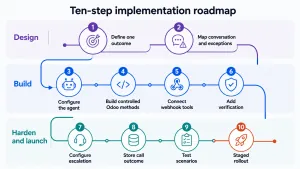
Step 1: Define one business outcome
Start with a specific result, such as “create a complete Helpdesk ticket from an inbound support call” or “qualify an Odoo CRM lead and schedule a sales callback.” Define who calls, which Odoo records are involved, what the agent may read, which fields it may write, which actions need confirmation, when it must escalate and how success is measured.
Avoid a broad objective like “let the agent use Odoo.” It creates scope nobody can test.
Step 2: Map the conversation and the exceptions
Design the happy path, then spend equal time on failure paths: no customer found, multiple matching contacts, caller refuses verification, requested order belongs to another account, Odoo API times out, required information missing, customer changes intent mid-call, caller interrupts, speech recognition uncertain, customer asks for a human. The agent should always know its next move when a step fails.
Step 3: Configure the ElevenLabs agent
Create the agent and define its role, tone and scope. Keep the main prompt concise and operational. It should state what the agent represents, supported and prohibited tasks, what must be verified, when tools are called, what must be confirmed before a write, how to handle unavailable information, when to transfer, and what the agent must never claim.
Put business documents, FAQs and policies in an approved knowledge base. ElevenLabs supports retrieval-augmented generation for larger sources, though retrieval adds latency and should be used selectively during a live call. If you are new to prompt and tool design for voice, our walkthrough on how to develop an AI voice agent covers the fundamentals.
Step 4: Build controlled Odoo service methods
Do not give the agent a generic execute_odoo_method tool. Create narrow endpoints for the chosen workflow. A Helpdesk integration might expose: find customer by normalized phone number, retrieve open tickets for the verified customer, retrieve approved troubleshooting content, create a ticket, add structured call notes, request a human callback. The service validates record ownership, allowed fields and permitted state transitions on every request.
Step 5: Connect the tools to ElevenLabs
Define each middleware endpoint as an ElevenLabs webhook tool with a clear name, description, parameters and response. Tool descriptions matter: the agent needs to know exactly when to use a tool, what to collect first and what success or failure means. ElevenLabs supports webhook tool authentication including OAuth client credentials, bearer tokens, basic auth and custom headers.
A successful tool response should be short and voice friendly. Return the conversational result, not the whole Odoo record:
{
“success”: true,
“order_reference”: “S1042”
“status_for_customer”: “Dispatched”
“expected_delivery_date”: “2026-09-03”
“requires_human_follow_up”: false
}
Never return internal cost, unrestricted notes, access tokens or unrelated customer fields.
Step 6: Add customer identification and verification
Caller ID helps locate a probable contact. It is not authentication for sensitive data or transactions. Choose verification by risk: one-time password, customer reference plus a second factor, a verified value already stored in Odoo, a secure link sent to an established channel, or human verification for high-risk actions.
Keep it proportionate. A general enquiry needs little. Changing an address, discussing an invoice or modifying an order needs more.
Step 7: Configure human escalation
A production voice agent needs an escape route. Escalate when the caller asks for a person, identity cannot be verified, tools return conflicting information, a complaint or dispute needs judgment, the same step fails repeatedly, the conversation leaves the approved scope, or confidence is low.
ElevenLabs provides a transfer-to-number tool for calls on supported Twilio or SIP configurations, with conference, blind or SIP REFER options, and warm transfer in supported Twilio flows. If live transfer is unavailable, create a high-priority Odoo activity or ticket with the customer’s details, reason, urgency and agreed callback time.
Step 8: Store the call outcome in Odoo
The post-call workflow correlates the ElevenLabs conversation with the correct Odoo record. Useful fields: conversation ID, call direction, start time and duration, customer or lead, call reason, outcome, summary, structured data collected, actions completed, failed tools, escalation status, follow-up owner and deadline, and a recording or transcript reference where permitted.
Use an idempotency key so a retried webhook cannot create duplicate tickets, activities or notes.
Step 9: Test before customers hear it
Testing covers far more than voice quality. Build scenarios for different accents and speaking speeds, background noise and poor phone audio, interruptions and mid-sentence corrections, similar customer or product names, ambiguous dates and timezones, duplicate records, unauthorized requests, tool timeouts and invalid responses, prompt-injection attempts, human-transfer failure and repeated webhook delivery.
ElevenLabs provides simulation, next-reply and tool-call testing so teams can verify multi-turn outcomes and check that the right tool is called with the right parameters.
Step 10: Roll out in controlled stages
Start with employees and test numbers, then a limited customer group or low-risk call type. Review transcripts and tool logs daily during the first weeks. A practical sequence:
- Internal testing
- Read-only Odoo access
- Limited write operations
- A small percentage of live calls
- Expanded traffic after KPI review
- Additional workflows only once the first is stable
ElevenLabs agent versioning supports isolated configuration changes and gradual traffic deployment, which is useful while you are still refining production prompts and tools.
Security and governance requirements
Voice AI connected to an ERP touches customer and operational data. Security cannot be bolted on after the workflow is designed.
Use least-privilege access
Create a dedicated integration user with access only to the necessary Odoo models, records and operations. Never reuse an administrator account.
Keep Odoo credentials behind the integration layer
Store secrets in a proper secret-management system. They must never appear in an agent prompt, transcript, tool response or client-side application.
Verify webhook authenticity
Validate incoming webhook signatures or shared secrets, reject stale requests, log verification failures and restrict inbound endpoints where practical.
Separate read and write actions
Reading appointment availability is lower risk than booking one. Use separate endpoints and permissions so each action is controlled independently.
Confirm consequential actions
Before creating, cancelling or changing an important record, the agent repeats the key information and obtains explicit confirmation.
Minimize returned and retained data
Return only the fields the current call needs. Define retention rules for recordings, transcripts, summaries and extracted data based on business purpose and applicable law.
Maintain an audit trail
Record what the caller requested, which tools ran, what Odoo changed and whether it succeeded. Administrators should be able to trace every automated modification.
Design for consent and disclosure
Tell callers they are speaking with an AI agent where required or appropriate, and obtain consent for recording and automated processing according to the countries and industries involved. Regulated sectors carry extra obligations, as we cover in our guide to HIPAA-compliant AI voice agents for healthcare.
Latency: where voice integrations usually fail
A voice agent can have a beautiful voice and still feel unusable if every answer arrives late. Latency accumulates across the whole path.
| Stage | Typical contribution | How to control it |
|---|---|---|
| Telephony transport | Fixed, provider dependent | Choose a region close to callers |
| Speech recognition | Streaming, low | Nothing to tune in most cases |
| LLM reasoning | Moderate | Keep prompts focused, avoid huge context |
| Knowledge retrieval | Can be significant | Use retrieval selectively, not on every turn |
| Middleware processing | Small if designed well | Validate fast, avoid chained calls |
| Odoo queries | Often the worst offender | Index phone and reference fields, return small payloads |
| Text to speech | Low, streamed | Stream the first sentence early |
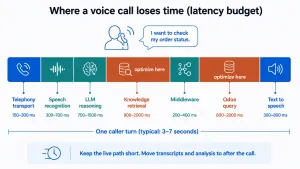
Appther’s approach is to keep the live path short:
- Use small, purpose-built responses from Odoo
- Index frequently searched fields such as normalized phone numbers and external references
- Never return complete records or large document sets
- Cache safe, non-transactional information
- Move transcript storage and analysis to after the call
- Give the caller a natural progress message before a slow tool
- Define a timeout and a fallback instead of leaving silence on the line
If Odoo does not respond in time, the agent should say something like:
“I’m unable to retrieve that record right now. I can create a priority callback request so the support team can contact you.”
That beats guessing, stalling or claiming the record does not exist.
Mistakes that kill an Odoo voice agent
These are the failure patterns we see most often in projects that arrive for rescue rather than being built from scratch. Our analysis of why AI voice agents fail covers the wider set with real call examples.
- One broad ERP endpoint. A single flexible tool is fine for a prototype and dangerous in production. Split it into task-specific tools so permissions, testing and audit logs stay clear.
- Caller ID treated as authentication. Useful for personalization and record discovery. Never sufficient for disclosing sensitive data or changing a record.
- Conversation success confused with system success. The agent saying “your ticket has been created” does not mean Odoo accepted the write. Spoken confirmation must follow a verified API response containing the record reference.
- Fallbacks designed last. Odoo will occasionally be slow and third-party services will occasionally fail. Every tool needs a safe failure response and a defined next action.
- The LLM making consequential decisions. The model understands the conversation. A rule or controlled service decides whether a field can change, which team gets a ticket and whether approval is required.
- One enormous prompt. Stuffing every policy and product document into the prompt raises cost, latency and inconsistency. Keep operating rules in the prompt, retrieve approved knowledge when needed, enforce permissions in code.
- No feedback loop. Accents, product names and unexpected customer behavior cannot be fully predicted. Production improvement needs a repeatable cycle: review, classify, correct, test, release.
How much does an ElevenLabs and Odoo integration cost?
There is no responsible fixed price before the workflow is defined. Cost depends far less on connecting the two platforms and far more on the operational depth around that connection.
| Cost driver | What increases the number |
|---|---|
| Use cases | Each additional inbound or outbound flow adds prompts, tools and tests |
| Odoo scope | More modules and custom fields mean more mapping and validation |
| Hosting and API route | Odoo Online plan limits versus Odoo.sh or on-premise custom modules |
| Telephony | Twilio numbers are simple, SIP or contact-center integration is not |
| Languages | Each language needs its own testing, vocabulary and confirmation wording |
| Verification | OTP or multi-factor flows add engineering and edge cases |
| Real time versus post call | More live operations mean tighter latency budgets |
| Compliance | Consent, recording, retention and audit controls |
| Volume and concurrency | Scaling, rate limiting and queueing |
| Monitoring and QA | Dashboards, alerting and transcript review workflows |
A focused proof of concept covers one call flow and a handful of controlled Odoo actions. A production deployment adds security hardening, routing, retries, audit logs, test suites, monitoring, escalation and admin controls. Budget for ongoing usage from the voice platform, telephony provider, language model and hosting, and model those with a realistic distribution of call durations rather than a single average. For indicative ranges, see our breakdown of AI voice agent development cost, MVP vs enterprise.
KPIs to track after launch
Measure the agent against business outcomes, not call volume.
| KPI | Why it matters | Healthy direction |
|---|---|---|
| Call completion rate | Did the conversation reach a defined end state | High and stable |
| Verification success rate | Is your identity flow too strict or too loose | High without weakening controls |
| Correct intent rate | Is the agent understanding the request | High, reviewed weekly |
| Tool success and failure rate | Is the Odoo integration reliable | Failures trending to near zero |
| Average response latency | Does the call feel natural | Low and consistent |
| First-call resolution | Real service value | Rising |
| Human transfer rate | Scope fit | Falling, but never zero by design |
| Ticket or lead completeness | Data quality in Odoo | Rising |
| Duplicate record rate | Idempotency working | Near zero |
| Follow-up completion rate | Promises kept | Rising |
| Conversion or appointment rate | Commercial outcome | Rising |
| Cost per completed outcome | The number leadership cares about | Falling |
ElevenLabs supports success evaluation and structured analysis of completed conversations, including goal assessment and extracted business data. Combine those results with Odoo outcomes to confirm the agent actually completed the intended workflow, not just the call.
Build in-house or work with an integration partner?
Building in-house works when you already have API engineers, an Odoo developer and someone who owns telephony. The specialist gap is usually conversation design, tool schema discipline and production observability, and that is where most first attempts stall.
A partner is worth it when the workflow touches regulated data, when you need SIP rather than a simple Twilio number, when several Odoo modules are involved, or when the agent will write to records that affect revenue. Related patterns are covered in our guides to integrating agentic AI into your ERP and agentic AI in Odoo, and if you are planning a wider rollout, the smart ERP with AI integration guide maps the full program.
Frequently asked questions
Can ElevenLabs connect directly to Odoo?
ElevenLabs webhook tools can call external APIs and Odoo provides external API capabilities, so a direct connection is technically possible. For production, Appther recommends a secure integration layer between them. It avoids exposing broad Odoo access and lets the business enforce validation, permissions, confirmations, logging and retries.
Can the voice agent create leads and Helpdesk tickets in Odoo?
Yes. A controlled tool validates the collected information and creates the record. The agent should confirm success only after Odoo returns a successful response with a record reference.
Can it check quotations, orders and invoices?
Yes, provided the caller is authorized and the integration exposes the required read operation. Sensitive commercial or financial details need stronger verification than caller ID.
Does the integration support inbound and outbound calls?
Yes. ElevenLabs supports inbound and outbound calling through supported Twilio numbers and SIP configurations. Exact capabilities depend on how the number and telephony infrastructure are configured.
Can the agent transfer a call to an Odoo user or support team?
Calls can be transferred to configured phone numbers or SIP destinations in supported setups, and Odoo can determine the right team, opening hours or assigned representative. If transfer is unavailable, the system creates an Odoo callback activity or ticket.
Can it support multiple languages?
Yes, but each language needs its own testing across accent, business vocabulary and call route. Translation quality alone is not enough: tool parameters, dates, names, confirmation wording and knowledge content all have to work. Our multilingual conversational AI guide covers the testing matrix.
Is the integration suitable for Odoo Online?
It depends on the plan, API availability and required customization. Odoo states that external API access is available on Custom pricing plans. Odoo.sh and on-premise environments generally allow more flexibility for custom modules and integration logic.
Should recordings and transcripts be stored in Odoo?
Only when there is a defined business purpose and an appropriate consent, access and retention policy. In many cases storing a structured summary plus an external reference is better than duplicating the full recording inside the ERP.
How long does an ElevenLabs Odoo integration take to build?
A single, well-scoped call flow with read-only Odoo access and one or two write actions is a matter of weeks, not months. Timelines stretch when the scope covers several modules, multiple languages, SIP telephony or strict verification requirements.
What happens if Odoo is down during a call?
The tool should time out quickly and return a defined failure. The agent then tells the caller honestly that it cannot retrieve the record, offers a callback and logs a priority follow-up as soon as the connection is restored. It should never guess or invent a status.
Can the agent handle interruptions and callers who change their mind?
Yes, and this is a core part of conversation design rather than a model setting. Map mid-call intent changes and barge-in explicitly, and test them alongside accents, background noise and poor line quality.
How is this different from an Odoo chatbot?
The reasoning and tool layer is similar, but voice has no forgiving pause. Latency, interruptions, speech recognition errors and verification over audio all add constraints a chat interface never faces. Chat patterns are covered in our work on AI chatbot development.
Final perspective
An ElevenLabs Odoo integration turns your ERP from a system employees update after a call into a system that actively supports the conversation.
The highest-value result is not a human-like voice. It is a dependable workflow where the agent understands the caller, retrieves authorized information, completes controlled actions, records the outcome and knows exactly when to bring in a person.
That takes expertise across conversational AI, telephony, Odoo development, API integration, security and production operations.
Appther designs and builds AI voice agent solutions integrated with Odoo AI integration services across CRM and ERP workflows. We can help you validate the use case, design the architecture, build a proof of concept and deploy a secure production system with monitoring and human escalation.
Ready to connect Voice AI with Odoo?
Build an Odoo voice agent that does more than answer questions. From inbound support and lead qualification to appointment booking, CRM updates and human escalation, Appther can help you build an ElevenLabs and Odoo integration around real business outcomes.
CTA button: Discuss Your Odoo Voice AI Project