Odoo 19 vs Odoo 17: Key Differences & Complete Upgrade Guide
ERP systems are no longer just back-office tools. They are strategic engines that drive revenue, efficiency, and competitive advantage.
For those using Odoo 17 or considering an upgrade to Odoo 19, this guide provides a straightforward overview of the changes, their implications for your industry, and insights on whether upgrading is currently advisable.
Here is the short version: Odoo 17 helped businesses work faster. Odoo 19 helps businesses work smarter, with AI-driven automation, predictive insights, and enterprise-grade scalability built in.
Odoo 17 vs Odoo 19: Quick Comparison at a Glance
The table below highlights the most important differences across core business areas.
Feature AreaOdoo 17Odoo 19Business Impact User Interface Modern and clean Intuitive, customisable, context-aware Faster adoption, less training time Performance Optimised for SMEs Advanced caching and enterprise optimisation Handles large-scale operations smoothly Automation Rule-based workflows AI-driven and event-based automation Cuts manual effort dramatically CRM Basic automation and pipelines Smart lead scoring with AI insights Higher sales conversion rates Accounting Strong core features Advanced compliance, audit trails, reporting Better financial control Inventory Good stock tracking Real-time smart inventory and demand forecasting Fewer stockouts and errors Integration Standard REST APIs Expanded API ecosystem and webhook support Connected business ecosystem Reporting Static dashboards Real-time and predictive analytics Data-driven decisions Scalability SME-friendly Enterprise-ready architecture Supports rapid business growth
The Core Difference: Evolution, Not Just an Upgrade
This is not a minor version jump. It is a fundamental shift in how Odoo delivers value.
Odoo 17, Built for Process Efficiency
- Faster, modern user interface with improved usability
- Smooth workflow navigation for growing SMEs
- Rule-based workflow automation for standard processes
Odoo 19, Built for Intelligent Operations
- AI-driven automation across all core modules
- Predictive insights for sales, inventory, and finance
- Cross-module intelligence with seamless data flow
- Enterprise-grade performance and scalability
Bottom LineOdoo 17 made your team more productive. Odoo 19 makes your entire business more intelligent.
Deep Dive: Key Improvements in Odoo 19
1. AI-Powered CRM and Sales IntelligenceIn Odoo 17, CRM relied on manual data entry and rule-based workflows. Sales teams prioritised leads based on gut feeling and experience. This worked, but it left revenue on the table.
Odoo 19 introduces a smarter CRM engine that changes how sales teams operate:
- AI-based lead scoring ranked by conversion probability
- Predictive sales forecasting powered by pipeline data
- Smart follow-up reminders triggered by customer behaviour
- Automated email suggestions tailored to each lead stage
- Win/loss analysis that helps coach sales teams with real data
Real ExampleA trading company receives 200+ leads daily. With Odoo 17, sales reps manually decided who to call first. With Odoo 19, AI automatically ranks leads by conversion likelihood, delivering a 20–30% improvement in conversion rates.
2. End-to-End Workflow AutomationOne of the most powerful upgrades in Odoo 19 is cross-functional automation. Actions connect across departments without manual intervention.
For example, when a sales order is confirmed in Odoo 19:
- An invoice is generated automatically
- Inventory is reserved in real time
- Delivery is scheduled with the logistics team
- The customer receives a confirmation email with tracking
- The finance dashboard updates with new revenue data
In Odoo 17, most of these steps needed manual triggers or separate workflow setups per department. That created delays and put too much dependency on individual users.
3. Performance and Scalability EnhancementsSpeed and reliability matter more as your business grows. Odoo 19delivers significant technical improvements under the hood:
- Optimised ORM for faster database queries
- Faster API response times for third-party integrations
- Improved caching layers for high-traffic scenarios
- Better concurrency handling for multi-user environments
- Smoother performance with large datasets across multiple locations
Managing operations across different warehouses, regions, or time zones can lead to bottlenecks, but these enhancements help reduce them, improving the user experience for everyone.
4. Advanced Accounting and ComplianceOdoo 19 strengthens the accounting module significantly. This matters most for businesses with complex tax structures or operations across multiple countries.
- Real-time financial dashboards with drill-down capability
- Advanced tax rule engine supporting multiple jurisdictions
- Automated bank reconciliation to reduce manual matching
- Improved audit trails for regulatory compliance
- Better GST handling for Indian businesses
- Compliance-ready reporting formats for South Africa and Australia
If you work in a regulated industry, healthcare, financial services, or manufacturing, these compliance improvements are a real shift.
5. Inventory and Supply Chain IntelligenceInventory management in Odoo 19 goes beyond tracking. It becomes predictive and self-managing:
- Real-time stock updates across all warehouses
- Automated replenishment based on demand thresholds
- AI-driven demand forecasting to prevent stockouts
- Multi-warehouse routing and transfer optimisation
- Better expiry tracking and batch/serial number management
This is especially beneficial for trading companies, import/export firms, manufacturers, and distributors managing numerous SKUs across various locations.
6. Integration and API EcosystemModern businesses depend on a connected ecosystem: eCommerce platforms, payment gateways, logistics providers, CRMs, and industry-specific software. Odoo 19 expands your ability to connect everything:
- More flexible and well-documented REST APIs
- Faster third-party integrations with pre-built connectors
- Better webhook support for event-driven architectures
- Easier integration with Shopify, WooCommerce, and other platforms
- Improved EDI support for B2B and enterprise supply chains
Module-by-Module Comparison: Odoo 17 vs Odoo 19
ModuleOdoo 17 CapabilitiesOdoo 19 Enhancements CRM Lead tracking, basic pipeline management AI lead scoring, predictive insights, smart follow-ups Sales Quotation and basic invoicing Smart automation, forecasting, revenue intelligence Inventory Standard stock tracking Smart replenishment, demand forecasting, multi-warehouse Accounting Invoicing, standard reports Advanced compliance, automated reconciliation, audit trails HR Employee management basics Improved analytics, performance tracking, automation Manufacturing Basic MRP module Optimised production planning with real-time visibility eCommerce Website builder and basic store Enhanced UX, better integrations, conversion optimisation Reporting Standard static reports Real-time dashboards, custom KPIs, predictive analytics
Should You Upgrade to Odoo 19?
Not every business needs to upgrade immediately. Use this practical framework to decide.
- Upgrade to Odoo 19 if you:Want automation to cut manual effort across departments
- Are scaling rapidly and need enterprise-grade performance
- Need better reporting, analytics, and AI-driven insights
- Operate across multiple countries with compliance requirements
- Use multiple tools and want a fully integrated ecosystem
- Consider staying on Odoo 17 if you:Have a stable system with heavy customisations recently completed
- Are in the middle of a major business change or restructure
- Have limited budget for implementation and training right now
Challenges in Upgrading: An Honest Overview
Upgrading an ERP is a significant project. Here are the most common challenges businesses face, and what you should plan for.
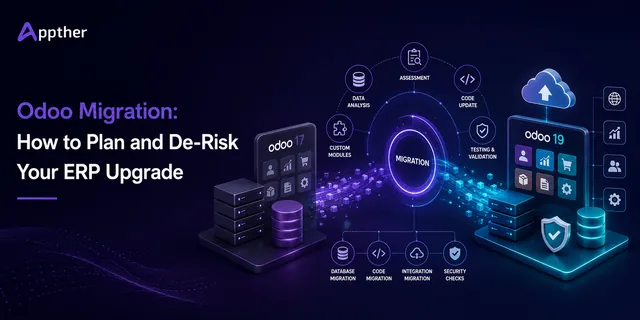
1. Data MigrationYou need to transfer historical data, sales orders, invoices, customer records, inventory, from Odoo 17to Odoo 19. This requires careful planning. Data integrity checks and field mapping are essential to avoid post-migration errors.
2. Custom Module CompatibilityIf your Odoo 17 setup includes custom-built modules or third-party apps, these may need updates or redevelopment. Audit all customisations before you start the upgrade.
3. User Training and Change ManagementEven though Odoo 19 has a more intuitive interface, your team will need structured training. Focus especially on new AI features, automation rules, and updated module workflows.
4. Business Continuity During TransitionFor businesses that run 24/7, you must plan for zero downtime during migration. This means careful scheduling, parallel running, and a tested rollback plan.
Key Takeaway
Selecting an experienced Odoo implementation partner, rather than just any IT vendor, is the most crucial choice you will make during an upgrade.
How Appther Helps You Upgrade and Implement Odoo 19
At Appther, we specialise in end-to-end Odoo implementation, migration, and customisation. We bring deep expertise across healthcare, trading, manufacturing, and professional services.
Our approach is business-first. We do not just install software. We map your business processes, find automation opportunities, and configure Odoo to reflect how your business actually works.
- Consultation and StrategyCurrent system audit and gap analysis
- Upgrade readiness assessment
- ROI modelling for Odoo 19 features
- Phased implementation planning
- Seamless Migration (Odoo 17 to Odoo 19)Secure data migration with full integrity checks
- Zero data loss approach with rollback safety
- Parallel running support for business continuity
- Minimal downtime execution
- Custom Odoo DevelopmentIndustry-specific module development
- Business workflow automation
- Custom reporting and dashboard builds
- Integration with third-party systems
- Ongoing Support and OptimisationPost-go-live support and performance tuning
- User training and onboarding programmes
- Feature enhancement roadmaps
- Continuous improvement reviews
Real-World Use Cases by Industry
Trading and Import/ExportA yarn trading company with 500+ SKUs across multiple warehouses was managing stock on spreadsheets and manual Odoo entry. After moving to Odoo 19:
- Purchase orders trigger automatically when stock falls below threshold
- Landed costs are tracked in real time across shipments
- GST and customs compliance is built into the workflow
- Profit margins are visible per product, per customer, per location
Healthcare and ClinicsA multi-branch clinic managing patient scheduling, consumable inventory, and staff payroll:
- Patient appointment workflows are integrated with billing
- Consumables are tracked per procedure with auto-reorder
- Staff attendance and payroll run end-to-end automatically
- Compliance reporting for health authorities is built in
ManufacturingA manufacturing unit running three-shift operations with complex BOM structures:
- Production planning is optimised based on real demand signals
- Quality control checkpoints are automated at each stage
- Raw material procurement links directly to confirmed production orders
- Real-time OEE dashboards provide instant visibility
Professional Services and ConsultingA consulting firm managing projects, timesheets, and client billing:
- Project profitability is tracked in real time per engagement
- Invoices generate automatically from approved timesheets
- Resource utilisation dashboards support capacity planning
- CRM to project pipeline runs with zero manual handoff
Frequently Asked Questions
Q1: Is Odoo 19 significantly different from Odoo 17?
Yes. Odoo 19 is a substantial upgrade. It introduces AI-driven automation, predictive analytics, advanced compliance tools, and enterprise-grade performance. Businesses that upgrade will handle complex, high-volume operations far more effectively than on Odoo 17.
Q2: How long does the upgrade take?
It depends on your setup, number of modules, data volume, customisations, and integrations. A standard SME migration typically takes four to eight weeks. Complex enterprise implementations may take three to six months. Appther provides a detailed project plan after an initial system audit.
Q3: Will my custom Odoo 17 modules work in Odoo 19?
Custom modules don’t automatically update for compatibility with Odoo 19’s framework. They require review and updates. While some modules only need minor tweaks for migration, others might require a complete rebuild. Appther performs a comprehensive audit of custom modules before beginning any migration process.
Q4: Can I lose data during migration?
With a professional migration partner, the risk is minimal. Appther uses a structured methodology with full data integrity checks, backups, and validation at every stage. We run the migration in a staging environment first so you can verify everything before going live.
Q5: Is Odoo 19 suitable for small businesses?
Yes. Odoo 19 scales to fit businesses of all sizes. Small businesses benefit from improved automation and ease of use. Growing mid-market companies gain better scalability and analytics. Large enterprises benefit from advanced compliance and multi-entity support.
Q6: Does Odoo 19 support Indian GST?
Yes. Odoo 19 includes enhanced GST handling: GSTIN management, HSN/SAC codes, e-invoicing, and GST return reporting. Appther has specific expertise in configuring Odoo for Indian compliance.
Q7: What industries does Appther serve?
Appther delivers Odoo implementations across trading, healthcare, manufacturing, professional services, logistics, financial services, and retail. We work with businesses in USA, Canada, India, South Africa, and Australia.
Q8: What does the upgrade cost?
Costs depend on system complexity, data volume, custom modules, and required integrations. Appther provides a fixed-cost proposal after an initial consultation and system audit, so you know exactly what you are paying before we begin.
Q9: Do we need to retrain all users?
Some training is always advisable after a major upgrade, especially around AI-powered CRM, updated reporting dashboards, and new automation tools. Appther includes structured user training as part of every implementation, tailored to different roles within your business.
Q10: How do I get started with Appther?
Reach out through appther.com. We start with a free consultation to understand your business, your current Odoo setup, and your upgrade goals. From there, we provide a detailed project scope, timeline, and cost estimate, with no obligation.
Final Verdict: Odoo 19 vs Odoo 17
Odoo 17 remains a solid, reliable ERP platform. Businesses running it are not on an outdated system. However, Odoo 19opens the door to capabilities that Odoo 17 simply cannot match: intelligent automation, predictive analytics, and enterprise-scale performance.
If your business is focused on growth, efficiency, and digital transformation, Odoo 19 is the clear path forward. Early adopters will build competitive advantages that compound over time.
The VerdictOdoo 17 is reliable. Odoo 19 is future-ready. The question is not whether to upgrade, it is when and how to do it right.