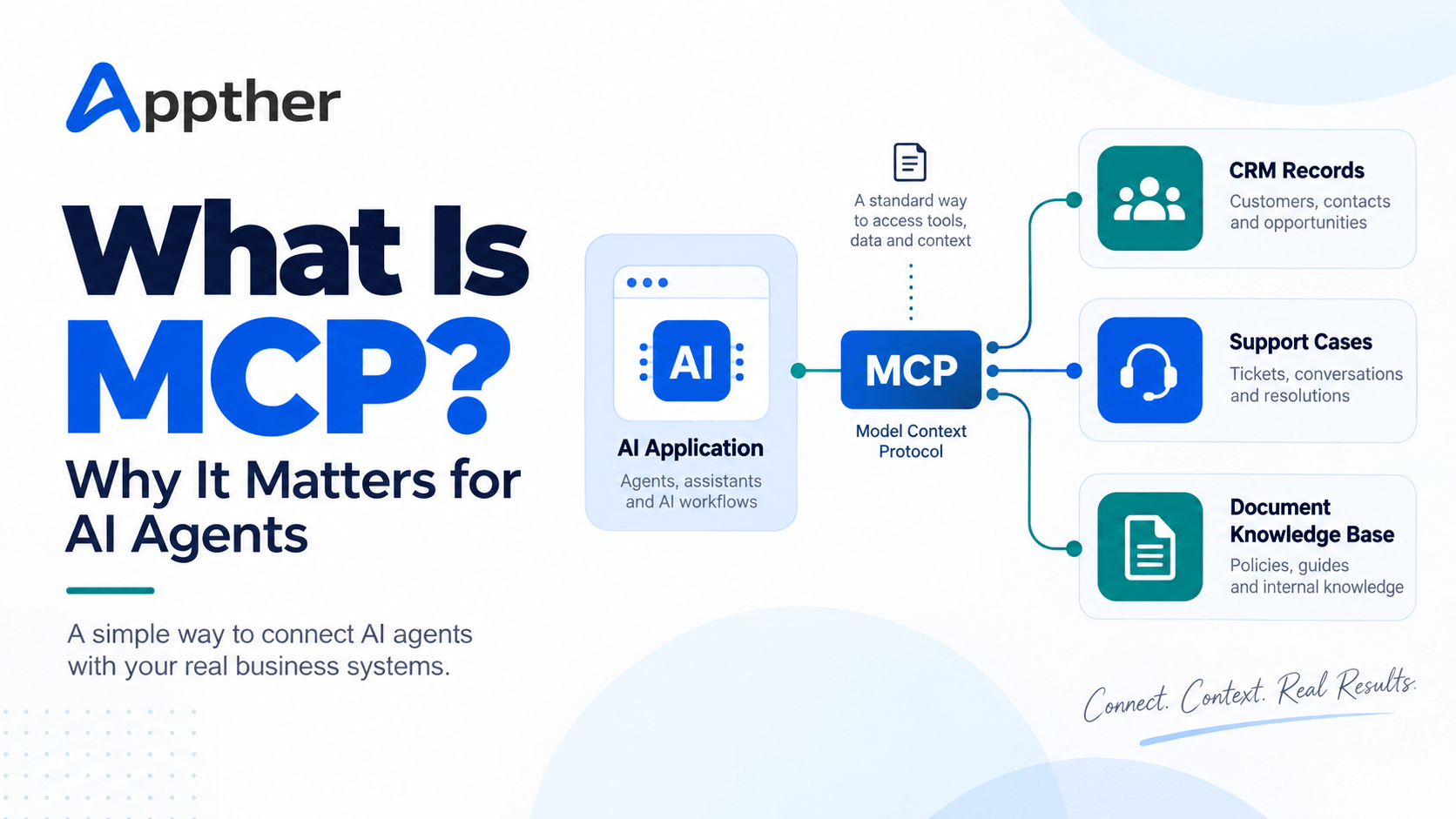
Quick answer: MCP (Model Context Protocol) is an open standard that lets an AI application discover and call capabilities exposed by external systems through one common interface. For AI agents, it replaces one-off connectors with reusable tools, resources and prompts, but it does not handle permissions, approvals or monitoring on its own. Those still need deliberate design.
An AI agent can write a useful answer from information already in the conversation. To check a live customer record, create a support ticket or retrieve an approved document, it needs a connection to another system. Those connections are usually built one at a time, with a different method for each application.
Model Context Protocol gives AI applications a common way to discover and use capabilities exposed by external systems. It makes integrations easier to reuse, but a working MCP connection is only one part of a reliable business workflow. This guide explains what MCP is for AI agents, how it works, how it differs from APIs, RAG and function calling, and what to check before you run a pilot.
What is MCP for AI agents?
MCP is an open protocol for connecting AI applications to external information and actions. An application that supports MCP can connect to an MCP server, discover what that server offers and request a specific capability through a defined interface.
Think of a customer support agent that needs to answer “Where is my order?” One server might expose a tool to look up the order, while another provides access to support knowledge. The agent’s application uses those capabilities to prepare an answer grounded in current data.
MCP is not the language model, the customer database or the business logic behind order lookup. It is the interface that lets the AI application communicate with capabilities those systems choose to expose.
How does MCP work?
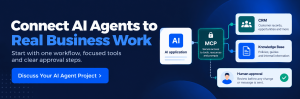
MCP architecture has three roles. A host runs the AI application, a client connects the host to one server, and a server exposes focused capabilities.
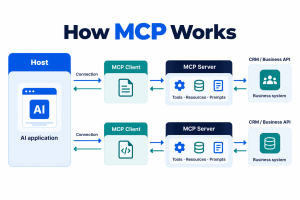
| Component | What it does | Example |
|---|---|---|
| Host | Runs the AI application and coordinates connections, permissions and model interaction. | An enterprise assistant application. |
| Client | Connects the host to one MCP server and exchanges protocol messages. | The host’s connection to a CRM server. |
| Server | Exposes focused capabilities or information. | A service that offers customer lookup and case creation. |
One host can connect to multiple servers through separate clients. A server can run locally or remotely. The host remains responsible for the overall AI experience, which lets teams keep each integration focused and set boundaries around what it can access.
A typical flow:
- A user asks the assistant for the status of a support case.
- The host identifies a case-lookup tool exposed by an MCP server.
- The application handles authorization and invokes the tool with a case identifier.
- The server queries the underlying service and returns a result.
- The assistant explains the status, with any required checks before further action.
The approval experience depends on the application and the risk of the action. An enterprise implementation should make sensitive actions explicit and reviewable. This is the same least-privilege pattern we describe in our guide to building a healthcare AI agent.
Tools, resources and prompts: the three MCP building blocks
MCP servers expose three kinds of capability: tools, resources and prompts.
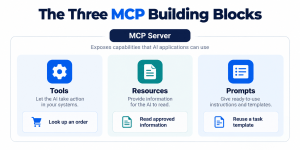
Tools let an AI application request an operation, such as finding a customer, calculating a price or creating a ticket. A tool defines its name and input schema. Because a tool can read or change data, its permissions matter.
Resources expose information the application can read, such as a document or structured reference data. A resource supplies context; it is not itself a request to perform a business action.
Prompts provide reusable task templates. A server might offer a template for summarising a service case from specified inputs.
Not every implementation needs all three. For a first pilot, a small set of tightly scoped tools and resources is easier to govern than a large catalogue of unrestricted actions.
Why does MCP matter for AI agents?
MCP matters because it turns integration work into reusable, reviewable capabilities instead of bespoke connectors. Four reasons stand out.
1. It gives integrations a common interface
Without a shared protocol, teams build a separate model integration for each CRM, knowledge base or internal service. MCP defines one way to expose and discover capabilities, which reduces repeated connector work when the chosen applications and servers support it. It does not remove the need to integrate the server with the underlying business system.
2. It connects responses to current business data
An agent can use an approved resource or lookup tool to retrieve what it needs at request time, such as the latest ticket status, instead of relying on a static prompt. Returned data still needs validation, and the assistant must not invent details when a lookup fails.
3. It makes allowed actions explicit
A focused tool such as get_order_status or create_support_ticket states exactly what the agent may request. That is easier to review than broad access to an internal application. Tool design alone does not enforce security: the server and the systems behind it must check identity, authorization and inputs on every request.
4. It supports modular, multi-agent systems
The same focused server can serve different compatible AI applications, subject to their permissions. In a multi-agent design, specialist agents may need different subsets of capabilities. MCP exposes those capabilities; orchestration, handoffs and shared state remain application design decisions. Our overview of ServiceNow AI agents shows how platform-level agents divide responsibilities in practice.
A practical example: an AI agent connected to a CRM or ERP
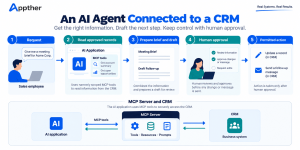
Imagine a sales assistant preparing for a meeting. It needs an account summary, open opportunities and a draft follow-up. An MCP server can offer narrowly defined read tools for account and opportunity data. A separate draft action prepares a message for human review.
The workflow returns an account brief with links to source records. If the assistant proposes changing an opportunity stage or sending an email, the application requires approval before the change. The server then enforces the user’s actual permissions in the CRM.
The same pattern applies to ERP systems. In an Odoo AI integration, for example, read tools can expose sales orders and stock levels while write actions such as confirming an order sit behind an approval step. The protocol provides the interface; the implementation defines who can see records, what can be changed and how each action is audited. If voice is the channel, the same tool boundaries apply, as covered in our AI voice agent architecture guide.
MCP vs APIs vs RAG vs function calling
MCP, APIs, RAG and function calling solve different problems and usually work together.
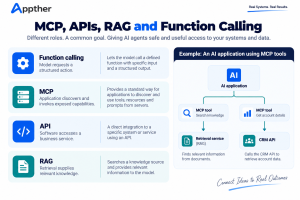
| Approach | Main purpose | Relationship to MCP |
|---|---|---|
| API | Lets software interact with an application or service. | An MCP server typically calls existing APIs behind its tools. |
| RAG | Retrieves relevant knowledge to ground a model response. | An MCP server may expose a search capability used by a RAG workflow. |
| Function calling | A model-level feature where the LLM outputs a structured request to call a function defined by the application. | Function calling decides which tool to invoke; MCP standardises how tools are discovered and exposed across applications. |
| MCP | Standardises how an AI application discovers and invokes exposed capabilities. | Sits between the AI application and APIs, databases or retrieval services. |
A knowledge-search tool exposed through MCP might call a retrieval service that searches an indexed document collection. MCP does not replace the retrieval design, the API or the controls around either.
What should businesses check before using MCP?
Before deploying MCP, check identity, trust boundaries, action scope, observability, version compatibility and cost.
Access and identity. Decide whose identity the integration uses, what it can access and whether the underlying system checks authorization on every call. An MCP connection does not make a tool safe by itself.
Trust in external content. Retrieved documents and tool results can contain misleading instructions. Treat them as data, keep privileged instructions separate and test for prompt injection.
Action boundaries. Start read-only where possible. For write actions, define allowed parameters, validation rules and human approval. A tool that creates a draft is different from one that can send, delete or approve.
Observability. Record which tool was called, by whom, with what outcome and which system was affected, while limiting sensitive data in logs. Track failures, latency, usage and business results.
Compatibility. Confirm which MCP specification version your host and server support. At the time of writing (September 2026), the 2026-07-28 specification is current. It introduces a stateless protocol core, removes the earlier session handshake and hardens authorization, so older SDKs and integration guides may not match. Check your chosen SDKs against the version you plan to deploy.
Cost and reliability. Budget for server hosting, underlying API charges, model usage, operational support and failure handling. A standard interface does not guarantee faster responses or lower costs on its own.
How to start an MCP pilot
A good MCP pilot covers one workflow, separates reads from writes and expands only after it works.
- Pick one workflow. For example, retrieve a support case and summarise its status for an authorised employee.
- Map data and actions. Separate read access from actions that change records.
- Choose a focused server. Expose only the capabilities the workflow needs and connect them to supported APIs.
- Define permissions and approvals. Test permitted and denied requests, including access to another user’s records.
- Evaluate with real cases. Check accuracy, tool selection, latency, failures and whether users can trace results to sources.
- Expand only after it works. Add new tools and systems with the same review discipline.
If you are choosing an implementation partner, our guide to AI development companies covers what to ask about integrations, access and measurable results.
Frequently asked questions
Is MCP an AI model?
No. MCP is a protocol for communication between an AI application and external capabilities. A language model may decide when to use an available tool, but the model and the protocol serve different roles.
Does MCP replace APIs?
No. An MCP server commonly wraps existing APIs or services and exposes selected capabilities to compatible AI applications.
What is the difference between MCP and function calling?
Function calling is how a model produces a structured request to invoke a function. MCP is how those functions are discovered, described and exposed across applications. They are complementary.
Does MCP make AI agents secure by default?
No. Secure deployment needs trusted servers, explicit access controls, narrow tool scopes, user consent, validation and monitoring. The specification sets out security principles; implementations must enforce them.
Do we need MCP to build an AI agent?
No. A direct integration may be enough for a small, fixed workflow. MCP becomes useful when you want a common interface for reusable capabilities across compatible applications.
Can MCP be used with multi-agent systems?
Yes. An application can use MCP to make relevant capabilities available to different agents. It still needs to design their responsibilities, handoffs and permissions.
Build an AI agent around a real workflow
MCP simplifies how an AI application connects to business capabilities. The value appears when those connections help complete a defined task accurately and under the right controls.
At Appther, our AI agent development team scopes agents around your existing systems, defines tool permissions and tests the workflow before expanding it. Talk to us to identify a practical starting point.