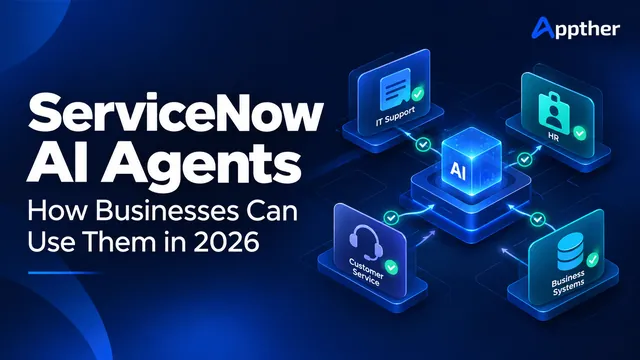
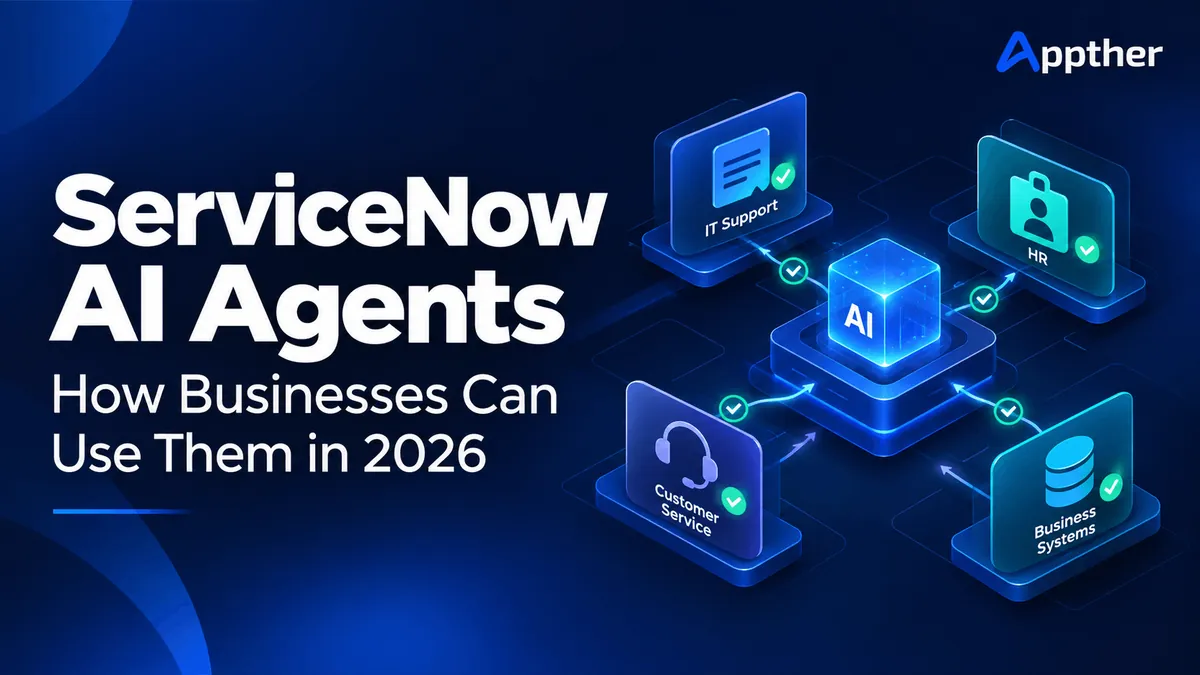
Short answer: ServiceNow AI agents are AI workers on the ServiceNow AI Platform that take a goal, such as resolving an employee's application access request, gather the relevant information and complete the task through approved flows, scripts and integrations. Unlike chatbots, they act rather than only answer, and several agents can work together in one workflow. Budget for platform and AI entitlements (quoted by ServiceNow), workflow design, data clean-up, integrations, testing and adoption. See our ServiceNow AI agent development.
An employee requests access to a business application. Before that request is completed, someone must check their role, identify the correct approval process, confirm licensing, arrange access and update the ticket.
The request takes one sentence to describe. Completing it involves several decisions and systems.
ServiceNow AI agents are designed to help businesses manage this kind of work. They combine AI reasoning with business context and tools to carry out tasks within enterprise workflows. ServiceNow provides capabilities for building agents, coordinating their work and governing their activity. ServiceNow AI Agents
For businesses evaluating this technology in 2026, the practical question is where an agent can complete useful work reliably, and how to measure whether the investment improves operations.
At Appther, we recommend starting with a clearly defined process, a measurable business outcome and explicit limits on what the agent can do.
What are ServiceNow AI agents?
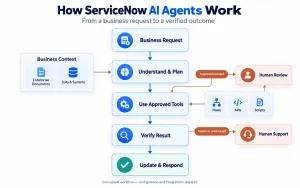
ServiceNow AI agents are software agents that interpret a goal, use relevant information and execute tasks through connected tools on the ServiceNow AI Platform.
Their roles describe their purpose and behavior. Their tools can include flows, scripts and other capabilities that perform specific actions. Several agents can also participate in a coordinated workflow. How ServiceNow AI Agents Work
Consider an employee reporting that they cannot access an application. An implementation could be designed to:
- Identify the employee and affected application.
- Retrieve relevant support information.
- Check for known incidents.
- Select an approved troubleshooting path.
- Perform a permitted action or request approval.
- Update the support record with the confirmed outcome.
This is an illustrative workflow. Its availability would depend on the organization’s configuration, integrations and permissions.
How are AI agents different from chatbots and traditional automation?
The most useful distinction is how the system handles decisions and actions.
| Approach | Main function | Example |
|---|---|---|
| FAQ chatbot | Retrieves or presents information | Explains how to request application access |
| Generative AI assistant | Helps a person interpret or produce content | Summarizes an access request |
| Traditional workflow automation | Executes predefined rules and steps | Routes the request to a designated approver |
| AI agent | Interprets context and selects permitted tools to pursue a goal | Investigates the request and coordinates the next steps |
These approaches can work together. A conversational interface may collect the request, an AI agent may interpret it, and a predefined workflow may enforce approval requirements.
For businesses comparing these approaches, Appther’s AI agent development services cover planning, tool integration, evaluation and human handoff.
The ServiceNow capabilities businesses should understand
ServiceNow’s agent ecosystem includes several components with different responsibilities.
| Component | Purpose |
|---|---|
| AI Agent Studio | Build and customize AI agents |
| AI Agent Orchestrator | Coordinate collaboration between agents |
| Agentic workflows | Define the business objective agents work toward |
| Agent tools | Provide executable capabilities, such as flows and scripts |
These components connect an agent’s objective to the actions it can perform. ServiceNow AI Agent Capabilities
AI Control Tower addresses oversight. ServiceNow describes it as a central capability for discovering AI assets, governing activity, observing performance and measuring business value across an enterprise. ServiceNow AI Control Tower
Before planning a deployment, confirm the capabilities available for your instance, release and commercial agreement.
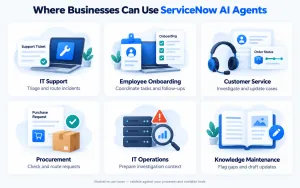
How businesses can use ServiceNow AI agents
The following scenarios illustrate potential implementations. Each requires validation against the organization’s processes, data and available tools.
1. IT service desk triage
Support teams often spend considerable effort collecting missing details and moving tickets between queues.
An agent could review an incoming incident, identify missing information, retrieve relevant knowledge and suggest an assignment group. For narrowly defined issues, it could also initiate an approved troubleshooting workflow.
Example: An employee reports a VPN problem. The agent checks whether a known outage exists, collects device information and routes the incident with a useful investigation summary.
Measure: Assignment accuracy, time to triage, manual handling time and ticket reopening rate.
2. Employee onboarding
Onboarding requires coordination across HR, IT, facilities and individual managers.
An agent could identify incomplete tasks, request missing information and coordinate follow-ups across an onboarding workflow.
Example: A new employee needs a laptop, software access and building entry. The agent checks the status of each request and alerts the responsible team when a dependency threatens the start date.
Measure: Day-one readiness, overdue tasks and manual follow-up effort.
Access entitlement should remain governed by approved roles and authorization rules.
3. Customer service case handling
Customer service representatives often switch between a helpdesk, CRM and order management system to answer one question.
An agent could retrieve relevant records, identify missing information and prepare the next permitted action.
Example: A customer asks about a delayed order. The agent checks shipment information through an integration, updates the case and routes an exception when the delivery status requires investigation.
Measure: Resolution time, repeat contacts, customer satisfaction and verified case completion.
4. Procurement request coordination
Procurement requests can stall because of incomplete specifications, unclear ownership or missing approvals.
An agent could inspect request completeness, identify the applicable purchasing process and ask the requester for missing details.
Example: A department requests new equipment. The agent checks required fields, retrieves the approved purchasing guidance and prepares the request for the correct reviewer.
Measure: Request completeness, approval cycle time and manual coordination effort.
Purchasing commitments and supplier changes should follow the organization’s authorization process.
5. IT operations investigation
Operations teams need to establish which service is affected, what changed and who should investigate.
An agent could assemble relevant incident history, asset information and recent change records into an investigation brief.
Example: A business application generates repeated alerts. The agent gathers related records and proposes an investigation path for the operations team.
Measure: Investigation preparation time, escalation quality and time to identify the responsible team.
6. Knowledge maintenance
Outdated documentation weakens both employee self-service and AI-generated responses.
An agent could flag conflicting articles, identify recurring questions with inadequate documentation and prepare revisions for a knowledge owner.
Example: Several resolved tickets describe a changed setup procedure. The agent drafts an article update and routes it for review.
Measure: Article review backlog, knowledge coverage and successful self-service outcomes.
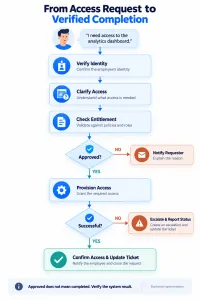
A practical example: application access requests
A useful pilot is an application access request with clear eligibility rules and an established approval workflow.
An employee submits:
“I need access to the analytics dashboard for the quarterly sales review.”
A proposed implementation could work as follows:
| Stage | Agent or workflow activity | Control |
|---|---|---|
| Identify | Establish the requester’s identity | Authenticated user context |
| Clarify | Confirm which dashboard and access level are needed | Ask when the request is ambiguous |
| Check | Retrieve entitlement rules and current access | Authorized data retrieval |
| Approve | Route the request to the required reviewer | Approval enforced by the workflow |
| Execute | Invoke the approved provisioning action | Restricted tool permissions |
| Verify | Check whether access was successfully granted | Confirm the system result |
| Communicate | Update the requester and ticket | Report only the verified status |
The distinction between “requested,” “approved” and “completed” matters. If provisioning fails after approval, the agent should report the failure and preserve the request for follow-up.
How to implement ServiceNow AI agents
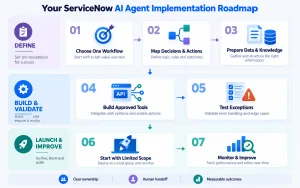
Appther recommends a staged approach that makes the result reviewable before expanding autonomy.
Step 1: Select one measurable workflow
Choose a process with sufficient volume, clear ownership and a reasonably consistent outcome.
A useful pilot definition might be:
“Reduce manual triage effort for application access requests while maintaining assignment accuracy and approval compliance.”
Avoid starting with a goal as broad as “automate employee support.” It becomes difficult to test or attribute results.
Step 2: Map decisions, data and actions
Document what the agent needs to know, what it may decide and what it can change.
Include:
- Required records and knowledge sources.
- Allowed actions and prohibited actions.
- Approval conditions.
- Exception routes.
- Completion criteria.
This becomes the operating specification for the agent.
Step 3: Prepare the information it will use
Review knowledge articles, ownership records, service categories and relevant business data.
Conflicting instructions should be resolved before launch. Each important knowledge source should have an owner and a review process.
Step 4: Build narrowly defined integrations
Give the agent tools with specific purposes, such as retrieving request status or adding a case note.
Each tool should validate inputs and enforce authorization. Operations that create or update records should account for retries so that a timeout does not produce duplicate work.
Appther’s API development and integration services support connections between AI systems and enterprise applications.
Step 5: Test exceptions as well as successful requests
Build a test set from representative business cases.
Include missing information, conflicting records, unavailable systems, unauthorized requests and repeated submissions. Also test whether text inside tickets or documents can improperly influence the agent’s permitted behavior.
Define success through observable outcomes: the correct record was updated, the right approval was obtained, or an appropriate escalation occurred.
Step 6: Launch with limited scope
Begin with recommendations or human-reviewed actions. Expand execution rights after the pilot demonstrates reliable behavior.
Assign an operational owner who can review failures, pause the agent and approve changes to its configuration.
Step 7: Monitor and improve
Review performance by request type. An acceptable overall result can hide poor outcomes for one department, application or exception category.
Re-test after changes to tools, prompts, workflows or knowledge sources.
What can go wrong?
Several implementation problems deserve attention during design.
| Problem | Business impact | Recommended response |
|---|---|---|
| Outdated knowledge | Incorrect guidance | Assign content owners and review dates |
| Excessive permissions | Unintended changes | Restrict tool and record access |
| Failed integrations | Incomplete work | Verify results and provide recovery routes |
| Repeated retries | Duplicate requests or updates | Use duplicate prevention and controlled retries |
| Weak escalation | Users repeat their issue | Transfer context, actions attempted and current status |
| Poor measurement | Activity mistaken for value | Track verified outcomes and rework |
Appther discusses related reliability issues in Why AI Voice Agents Fail. Although that article focuses on voice interactions, its treatment of confirmed actions, integration failures and escalation is relevant to enterprise agent design.
How to measure business value
Set a baseline before the pilot begins. Compare similar request categories and include the effort required to review or correct AI work.
| Metric | What it reveals |
|---|---|
| Verified completion rate | Whether the intended business outcome occurred |
| Manual minutes per request | How much employee effort remains |
| Reopening rate | Whether apparent resolutions were premature |
| Escalation quality | Whether people receive actionable context |
| Cost per completed request | Whether the workflow is economically useful |
| User satisfaction | Whether the experience meets user expectations |
For example, suppose a pilot handles 2,000 eligible requests per month and reduces average manual effort by six minutes per request.
That represents 200 hours of gross capacity released per month:
2,000 × 6 ÷ 60 = 200 hours
Subtract review, exception handling and maintenance effort to estimate the net capacity benefit. Treat this as an illustrative calculation, not a promised result or automatic reduction in payroll spending.
What should businesses budget for?
Build the business case around the complete implementation.
| Budget area | What to include |
|---|---|
| Platform and AI entitlements | Required subscriptions, capabilities and usage terms |
| Workflow design | Process mapping and acceptance criteria |
| Data preparation | Knowledge cleanup and record quality |
| Integration development | APIs, authentication and error handling |
| Testing | Business scenarios, permissions and failure recovery |
| Adoption | Training, operating procedures and process ownership |
| Ongoing support | Monitoring, evaluation and maintenance |
Request a commercial quote for the proposed configuration. ServiceNow directs customers to contact its team for AI Control Tower pricing. ServiceNow AI Control Tower Pricing
Should you use ServiceNow agents or build a custom solution?
Appther recommends evaluating where the workflow already lives.
| Situation | Approach to evaluate |
|---|---|
| Requests, approvals and service records already run in ServiceNow | Native ServiceNow agent capabilities |
| The workflow primarily lives in a custom product | Custom agent development |
| ServiceNow manages cases while another platform holds operational data | A combined architecture with controlled integrations |
| The task follows simple, stable rules | Conventional workflow automation |
A combined approach may let ServiceNow coordinate the service process while external systems remain authoritative for customer, inventory or transaction data.
If voice is part of the experience, our guide to AI voice agent architecture explains the additional speech, orchestration and integration layers involved.
Frequently asked questions
Do businesses need coding skills to build ServiceNow AI agents?
ServiceNow offers natural-language agent creation through AI Agent Studio. Production implementation can still require technical work for integrations, permissions, testing and operational support. ServiceNow AI Agent Studio
Can an agent complete every request automatically?
Plan for exceptions. Some requests require missing information, additional authorization or human judgment. Define when the agent should stop and transfer the work.
What is a good first use case?
Appther recommends a frequent, narrowly scoped process with clear rules and measurable outcomes. Ticket triage, request completeness checks and knowledge-assisted support are useful candidates to assess.
How long does implementation take?
Estimate the timeline after confirming workflow scope, platform readiness, integration access and testing requirements. A limited pilot and a rollout across several departments should have separate plans and acceptance criteria.
How can Appther help?
Appther’s AI agent development services cover workflow planning, connected tools, knowledge retrieval, evaluation and human handoff.
For a ServiceNow-centered project, the initial assessment should establish the native capabilities available, the integrations required and the responsibilities of your platform team.
Ready to put AI agents to work in your business?
Start with one process where delays, repetitive tasks or disconnected systems create measurable overhead.
Appther can help you assess the workflow, define integration requirements and plan an AI implementation around a concrete business outcome.