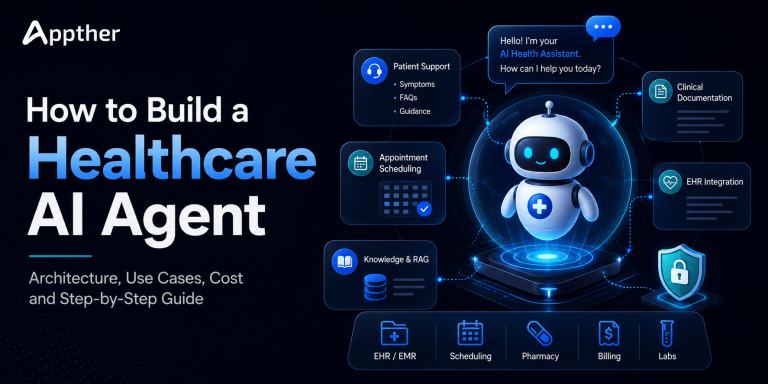
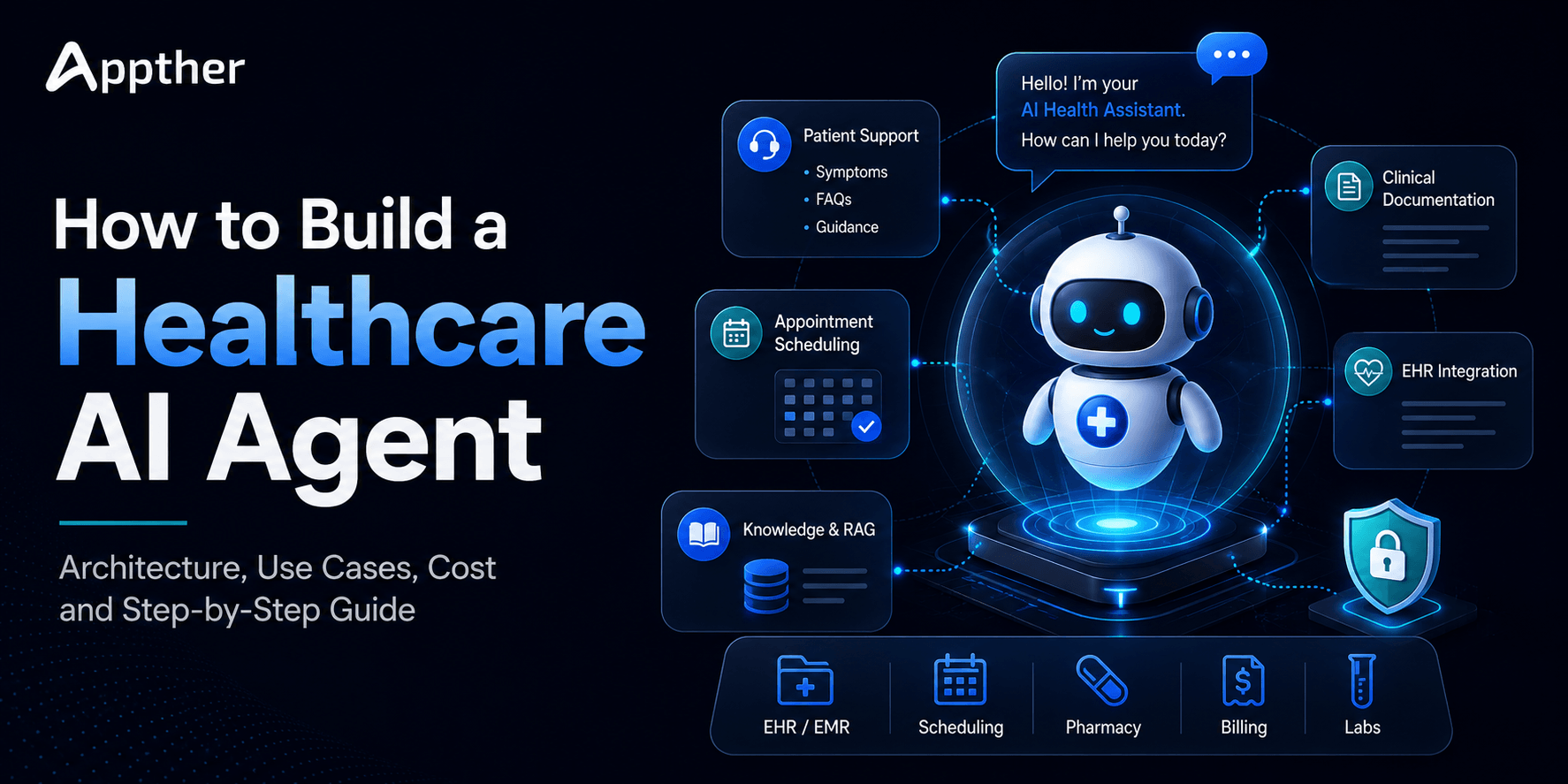
Short answer: To build a healthcare AI agent: pick one specific workflow such as appointment rescheduling, decide what the agent may do without human approval, map the workflow, choose the LLM and orchestration layer, add a RAG knowledge layer, connect approved tools and EHR or FHIR APIs, then test, secure and monitor it. The model never writes to clinical systems directly; every action runs through permissioned APIs with audit logs. Costs range from $8,000 to $20,000 for a FAQ assistant to $35,000 to $100,000+ for an EHR-integrated agent. See our AI agent development.
AI agents are moving healthcare software past basic chatbots, and a healthcare AI agent does far more than answer a patient’s question. It understands an objective, retrieves the right information, works with approved systems, executes permitted actions, and escalates cases that need a human.
Consider a patient who says:
“I need to reschedule my cardiology appointment to sometime next week, preferably in the afternoon.”
A traditional chatbot hands back a phone number or a set of instructions.
A well-designed AI agent does the whole job. It authenticates the patient through an approved workflow, understands the request, checks available slots, presents suitable options, reschedules after confirmation, and sends an updated notification.
That loop, understand → reason → retrieve → act → verify, is what makes agentic AI compelling for healthcare organizations.
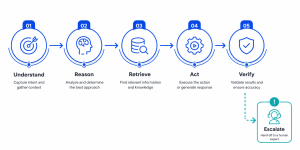
Quick answer: To build a healthcare AI agent, define one narrow workflow, set its autonomy level, and design a layered architecture that keeps the LLM separate from your data, authorization, and actions. Add RAG for approved knowledge, a narrow tool for each task, guardrails, human escalation, and audit logging. Then test hard and roll out in stages.
But building a healthcare AI agent is far more than wiring an LLM to a chat window. Patient privacy, hallucinations, access controls, clinical safety, system integration, auditability, security, and human oversight all have to be designed in from the start.
This guide covers how to build an AI agent for healthcare in 2026: architecture, development steps, technology choices, use cases, security, cost, and deployment.
What Is a Healthcare AI Agent?
A healthcare AI agent is an AI-powered system that performs specific healthcare tasks. It combines several technologies:
- Large language models (LLMs)
- Retrieval-Augmented Generation (RAG)
- APIs and software tools
- Workflow orchestration
- Memory or state management
- Healthcare data systems
- Business rules
- Human-in-the-loop controls
Unlike a simple chatbot, an agent can take action within defined boundaries.
Give it a request like:
“Book my follow-up appointment with Dr. Smith next Tuesday afternoon.”
The system breaks that into steps:
User Request → Intent Detection → Identity/Authorization Check → Scheduling System → Available Slots → Patient Confirmation → Booking → Notification
The LLM is only one part of the system. A production healthcare agent needs a controlled architecture around the model.
AI Agent vs Healthcare Chatbot: What’s the Difference?
People use AI chatbot and AI agent interchangeably, but they describe different levels of capability.
| Capability | Traditional Chatbot | Generative AI Assistant | AI Agent |
|---|---|---|---|
| Answer FAQs | ✓ | ✓ | ✓ |
| Understand natural language | Limited | ✓ | ✓ |
| Use organizational knowledge | Limited | ✓ | ✓ |
| Maintain contextual state | Limited | ✓ | ✓ |
| Retrieve information | Limited | ✓ | ✓ |
| Call external APIs | Sometimes | Sometimes | ✓ |
| Execute workflows | Limited | Limited | ✓ |
| Perform approved actions | Usually no | Sometimes | ✓ |
| Coordinate multiple tools | No | Limited | ✓ |
| Escalate on workflow rules | Basic | Possible | ✓ |
The difference is agency. A chatbot communicates. An agent communicates and acts.
In healthcare, more autonomy is not automatically better. Match the level of autonomy to the risk of the task. Scheduling an appointment and generating a clinical recommendation sit in very different risk categories.
Healthcare AI Agent Architecture
Do not design a healthcare agent as:
Patient → LLM → Healthcare Database
That shape creates serious security, privacy, reliability, and control risks.
A safer production architecture puts controlled layers between the model and your healthcare systems.
Reference architecture
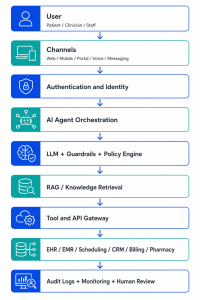
Patient / Clinician / Staff
↓
Web App / Mobile App / Patient Portal / Voice / Messaging Channel
↓
Authentication and Identity Layer
↓
AI Agent Orchestration Layer
↓
LLM + Guardrails + Policy Engine
↓
RAG / Knowledge Retrieval
↓
Tool and API Gateway
↓
EHR / EMR / Scheduling / CRM / Billing / Pharmacy / Internal Systems
↓
Audit Logs + Monitoring + Human Review
Each layer owns a specific job.
1. User Interaction Layer
Healthcare agents run across many channels:
- Hospital websites
- Patient portals
- Mobile apps
- Staff dashboards
- Contact centers
- Voice assistants
- Secure messaging
- Approved messaging platforms
Pick the channel around the workflow, not the other way around. A scheduling agent fits a mobile app or voice channel. A clinical documentation copilot belongs inside the clinician’s existing workflow.
2. Identity, Authentication and Authorization
Before the agent touches protected information or runs a sensitive action, the system establishes who the user is and what they can access.
Depending on the environment, that means:
- Patient portal authentication
- OAuth
- SSO
- MFA
- Role-Based Access Control (RBAC)
- Attribute-Based Access Control (ABAC)
- Session management
- Consent checks
The AI model does not decide who gets access to sensitive information. Deterministic application and security layers enforce authorization.
3. AI Agent Orchestration Layer
The orchestration layer is the agent’s control system. It decides:
- What the user wants
- Which workflow runs
- What information the task needs
- Which tools are permitted
- Whether confirmation is required
- Whether a human needs to step in
- What happens when a tool fails
For example:
Patient asks for an appointment → Agent detects scheduling intent → Checks authentication → Calls scheduling tool → Retrieves slots → Requests confirmation → Books the selected slot
You can implement these workflows with orchestration frameworks or custom services.
4. Large Language Model
The LLM handles natural-language understanding and generation. Healthcare systems use commercial or open-source models, depending on requirements.
The model helps with:
- Intent understanding
- Information extraction
- Conversation
- Summarization
- Classification
- Tool selection
- Document interpretation
The LLM is not the database, the authorization system, the workflow engine, or the source of clinical truth. Keep that separation strict.
5. RAG and Healthcare Knowledge
Retrieval-Augmented Generation lets the agent answer from approved organizational knowledge instead of relying on what the model learned in training.
A typical RAG pipeline:
Healthcare Documents → Parsing → Chunking → Embeddings → Vector/Search Index → Retrieval → LLM → Response
Knowledge sources can include approved:
- Patient education materials
- Hospital policies
- Service information
- Insurance documentation
- Operational procedures
- Medication education resources
- Clinical guidelines, where appropriate
- Internal knowledge bases
Every source needs clear ownership, a review process, versioning, and access controls. In higher-risk scenarios, show the source that supports each AI-generated answer.
6. Tool Calling and Healthcare APIs
Tools turn an AI assistant into an AI agent. Instead of only generating text, the agent asks an application service to run an approved operation.
Common tools include:
check_appointment_availability()
schedule_appointment()
cancel_appointment()
retrieve_patient_profile()
check_claim_status()
create_support_ticket()
send_reminder()
escalate_to_human()
Never give the agent open database access. Each tool exposes only the minimum it needs. Instead of generic write permissions, give the agent a tightly scoped:
reschedule_appointment(patient_id, appointment_id, new_slot)
That one choice shrinks the blast radius of any AI error.
7. EHR/EMR and FHIR Integration
Integration is often the hardest part of healthcare AI development.
An agent may need to work with:
- Electronic Health Records (EHR)
- Electronic Medical Records (EMR)
- Hospital Information Systems
- Laboratory systems
- Appointment platforms
- Billing systems
- CRM platforms
- Pharmacy systems
- Telemedicine platforms
Where they are supported, interoperability standards like FHIR (Fast Healthcare Interoperability Resources) give you structured ways to exchange healthcare data.
The architecture then looks like:
AI Agent → Secure API Layer → FHIR/API Server → EHR
The agent reaches only the resources the workflow requires.
Healthcare AI Agent Use Cases
There is no single “healthcare AI agent.” Organizations build specialized agents for different operational and clinical-support workflows.
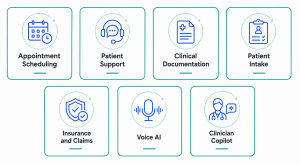
1. AI Appointment Scheduling Agent
A scheduling agent helps patients:
- Search availability
- Book appointments
- Reschedule visits
- Cancel appointments
- Find the right department
- Get appointment instructions
- Receive reminders
This is one of the best places to start, because the workflow is highly structured.
2. Patient Support Agent
A patient-facing agent covers common administrative and informational requests around the clock:
- Hospital service questions
- Appointment information
- Facility information
- Insurance FAQs
- Pre-visit instructions
- Post-visit educational information
- Support ticket creation
Route high-risk questions to a qualified professional instead of answering them autonomously.
3. Clinical Documentation Agent
Clinicians lose hours to documentation. A documentation agent can:
- Transcribe conversations
- Structure notes
- Summarize encounters
- Prepare draft documentation
- Extract relevant information
A clinician reviews and approves the documentation before it enters the official record, where that is required.
4. Patient Intake Agent
An intake agent collects information before an appointment:
Patient → AI Intake → Structured Questions → Validation → Staff Review → EHR
It can gather:
- Visit reason
- Symptoms the patient describes
- Relevant history
- Administrative details
- Insurance information
- Consent information
This cuts repetitive admin work and gives staff structured information before the consultation.
5. Insurance and Claims Agent
Agents also support revenue-cycle and insurance workflows:
- Check claim status
- Explain administrative claim information
- Collect missing documentation
- Route rejected claims
- Update workflow status
- Generate administrative summaries
The agent connects to billing and claims systems through controlled APIs.
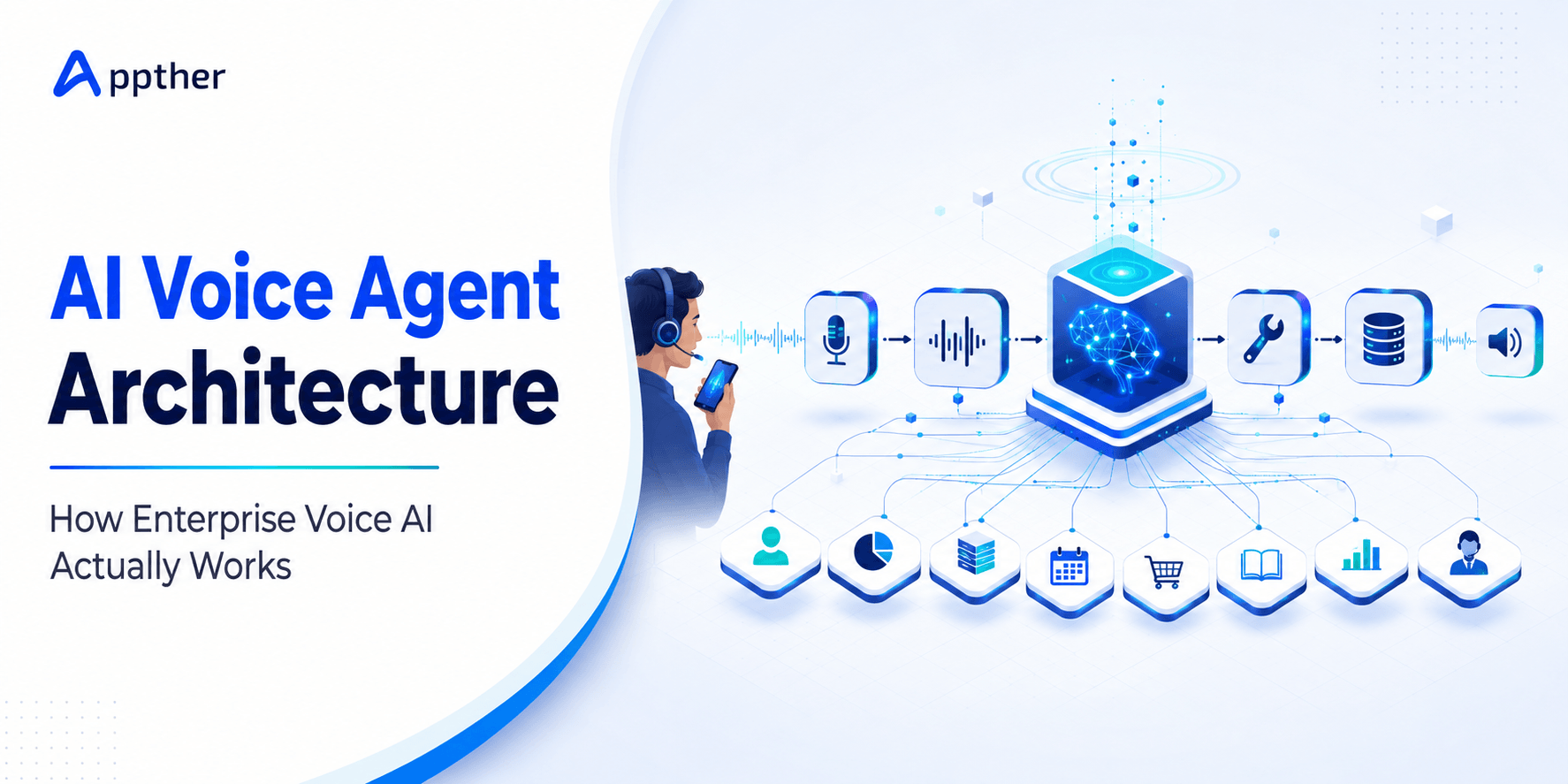
6. Healthcare Voice AI Agent
Voice AI automates parts of the contact center:
Incoming Call → Speech-to-Text → AI Agent → Healthcare System/API → Response → Text-to-Speech
Use cases include:
- Appointment scheduling
- Appointment confirmation
- Reminders
- Basic administrative FAQs
- Call routing
- Follow-up workflows
Voice adds requirements around identity verification, consent, recording, transcription storage, latency, and escalation.
7. Clinician AI Copilot
Instead of talking to patients, an agent can support the professionals. A clinician copilot can:
- Search authorized records
- Summarize patient histories
- Retrieve relevant organizational knowledge
- Draft documentation
- Prepare handover summaries
- Organize information for review
The goal is to assist clinical judgment, not silently replace it.
How to Build a Healthcare AI Agent: Step-by-Step
Here is the development process.
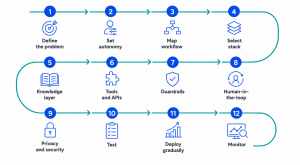
Step 1: Define One Specific Healthcare Problem
Do not start with:
“We need an AI agent.”
Start with a measurable workflow problem:
“Our contact center handles thousands of appointment rescheduling requests each month.”
Then define the agent:
“Build an AI scheduling agent that authenticates patients, checks availability, and processes approved rescheduling requests.”
A narrow problem is easier to design, test, secure, and measure.
Step 2: Set the Agent’s Autonomy Level
Not every agent should hold the same permissions.
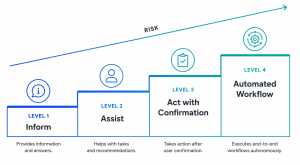
A useful model:
Level 1, Inform
The agent provides information and takes no external action.
Level 2, Assist
The agent prepares recommendations or drafts actions for a human.
Level 3, Act with Confirmation
The agent executes an action after explicit user or staff confirmation.
Level 4, Automated Workflow
The agent runs predefined low-risk operations automatically, within strict policies.
Decide which workflows belong at each level before you build.
Step 3: Map the Workflow
Document the full workflow before you choose an LLM:
Patient Request
↓
Identify Intent
↓
Authenticate Patient
↓
Determine Appointment Type
↓
Retrieve Availability
↓
Present Available Slots
↓
Patient Selects Slot
↓
Request Confirmation
↓
Update Scheduling System
↓
Send Confirmation
↓
Write Audit Log
Mapping the failure paths matters just as much. Define what happens when:
- Identity verification fails
- No appointments are available
- The API is down
- The patient asks a medical question
- The agent is uncertain
- The requested action is prohibited
Settle these before development, not after.
Step 4: Select the AI Technology Stack
A healthcare agent combines several technologies.
Example stack
| Layer | Possible Technologies |
|---|---|
| LLM | GPT-class models, Claude, Gemini, approved open-source models |
| Agent orchestration | LangGraph, LangChain, Semantic Kernel, custom Python services |
| Backend | Python / FastAPI, Node.js |
| Database | PostgreSQL |
| Retrieval | Vector/search infrastructure |
| Healthcare integration | FHIR APIs / EHR APIs |
| Authentication | OAuth 2.0 / OIDC / SSO |
| Cloud | AWS / Azure / Google Cloud |
| Monitoring | Application + AI observability stack |
| Voice | STT + TTS + telephony integration |
Base your choices on security, compliance, deployment model, latency, existing infrastructure, vendor requirements, and the specific workflow.
Step 5: Build the Healthcare Knowledge Layer
If the agent needs organizational knowledge, build a controlled retrieval pipeline:
- Identify approved information sources.
- Clean and normalize documents.
- Split information into retrievable sections.
- Generate embeddings or search indexes.
- Store metadata and permissions.
- Retrieve relevant information.
- Pass the retrieved context to the model.
- Return answers with source references.
Do not dump sensitive healthcare data into a vector database. Access control applies to retrieval too.
Step 6: Build Tools and API Integrations
Now connect the agent to approved healthcare services. Instead of exposing a large API surface, build narrow tools around specific tasks.
Tool: Check available appointments
Input: specialty, location, date range
Output: permitted appointment slots
Then:
Tool: Book appointment
Input: authenticated patient, selected slot
Requirement: explicit confirmation
Output: booking status
Narrow tools create a predictable boundary around what the agent can do.
Step 7: Implement Guardrails
Healthcare agents need guardrails at several layers.
Input guardrails
Catch unsafe, unsupported, malicious, or out-of-scope requests.
Retrieval guardrails
Let users retrieve only what they are authorized to see.
Tool guardrails
Restrict which actions the agent can run.
Output guardrails
Check responses for unsupported claims, exposed sensitive information, or prohibited content.
Workflow guardrails
Require confirmation or human review for selected actions.
Do not rely on another LLM prompt as your only guardrail. Put the important controls at the application, API, identity, and policy layers.
Step 8: Add Human-in-the-Loop Workflows
A good healthcare agent knows when not to act. Escalation triggers include:
- Clinical uncertainty
- Emergency language
- Conflicting patient information
- Failed identity verification
- Unsupported requests
- Low-confidence workflow decisions
- Sensitive changes
- System errors
The handoff carries the relevant conversation and workflow context, so the patient never starts over.
Step 9: Design for Privacy, Security and Compliance
You cannot bolt security on after the build.
Depending on jurisdiction, data, vendors, and use case, you may need to evaluate frameworks and regulations such as:
- HIPAA
- HITECH
- GDPR
- Applicable national healthcare privacy laws
- Organizational security policies
Key technical controls include:
Encryption
Protect sensitive data in transit and at rest.
Least-Privilege Access
Give the agent only the permissions it needs.
Audit Logging
Record the events that matter:
- Authentication
- Data retrieval
- Tool invocation
- User confirmation
- Changes to records
- Human escalation
Data Minimization
Do not send unnecessary patient information to an LLM.
Secret Management
Store API credentials and tokens securely, outside prompts and application code.
Vendor Assessment
Review how your model, cloud, analytics, transcription, logging, and infrastructure vendors handle sensitive information.
Compliance is an organizational and legal responsibility. Using a particular AI model or cloud service does not make an application compliant on its own.
Step 10: Test the AI Agent
Traditional software testing alone is not enough for agentic AI. Test both the deterministic workflows and the probabilistic model behavior.
Functional Testing
Do scheduling, cancellation, retrieval, authentication, and escalation all work?
AI Evaluation
Does the system understand real user requests and produce grounded responses?
Hallucination Testing
Does the model invent appointments, policies, patient information, or clinical facts?
Authorization Testing
Can one user reach another user’s information?
Prompt-Injection Testing
Can malicious input push the agent into leaking data or calling unauthorized tools?
Failure Testing
What happens when APIs, LLMs, retrieval services, or databases go down?
Adversarial Testing
Throw intentionally difficult, ambiguous, and malicious scenarios at it.
Define measurable acceptance criteria before you go to production.
Step 11: Deploy Gradually
Do not jump from prototype to organization-wide rollout. A safer path:
Internal Prototype → Controlled Pilot → Limited Patient Group → Monitored Production → Wider Rollout
Start with lower-risk workflows. Appointment administration is a far more manageable starting point than autonomous clinical decisions.
Step 12: Monitor the Agent Continuously
Deployment is not the finish line. Track metrics like:
- Task completion rate
- Escalation rate
- Tool failure rate
- Response latency
- Retrieval quality
- User satisfaction
- Unsupported-response rate
- Human override rate
- Cost per conversation or task
- Security events
Handle the conversation and model data you collect for monitoring under the same privacy and retention rules as everything else.
Example Healthcare AI Agent Workflow
Take an appointment agent.
Patient
“I need to move my dermatology appointment from Friday to next week.”
Agent workflow
- Understand intent. Intent = reschedule appointment.
- Verify identity. Use approved authentication.
- Retrieve the existing appointment. Call the scheduling service.
- Search available appointments. Pull next week’s eligible slots.
- Present options. Offer suitable times.
- Patient selects. Patient chooses Tuesday at 2:30 PM.
- Confirm the action. “Would you like me to move your appointment to Tuesday at 2:30 PM?”
- Execute. Call the approved rescheduling API.
- Verify. Confirm the scheduling system accepted the change.
- Notify. Send confirmation through the configured channel.
- Audit. Store the workflow logs.
Notice that the LLM never modified the scheduling database on its own. The model took part in a controlled workflow.
How Much Does It Cost to Build a Healthcare AI Agent?
There is no universal price. Cost depends on integration complexity, data sensitivity, workflow risk, channels, existing infrastructure, and compliance requirements.
Indicative development ranges look like this:
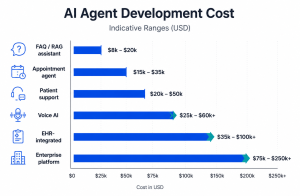
| Healthcare AI Solution | Indicative Range |
|---|---|
| Healthcare FAQ/RAG assistant | $8,000–$20,000 |
| Appointment AI agent | $15,000–$35,000 |
| Patient support agent | $20,000–$50,000 |
| Healthcare voice AI agent | $25,000–$60,000+ |
| EHR-integrated AI agent | $35,000–$100,000+ |
| Enterprise multi-agent platform | $75,000–$250,000+ |
Treat these as broad planning ranges, not fixed quotes.
What drives the cost?
The biggest factors:
- Number of workflows
- EHR/EMR integration complexity
- Number of third-party systems
- Voice requirements
- RAG complexity
- Data migration
- Authentication
- Security requirements
- Human review workflows
- Reporting and analytics
- Deployment environment
- AI evaluation requirements
- Compliance work
A narrowly scoped appointment agent costs far less than an enterprise platform coordinating patient, clinician, billing, and administrative workflows.
How Long Does Healthcare AI Agent Development Take?
A focused proof of concept takes a few weeks. Production healthcare systems take longer.
A simplified roadmap:
| Phase | Typical Activities |
|---|---|
| Discovery | Requirements, workflows, risk assessment |
| Architecture | Security, integrations, AI design |
| Prototype | Core agent + selected workflow |
| Integration | APIs, RAG, EHR/EMR, authentication |
| Testing | Functional, security, AI evaluation |
| Pilot | Limited real-world deployment |
| Production | Controlled rollout and monitoring |
A focused agent usually reaches an initial production release in about 8–16 weeks, depending on integration and compliance complexity. Enterprise implementations run several months.
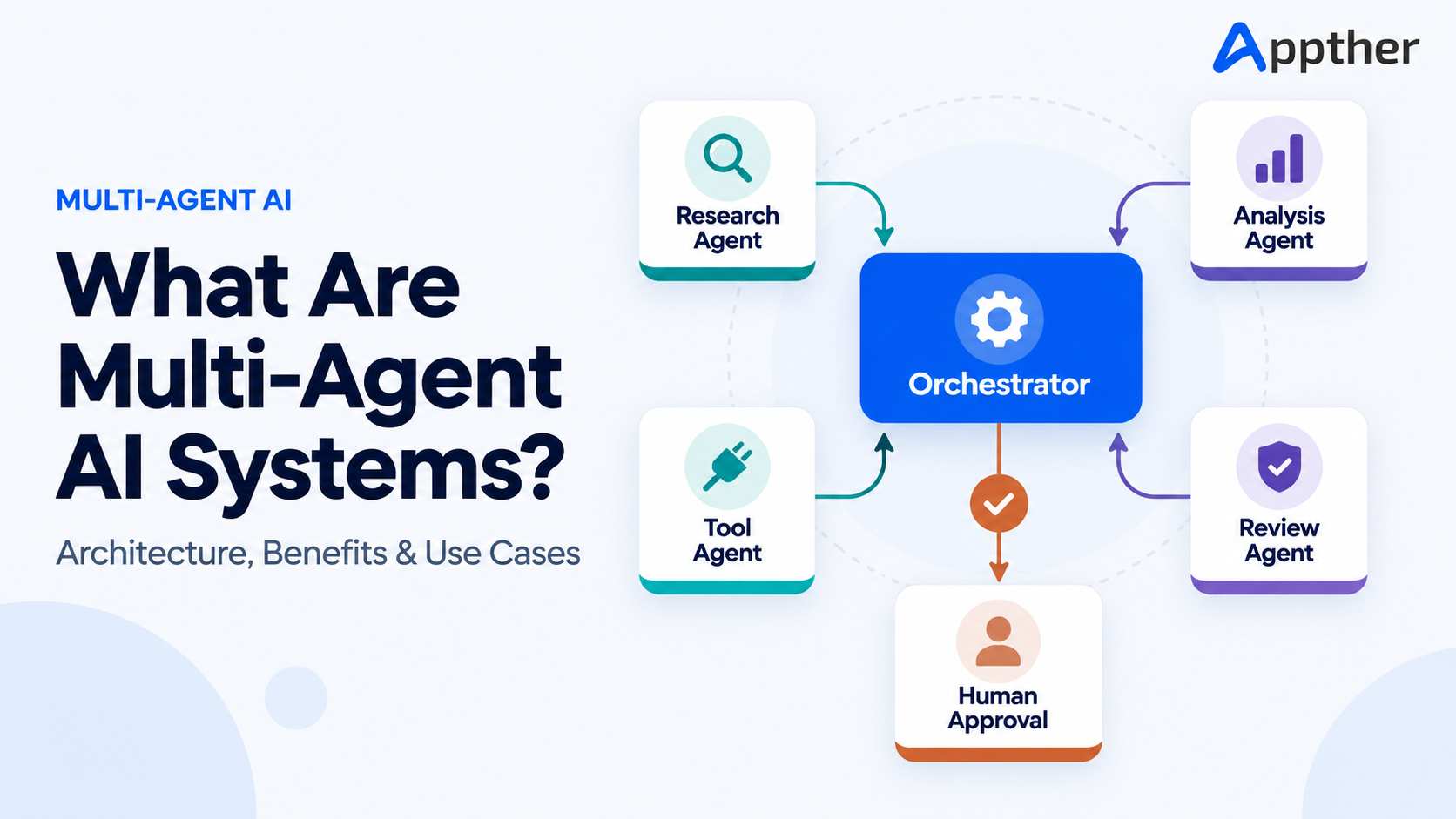
Single Agent vs Multi-Agent Healthcare Architecture
Not every system needs multiple agents. A single orchestrated agent is easier to test, secure, and operate.
Larger platforms may eventually split responsibilities:
Healthcare AI Orchestrator
↙ ↓ ↘
Scheduling Agent | Patient Support Agent | Billing Agent
↓ ↓ ↓
Scheduling System | Knowledge/EHR Services | Billing System
Specialized agents improve separation of responsibilities. They also add orchestration, observability, authorization, and testing complexity. Start with the simplest architecture that solves the problem.
Common Mistakes When Building Healthcare AI Agents
Giving the LLM Too Much Access
Never give a model open access to production healthcare systems. Use narrow tools and least-privilege permissions.
Using Prompts as the Only Security Layer
A system prompt that says “never reveal patient data” is not an access-control system. Enforce security outside the model.
Automating High-Risk Decisions Too Early
Begin with clearly bounded workflows and add automation gradually.
Ignoring Human Escalation
Every healthcare agent needs clear boundaries and escalation paths.
Trusting RAG to Eliminate Hallucinations
RAG improves grounding. It does not guarantee correctness.
Logging Everything
Observability matters, but logging sensitive patient data indiscriminately creates its own privacy risk.
Starting With the Model Instead of the Problem
Choose the LLM after you understand the workflow, users, data, risk, and integration requirements.
Build vs Buy: Should You Develop a Custom Healthcare AI Agent?
Off-the-shelf platforms work well for standardized workflows.
Custom development wins when you need:
- Deep EHR integration
- Proprietary workflows
- Multiple healthcare systems
- Custom security policies
- Specialized RAG
- Voice workflows
- Custom patient experiences
- Organization-specific business rules
- Tighter control over deployment and data flow
The decision is less about whether custom AI is “better” and more about whether an existing product can meet your workflow and risk requirements.
The Future of AI Agents in Healthcare
Healthcare AI is shifting from isolated assistants toward systems that coordinate workflows across many applications.
The move is from:
Ask → Answer
toward:
Understand → Retrieve → Reason → Act → Verify → Escalate
Expect developments like these.
Multimodal AI Agents
Agents that work across text, voice, documents, images, and structured healthcare data.
Voice-First Healthcare Agents
Natural-language voice interfaces for scheduling, administrative support, and contact-center work.
Clinician Copilots
Context-aware assistants embedded in clinician workflows.
Multi-Agent Healthcare Systems
Specialized agents coordinating scheduling, billing, patient communication, and operations.
More Controlled Agentic Infrastructure
As healthcare AI matures, the focus moves from impressive demos toward permissions, evaluation, observability, interoperability, and measurable outcomes.
Healthcare AI Agent Development Checklist
Before you deploy, ask:
- ☐ Is the healthcare problem clearly defined?
- ☐ Is the agent’s autonomy level documented?
- ☐ Are approved and prohibited actions defined?
- ☐ Is authentication implemented?
- ☐ Is authorization enforced outside the LLM?
- ☐ Are APIs protected by least-privilege permissions?
- ☐ Is sensitive data minimized?
- ☐ Is RAG permission-aware where required?
- ☐ Are high-risk actions confirmed?
- ☐ Is human escalation available?
- ☐ Are tool calls audited?
- ☐ Has hallucination testing been completed?
- ☐ Has prompt-injection testing been performed?
- ☐ Are AI vendors and subprocessors assessed?
- ☐ Are failure scenarios documented?
- ☐ Is production monitoring in place?
- ☐ Are rollback and incident-response processes defined?
Frequently Asked Questions
What is an AI agent in healthcare?
A healthcare AI agent is an AI-powered application that understands requests, retrieves authorized information, works with approved tools or healthcare systems, and runs defined workflows within set permissions and guardrails.
How do you build an AI agent for healthcare?
Start by defining a narrow healthcare workflow. Then set the autonomy level, design the architecture, choose the LLM and orchestration technologies, integrate approved knowledge and healthcare APIs, implement security and guardrails, add human escalation, test thoroughly, and deploy through a controlled pilot.
Can AI agents integrate with EHR systems?
Yes. Depending on the EHR and its interfaces, agents integrate through approved APIs, FHIR-based interfaces, middleware, or other supported mechanisms. Restrict access to the workflow and the user’s permissions.
Can a healthcare AI agent be HIPAA compliant?
An AI agent can operate as part of a HIPAA-compliant environment. Compliance depends on the whole system, organization, vendors, contracts, policies, data flows, safeguards, and operational practices, not on the AI model alone.
Can AI agents replace doctors?
No. Healthcare AI agents support patients, clinicians, and administrative teams. They do not replace qualified professionals. Higher-risk clinical decisions require careful validation, oversight, and regulatory consideration.
What is the best healthcare AI agent use case to start with?
Start with a narrow, lower-risk, high-volume workflow such as appointment management, administrative patient support, internal knowledge retrieval, or documentation assistance.
How much does healthcare AI agent development cost?
A focused solution can start in the low tens of thousands of dollars. Deeply integrated enterprise platforms can reach six figures or more. Integration, security, data, compliance, workflow complexity, and AI evaluation all move the number.
Conclusion
Building a healthcare AI agent in 2026 is not about finding the most powerful LLM. The real work is building a reliable system around the model.
Strong healthcare AI agents combine:
LLMs + Healthcare Knowledge + APIs + Identity + Guardrails + Security + Human Oversight + Monitoring
Start with a clearly defined problem. Restrict the agent to the minimum capabilities it needs. Integrate systems through controlled APIs. Test aggressively. Expand autonomy only when the workflow proves reliable.
The best healthcare AI implementations will not be the ones that automate the most. They will be the ones that deliver measurable improvements while holding on to control, security, transparency, and human oversight.
Build a Healthcare AI Agent for Your Organization
Planning an AI agent for patient support, appointment scheduling, clinical documentation, healthcare voice automation, EHR integration, or internal healthcare workflows?