
At 4 pm on a Friday, a retailer sends its last order to your old warehouse management system. By Monday morning, your new system is live. The retailer resends the order because it never received an acknowledgement. Will the new system recognise it as a retry, or will your warehouse pick and ship it twice?
That is the kind of problem a 3PL warehouse management system (WMS) migration needs to solve. Moving product and stock data is only one part of the project. Your warehouse must still receive orders, send despatch confirmations, update inventory, book carriers and bill each client correctly while the systems change over.
For Australian 3PL operators, the starting point is to map each client’s integrations, test the full order-to-despatch workflow with the client, and agree how to reconcile live transactions before releasing the next wave. Where stock, equipment or warehouse workflows make client-by-client migration impractical, apply the same controls to a rehearsed site-wide cutover.
1. Map each client’s order, stock and despatch feeds
Build an integration register with one row per client and workflow. A client might send orders through electronic data interchange (EDI), receive stock balances by CSV and get tracking updates through a carrier API. Treat each connection as a separate item to test and sign off.
| Record in the register | What your team should confirm |
|---|---|
| Inbound orders | Who sends them, how often, which identifiers are required, and how changes or cancellations arrive |
| Outbound messages | Who receives order acknowledgements, despatch advice, tracking details, stock balances and return updates |
| Business rules | How the client handles carton and unit quantities, split shipments, backorders, substitutions and delivery windows |
| Transport and timing | Which endpoints or file locations each party uses, when feeds run, and who gets alerted if a file is late |
| Exception handling | How to identify a duplicate, correct rejected data and retry a failed message safely |
| Owners and evidence | Who can provide sample files, verify results in the client’s system and approve the switch |
Use actual transaction samples, rejected files and support tickets. Ask warehouse staff what they fix manually before orders can be picked or confirmations can be sent. Those workarounds often reveal rules missing from the interface documentation. For clients using GS1 EDI, confirm which messages they expect at each stage. An order acknowledgement and a despatch advice should be tested separately. assets.ctfassets.net
2. Keep existing client interfaces where practical
A mapping layer can let clients keep their existing order format while the new WMS uses its own product IDs, units of measure and warehouse codes. It can also translate outbound data back into the format each client expects.
Consider a retailer that orders 10 cartons of 12 units. The WMS allocates 120 units, but the warehouse can despatch only eight cartons. The warehouse should record a movement of 96 units. The client’s despatch advice should show eight cartons shipped against the original order line. The remaining two cartons should follow the agreed backorder or cancellation rule.
Use examples like this to check that both systems interpret the same transaction correctly. If a client must change endpoints, credentials, schedules or message formats, give that change a named owner and a test date before you commit to go-live.
Explore Appther’s API development and integration services.
3. Test the transaction through to the client’s system
A successful import confirms the new WMS can read the order. The migration test should continue until the warehouse has picked and despatched it, stock has moved correctly, and the client has accepted the response in their own system.
| Test scenario | What must happen before sign-off |
|---|---|
| Duplicate order after a retry | The team can identify the original order. The retry creates no second pick, shipment or client charge. |
| Split or partial shipment | Each despatch message carries the right quantities, tracking details and original order references. The outstanding balance is correct. |
| Cancellation after picking | The warehouse releases or returns stock as agreed and sends the correct client status. |
| Unknown SKU or invalid address | The order reaches a named exception queue. Staff can correct it and resume processing. |
| Failed despatch confirmation | The team can see which message failed, resend it safely and verify the client accepted it. |
| Return or stock adjustment | Stock reconciles by client, SKU, location and status. Any applicable billing event can be traced to the movement. |
Ask the client to approve what they received in their own system. Record the test order reference, expected result, actual result and sign-off owner. That evidence gives the go-live team something concrete to check when the first orders arrive.
4. Rehearse the switch with a real cutover scenario
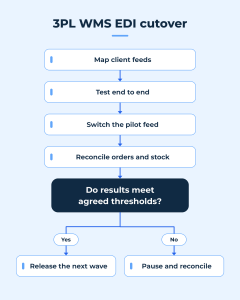
Choose a pilot client with manageable volume and representative workflows. A useful pilot might include order imports, partial fulfilment, carrier booking, outbound confirmation and a scheduled stock report. It should exercise the connections the next group of clients will depend on.
Here’s an illustrative cutover for one client at one warehouse.
| Stage | What the team does | Evidence to proceed |
|---|---|---|
| Before the switch | Record stock by owner, SKU, location and status. List open orders, picks in progress, pending returns and despatch confirmations still due. Agree who owns each in-flight transaction. | Warehouse operations signs off the opening stock and transaction list. |
| Switch the client feed | Hold or drain the old inbound queue as planned. Route new orders to the replacement WMS and record the cutoff time and last processed references. | Each order has one active processing route, including any orders received during the switch. |
| Run the first live despatch | Follow a live order through pick, pack, carrier booking, despatch and outbound confirmation. Match the records in the warehouse, carrier and client systems. | The client accepts the confirmation, and the warehouse can explain the resulting stock movements. |
| Close the first operating cycle | Reconcile open orders, stock movements, shipped quantities and any in-scope charges. Review unresolved exceptions. | Operations and the client sign off against the thresholds agreed before go-live. |
Scheduling matters. Choose a window around the client’s order peaks, carrier collection times and the availability of staff who can make decisions. If the warehouse cannot separate client feeds or stock movements cleanly, rehearse one coordinated switch with the whole site.
5. Decide when to pause and how to recover
Before go-live, name the person who can pause the migration and define the conditions that trigger that decision. Examples include duplicate picks, unexplained stock differences or a client receiving no despatch confirmations after live orders have shipped.
If the new WMS has already booked carriers, moved stock or shipped orders, first capture those transactions and check what each external system has accepted. Then decide which orders can safely be replayed, which shipments need to be recorded in the legacy system, and which confirmations still need sending. Keep new inbound traffic on hold until the team has agreed how to resume it.
A cutover is ready to expand when the team can account for every live order, explain stock differences, confirm that clients received the expected messages, and recover an exception without duplicating work.
What this can look like in practice
Appther’s 3PL warehouse solution showcase illustrates how client-specific order feeds can pass through a mapping and validation layer before reaching Odoo. The warehouse can then manage inventory, barcode operations, shipping and billing in a common workflow. If you’re evaluating an ERP-backed WMS, use the example to discuss which client connections you can preserve and which workflows the replacement needs to support.
View the 3PL warehouse solution showcase · Explore Odoo implementation in Australia.
Frequently asked questions
Do all clients have to rebuild their EDI connections when we replace the WMS?
Some can keep their existing connections if the new integration layer preserves their message format, transport and business rules. Each affected client should still test its order and despatch workflow before go-live.
Can we run both warehouse systems during migration?
Yes, if the team can assign ownership of orders, stock movements and outbound messages. One approach is for the legacy WMS to finish orders already in progress while the new WMS takes new orders for a pilot client. Document the cutoff and verify how both systems handle retries.
How much history should we migrate?
Start with the records you need to trade on day one, including client and product masters, stock balances, open orders, pending returns and in-flight shipments. Decide separately which historical transactions staff need in the new WMS for reporting, billing or client support.
What should we ask a WMS migration partner to show us?
Ask for a walkthrough using one of your real client order flows, including a partial shipment, a failed outbound message and stock reconciliation. Ask who owns each step and what evidence the team would need before moving the next client.
Planning a 3PL WMS replacement?
Appther can help you map the connections your clients rely on, scope the replacement and define the acceptance tests for your first cutover. Start with one representative client workflow, from the inbound order through to the despatch confirmation and stock update.