Running a Shopify store is exciting when orders start coming in. But as sales grow, managing everything behind the storefront can become increasingly complicated.
A customer places an order on Shopify. Your sales team needs the customer information in Zoho CRM. The warehouse needs accurate stock levels in Zoho Inventory. Your accounts team needs transaction records in Zoho Books. Meanwhile, someone is manually updating spreadsheets, checking order statuses, and correcting mismatched information.
For a business processing hundreds of orders, these small administrative tasks can quickly become a serious operational bottleneck.
This is where Shopify and Zoho integration becomes valuable.
By connecting Shopify with Zoho applications, businesses can reduce repetitive data entry, improve visibility across departments, and automate workflows involving customers, orders, inventory, and accounting.
However, successful integration involves more than connecting two applications. Businesses need to understand which Zoho products they require, how data should move between systems, and what happens when records fail to synchronize.
In this guide, we explain how Shopify Zoho integration works, available integration methods, practical setup steps, common challenges, costs, and when a custom solution makes sense.
What Is Shopify and Zoho Integration?
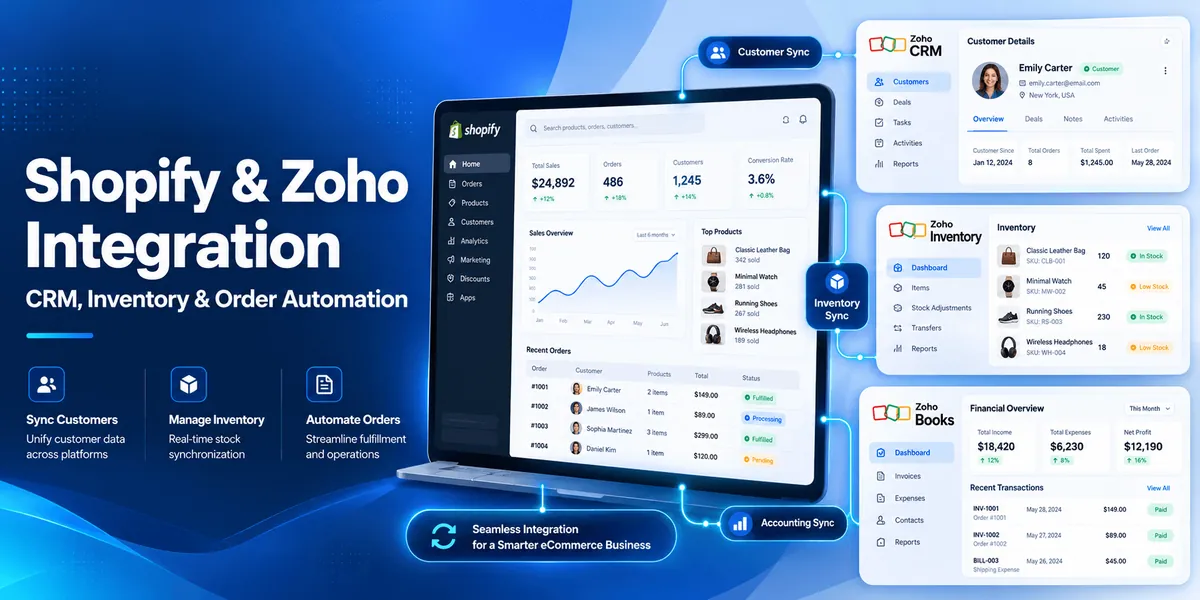
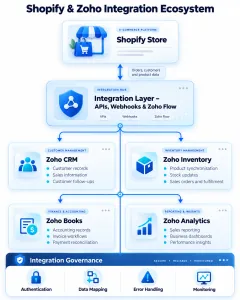
Shopify and Zoho integration connects a Shopify eCommerce store with Zoho business applications to exchange data and automate operational workflows.
Depending on the Zoho application and connector, businesses can synchronize customer information, product records, orders, inventory levels, invoices, and other relevant data.
Shopify primarily manages the online shopping experience, including product listings, checkout, payments, and customer orders.
Zoho offers different applications for managing business operations:
- Zoho CRM: Customer relationships, sales activities, and customer engagement.
- Zoho Inventory: Stock management, sales orders, warehouses, and fulfillment.
- Zoho Books: Accounting, invoices, financial transactions, and reconciliation.
- Zoho Flow: Workflow automation between connected applications.
- Zoho Analytics: Business reporting and data analysis.
These applications serve different purposes, so the correct integration architecture depends on the business requirements.
For example, connecting Shopify with Zoho CRM does not automatically provide complete warehouse management. Similarly, integrating Shopify with Zoho Inventory does not mean every CRM or accounting workflow is automatically configured.
Shopify Zoho Integration Example
Consider an online electronics retailer using Shopify for sales and Zoho for internal operations.
When a customer purchases a product:
- Shopify records the order and payment information.
- The integration transfers the relevant order data to Zoho Inventory.
- Zoho Inventory processes the sales order and manages stock and fulfillment.
- Customer and order information can be made available in Zoho CRM through an appropriate integration.
- Accounting information can flow into Zoho Books through a configured financial integration.
- The business monitors order processing and synchronization exceptions.
The exact behavior depends on the selected applications, mappings, sync settings, and connector capabilities.
A properly designed integration gives each department access to the information it needs without repeatedly entering the same data.
Why Should You Integrate Shopify with Zoho?
Many eCommerce businesses begin with simple operational processes.
Orders are manageable, inventory is updated manually, and customer information can be exported whenever the sales team needs it.
But as transaction volumes increase, disconnected systems create problems.
1. Reduce manual data entry
Without integration, employees may need to copy customer details, order information, and inventory changes between Shopify and Zoho.
Automating supported data transfers reduces repetitive work and helps employees focus on exceptions rather than routine updates.
2. Improve inventory accuracy
Inventory mismatches are particularly frustrating for online retailers.
A product may appear available on Shopify even though the warehouse has insufficient stock.
Connecting Shopify with Zoho Inventory helps businesses maintain more consistent stock information, subject to synchronization intervals and configuration.
3. Centralize customer information
Customer details collected through Shopify can support sales and service activities in Zoho CRM.
Businesses can use appropriately synchronized information to improve customer follow-ups, understand purchase history, and coordinate support activities.
4. Streamline order processing
An integrated workflow can move eligible orders from Shopify into Zoho Inventory without manual re-entry.
This reduces administrative delays between checkout and fulfillment.
5. Improve financial visibility
With the right Zoho Books integration, sales transactions can be reflected in accounting workflows.
Businesses can reduce manual reconciliation work while maintaining appropriate financial controls.
6. Support business growth
As an eCommerce business expands across products, warehouses, and sales channels, integration can help reduce the operational complexity of managing disconnected applications.
For businesses planning broader eCommerce improvements, Appther provides custom eCommerce development services, including storefront development, platform integrations, and scalable commerce solutions.
Which Zoho Applications Can You Integrate with Shopify?
Choosing the right Zoho application is the first major decision.
Each product supports a different business function.
| Zoho application | Primary purpose | Typical Shopify integration use case |
|---|---|---|
| Zoho CRM | Sales and customer management | Synchronize customer information and support sales workflows |
| Zoho Inventory | Stock and order management | Synchronize products, orders, stock, and fulfillment information |
| Zoho Books | Accounting | Transfer sales information into accounting workflows |
| Zoho Flow | Workflow automation | Connect events and actions across applications |
| Zoho Analytics | Reporting | Combine commerce and business data for analysis |
| Zoho Desk | Customer support | Make order context available for support workflows |
Not all integrations provide the same features or synchronization direction.
Before selecting a connector, confirm whether it supports the specific Zoho edition, Shopify plan, fields, order events, and business processes your organisation requires.
Shopify and Zoho CRM Integration: How Does It Work?
Shopify Zoho CRM integration helps businesses connect online customer activity with sales and customer relationship management workflows.
Shopify captures customer and order information. Zoho CRM helps sales and account management teams organize contacts, track opportunities, and manage interactions.
Connecting the two can provide a more complete view of customer relationships.
What data can be synchronized?
Depending on the connector and configuration, integration may support:
- Customer names and contact details
- Customer identifiers
- Billing and shipping addresses
- Order references and purchase history
- Product information
- Selected customer attributes
- Custom CRM fields
Some of these capabilities may require custom mappings or workflows rather than being available through every standard extension.
Example: Shopify customer synchronization
Suppose a customer purchases office equipment from a Shopify store.
The integration checks whether the customer already exists in Zoho CRM.
If a matching record exists, the workflow can update relevant information according to the configured rules.
If no matching record exists, the integration may create a new contact.
The sales team can then access the customer record and use the available information for permitted follow-up activities.
How to integrate Shopify with Zoho CRM
A typical setup process includes:
Step 1: Review your Shopify data
Identify which customer, product, and order fields are required in Zoho CRM.
Step 2: Select an integration method
Choose a compatible Zoho CRM extension, Zoho Flow workflow, third-party connector, or custom API integration.
Step 3: Authenticate both applications
Connect the relevant Shopify and Zoho accounts using the authorization method supported by the selected integration.
Step 4: Configure field mappings
Determine how Shopify customer IDs, email addresses, order references, and custom attributes map to Zoho CRM fields.
Step 5: Establish synchronization rules
Define when records should be created or updated, how duplicates are handled, and which system controls each field.
Step 6: Test the integration
Use sample customer records and orders to confirm that information is transferred correctly.
Step 7: Monitor synchronization
Review errors, duplicate records, and unexpected changes after deployment.
Important consideration: Duplicate customer records
Customer duplication is one of the most common integration challenges.
Using email addresses alone as unique identifiers may not always be sufficient because customers can change email addresses or use different addresses for different orders.
A more reliable design uses stable system identifiers and documented matching rules.
For businesses managing complex sales processes, Appther’s enterprise software development services can support custom CRM workflows and integration requirements.
Shopify and Zoho Inventory Integration: Automate Stock and Order Management
For many retailers, Shopify Zoho Inventory integration provides the most immediate operational value.
It connects online sales activity with inventory and fulfillment processes.
Zoho Inventory offers an official Shopify integration that supports synchronization of items and sales orders, inventory updates, and related workflows.
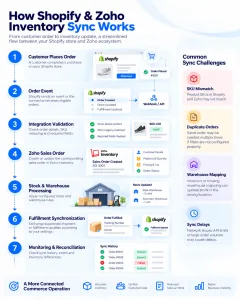
How inventory synchronization works
Consider a retailer selling the same product through Shopify and a physical store.
When an online order is processed, stock availability needs to remain consistent with the inventory system.
A configured integration can synchronize relevant inventory information between the applications.
However, synchronization is not necessarily instantaneous in every configuration. Zoho Inventory supports automatic synchronization cycles and manual synchronization options.
Key capabilities
Order synchronization
Shopify orders can be imported into Zoho Inventory as sales orders according to the integration settings.
Product synchronization
Product records can be mapped between Shopify and Zoho Inventory.
Stock updates
Available inventory can be synchronized to Shopify based on the configured stock management rules.
Warehouse mapping
Businesses operating multiple warehouses can map Shopify locations to corresponding Zoho Inventory warehouses.
Fulfillment information
Supported shipment and fulfillment information can be synchronized based on integration configuration.
Synchronization history
Zoho Inventory provides synchronization history and tools for investigating failed records.
How to connect Shopify with Zoho Inventory
The following is a simplified setup process based on Zoho Inventory’s integration workflow.
- Sign in to Zoho Inventory.
- Open Settings.
- Navigate to Integrations & Marketplace and select Shopping Cart.
- Enable online sales if prompted.
- Locate Shopify and select Set Up Now.
- Enter the Shopify store information and complete the authorization process.
- Configure the relevant synchronization preferences.
- Map products, warehouses, and Shopify locations where applicable.
- Run an initial synchronization.
- Review the synchronization history and validate imported records.
The available screens and options may differ by Zoho edition and product updates.
For current configuration details, refer to the official Zoho Inventory Shopify integration guide.
Why SKU mapping matters
A stock keeping unit (SKU) identifies a product or variant for inventory management.
Suppose Shopify contains a product with SKU TSHIRT-BLK-M, while Zoho Inventory uses BLACK-TSHIRT-M.
Without correct mapping, the systems may treat these as different items.
This can cause duplicate product records, incorrect stock updates, or failed order imports.
Before enabling live synchronization, businesses should validate product identifiers, variants, units of measurement, and warehouse assignments.
Managing multiple warehouses
Multi-warehouse businesses need additional planning.
For example, a retailer might maintain inventory in Sydney, Melbourne, and Brisbane.
The integration should understand which Shopify location corresponds to which Zoho warehouse.
Incorrect mappings can affect stock availability and shipment updates.
Warehouse synchronization should therefore be tested using realistic orders before production deployment.
Shopify and Zoho Books Integration: Automate Accounting Workflows
Shopify handles online transactions, while Zoho Books supports accounting and financial management.
Integrating them can reduce manual work involved in transferring sales information into accounting systems.
What can Shopify Zoho Books integration automate?
Depending on the selected connector and configuration, businesses may automate:
- Customer record creation
- Sales order or invoice creation
- Tax-related field mapping
- Transaction information transfer
- Payment record handling
- Credit notes and refund workflows
- Financial reporting inputs
Not every connector supports every capability.
For example, a third-party Zoho Marketplace integration supports importing Shopify orders into Zoho Books, but businesses should verify its current functionality before assuming it handles refunds, payment reconciliation, or all accounting adjustments.
Example: Accounting workflow
An online retailer receives 100 orders through Shopify.
Instead of manually creating accounting records for each transaction, an integration transfers the supported sales data into Zoho Books.
The accounting team can then review the imported records and complete the relevant reconciliation processes.
This reduces duplicate data entry but does not eliminate the need for financial verification.
Important accounting considerations
Tax configuration
Tax rates and transaction treatment must be mapped correctly.
Payment gateway fees
The amount paid by a customer may differ from the net amount received after payment processing fees.
Refunds and cancellations
Refunds should be reflected correctly in the accounting workflow.
Multi-currency transactions
Businesses selling internationally may need currency conversion and exchange-rate handling.
Duplicate prevention
The integration should prevent the same Shopify transaction from being imported repeatedly.
These details are particularly important for businesses using Shopify alongside multiple sales channels or accounting platforms.
Shopify Zoho Integration Methods: Which Approach Should You Choose?
There are several ways to connect Shopify with Zoho.
The right choice depends on your workflow complexity, budget, customization requirements, and maintenance expectations.
Method 1: Native or officially supported integrations
Where available, a supported integration is often the simplest starting point.
For example, Zoho Inventory provides a Shopify integration for relevant commerce and inventory workflows.
Best for: Businesses whose requirements match the supported features.
Advantages:
- Relatively straightforward configuration
- Lower custom development effort
- Existing synchronization functionality
- Vendor documentation
Limitations:
- Restricted customization
- Connector-specific feature limitations
- Dependency on supported editions and plans
Method 2: Zoho Flow
Zoho Flow is an integration and workflow automation platform.
It can connect supported application triggers with actions across business systems.
For example, a business might configure a workflow that responds to a Shopify event and creates or updates a corresponding Zoho record.
Best for: Small and medium businesses with relatively straightforward workflow requirements.
Advantages:
- Low-code configuration
- Event-driven automation
- Reusable workflow steps
- Less custom development for supported scenarios
Limitations:
- Task and subscription limits
- Connector-specific restrictions
- Potential complexity in large workflows
- Limited flexibility for certain advanced data transformations
Method 3: Third-party integration applications
Businesses can also use compatible applications available through the Shopify App Store or Zoho Marketplace.
These connectors may provide preconfigured synchronization features for specific Zoho products.
Best for: Businesses that need functionality already supported by a specialized connector.
Before purchasing, review:
- Supported Zoho editions
- Synchronization direction
- Field mapping capabilities
- Order and refund handling
- Data security
- Subscription costs
- Support and maintenance arrangements
Method 4: Custom API integration
Custom integration uses Shopify APIs, Zoho APIs, and application-specific business logic to create a tailored connection.
This approach is useful when standard connectors cannot support the required workflows.
For example, a business may need to:
- Synchronize multiple Shopify stores
- Support custom Zoho CRM modules
- Implement advanced order approval rules
- Integrate third-party logistics systems
- Handle complex product variants
- Apply custom tax or accounting transformations
- Maintain detailed audit logs
- Synchronize records across multiple applications
Custom integration provides greater control but also requires development, testing, monitoring, and maintenance.
Comparison of integration methods
| Factor | Supported integration | Zoho Flow | Third-party connector | Custom API |
|---|---|---|---|---|
| Initial setup | Usually simpler | Low to moderate | Varies | More involved |
| Custom workflows | Limited | Moderate | Varies | Extensive |
| Development effort | Low | Low to moderate | Low to moderate | Moderate to high |
| Multi-system logic | Limited | Supported within platform limits | Varies | Highly configurable |
| Maintenance | Vendor-dependent | Platform-dependent | Vendor-dependent | Your development team |
| Best suited for | Standard workflows | Business automation | Specialized ready-made features | Complex requirements |
The cheapest option initially is not always the most cost-effective over time.
A connector that requires repeated manual corrections may create more operational expense than a properly designed custom integration.
Shopify Zoho Integration Architecture: How Data Flows Between Systems
A reliable integration should have a clearly defined architecture.
For a business using Shopify, Zoho CRM, Zoho Inventory, and Zoho Books, the architecture might look like this:
Shopify Store → Integration Layer → Zoho Applications
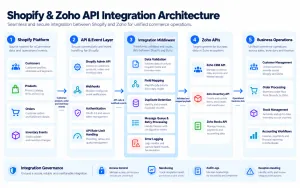
The integration layer manages authentication, data mapping, event processing, error handling, and synchronization.
Layer 1: Shopify data sources
Shopify provides information about customers, products, orders, inventory, and fulfillment.
Depending on the use case, data can be accessed through supported APIs and webhooks.
Layer 2: Integration middleware
Middleware processes incoming information and applies the required business logic.
Typical responsibilities include:
- Validating incoming data
- Mapping fields
- Identifying existing records
- Preventing duplicates
- Managing retries
- Recording errors
- Applying synchronization rules
Layer 3: Zoho applications
The processed information is sent to the appropriate Zoho product.
For example:
Shopify → Zoho CRM: Customer and sales information.
Shopify → Zoho Inventory: Product and order information.
Zoho Inventory → Shopify: Supported stock and fulfillment updates.
Shopify/Zoho Inventory → Zoho Books: Accounting information through a suitable integration.
Layer 4: Monitoring and exception handling
A reliable system should provide visibility into successful and failed synchronization events.
If an order fails to transfer, the integration should retain sufficient information to investigate and retry safely.
Why webhooks and APIs matter
Shopify webhooks can notify connected applications when relevant events occur.
APIs allow the integration to retrieve or update authorized information.
For example, a Shopify order event may trigger middleware to validate the order, map its fields, and create the corresponding record in Zoho.
However, receiving an event does not guarantee that the entire process completes immediately.
API rate limits, temporary outages, asynchronous processing, and business rules can introduce delays.
For this reason, businesses should distinguish between event-driven integration and guaranteed real-time synchronization.
Common Shopify and Zoho Integration Problems and How to Fix Them
Even well-configured integrations can experience synchronization issues.
Understanding the most common problems helps businesses build more reliable workflows.
1. Orders are not syncing
Possible causes:
- Expired authorization
- Unsupported order status
- Missing required fields
- Incorrect product mapping
- Connector errors
Recommended solution:
Review synchronization history, validate credentials, inspect failed records, and retry safely after correcting the underlying issue.
2. Duplicate customer records
Possible causes:
- Inconsistent customer identifiers
- Multiple email addresses
- Missing duplicate-checking logic
Recommended solution:
Establish a consistent identity-matching strategy and store the source-system identifiers.
3. Inventory quantities do not match
Possible causes:
- Incorrect SKU mapping
- Warehouse configuration errors
- Synchronization delays
- Multiple systems updating stock
Recommended solution:
Define which system owns inventory quantities, validate location mappings, and investigate conflicting updates.
4. Product variants are mapped incorrectly
Possible causes:
- Inconsistent product identifiers
- Missing variant mappings
- Different product structures
Recommended solution:
Map product variants using stable identifiers and test representative product combinations.
5. Refunds are not reflected correctly
Possible causes:
- Connector limitations
- Unsupported refund events
- Missing accounting adjustments
Recommended solution:
Document the complete refund lifecycle and verify how the chosen integration handles each event.
6. API limits interrupt synchronization
Possible causes:
- Excessive API requests
- Poor batching
- Missing retry logic
Recommended solution:
Implement rate-limit-aware processing, backoff strategies, and appropriate request queues.
7. Integration failures go unnoticed
Possible causes:
- Missing monitoring
- No failure notifications
- Inadequate logging
Recommended solution:
Introduce operational alerts, reconciliation reports, and periodic synchronization checks.
Shopify Zoho Integration Cost in 2026
The cost of Shopify and Zoho integration depends on the selected method and the complexity of the required workflows.
A simple connector setup is generally less expensive than building a custom integration platform.
The following figures are illustrative project planning estimates in USD, not verified market averages or fixed Appther quotations.
| Integration requirement | Illustrative implementation cost |
|---|---|
| Basic connector setup and configuration | $200–$600 |
| Shopify–Zoho CRM integration with field mapping | $500–$1,500 |
| Shopify–Zoho Inventory integration with workflow configuration | $600–$2,000 |
| Shopify–Zoho Books accounting workflow integration | $500–$1,800 |
| Multi-application custom API integration | $2,000–$6,000+ |
| Complex multi-store enterprise integration | Custom estimate |
These ranges exclude Shopify and Zoho subscription fees, paid connector subscriptions, and ongoing hosting or maintenance unless specifically included in a quotation.
What affects integration cost?
Number of applications: Connecting Shopify to one Zoho application is usually simpler than integrating CRM, Inventory, Books, and other systems.
Data complexity: Custom fields, product variants, historical records, and complex tax structures increase effort.
Synchronization frequency: Frequent event-driven updates may require more robust processing and monitoring.
Business rules: Custom approval processes, fulfillment rules, and accounting logic add development work.
Existing data quality: Cleaning duplicate or inconsistent records may require additional effort.
Testing requirements: Multi-warehouse, multi-currency, and high-volume scenarios need broader validation.
Maintenance: API changes, application updates, and business process changes create ongoing support requirements.
Businesses should request a scope-based estimate that identifies exactly which records, fields, workflows, and exceptions are included.
When Should You Choose Custom Shopify Zoho Integration?
Standard integrations are suitable for many businesses.
However, custom development becomes valuable when the business process cannot be reliably supported through available connectors.
Multiple Shopify stores
A retailer operating several Shopify storefronts may need consolidated customer, order, and inventory management.
Complex warehouse operations
Businesses with multiple fulfillment centers may require custom allocation rules and inventory visibility.
Advanced CRM workflows
Sales teams may need specialized lead assignment, account matching, customer segmentation, or approval processes.
Custom financial processes
Some businesses require complex payment reconciliation, tax handling, refund adjustments, or financial reporting.
Integration with additional platforms
A Shopify–Zoho workflow may also need to connect with logistics providers, marketplaces, payment systems, or proprietary applications.
High-volume synchronization
Large transaction volumes may require message queues, retry mechanisms, and dedicated monitoring.
In these situations, custom integration should be designed around documented business processes rather than adding complexity unnecessarily.
Best Practices for a Successful Shopify Zoho Integration
Before launching an integration, consider the following recommendations.
Define the source of truth
Decide which system owns each category of information.
For example:
- Shopify may own checkout and order-origin information.
- Zoho Inventory may own warehouse stock quantities.
- Zoho CRM may own sales relationship information.
- Zoho Books may own accounting records.
The exact ownership model should reflect the business’s operational requirements.
Document field mappings
Create a mapping document that identifies source fields, destination fields, data formats, and transformation rules.
Avoid uncontrolled two-way synchronization
Bidirectional updates can create conflicts if both systems modify the same information.
Establish clear ownership and conflict-resolution rules.
Test realistic scenarios
Testing should include:
- New customers
- Repeat customers
- Product variants
- Partial fulfillment
- Order cancellations
- Refunds
- Inventory shortages
- Duplicate events
- Failed API requests
Protect customer information
Use appropriate authentication, least-privilege permissions, encryption, and access controls.
Avoid transferring unnecessary personal information between systems.
Monitor integration health
Track synchronization success, failures, processing delays, and reconciliation differences.
Plan for future changes
Shopify and Zoho may update APIs, supported features, or application behavior.
Choose an integration architecture that can be maintained as the business evolves.
How Appther Can Help with Shopify and Zoho Integration
Connecting Shopify with Zoho can simplify daily operations, but the right implementation depends on how the business manages customers, products, orders, inventory, and accounting.
At Appther Technologies, our approach to custom software integration begins with understanding the business workflow.
Rather than treating integration as a simple data-transfer task, we focus on how connected applications should operate together.
Integration requirements and workflow analysis
We help businesses define their integration scope, data requirements, synchronization rules, and operational dependencies.
Shopify and Zoho API integration
For requirements that go beyond standard connectors, custom API development can support tailored data flows and business processes.
CRM and enterprise workflow automation
Connected systems can support customer management, order visibility, internal approvals, and operational reporting.
Data migration and synchronization
Integration projects may require initial data preparation, record mapping, duplicate prevention, and historical data migration.
Testing and ongoing support
A reliable integration requires validation of normal workflows, edge cases, failures, and future application changes.
Appther’s broader capabilities include eCommerce Development and Enterprise Software Development.
Whether you’re planning a new Shopify store or improving an existing eCommerce operation, a well-designed integration can help create a more connected business environment.

Frequently Asked Questions About Shopify Zoho Integration
1. Can Shopify integrate with Zoho CRM?
Yes. Shopify can be connected with Zoho CRM through compatible extensions, workflow automation platforms, or custom APIs. Supported synchronization features depend on the chosen integration method.
2. How do I connect Shopify to Zoho Inventory?
Zoho Inventory provides a Shopify integration accessible through its integrations and shopping cart settings. Businesses can authorize their Shopify store, configure synchronization preferences, and map relevant products and warehouses.
3. Does Shopify integrate with Zoho Books?
Yes. Shopify and Zoho Books can be connected through compatible third-party integrations, automation workflows, or custom API development. Available accounting capabilities vary by connector.
4. Can Shopify orders automatically sync with Zoho?
Yes. Supported integrations can transfer Shopify orders into relevant Zoho applications. The timing, eligible order statuses, and synchronization direction depend on the configuration.
5. Can Shopify and Zoho sync inventory in real time?
Some integration methods support event-driven updates, while others use scheduled synchronization. Businesses should verify the actual update frequency and should not assume every connector provides instantaneous stock synchronization.
6. Is Shopify Zoho integration free?
Some integration functionality may be included within existing product plans, while other connectors or automation platforms require paid subscriptions. Custom integration also involves development and maintenance costs.
7. What is the best way to integrate Shopify with Zoho?
For standard workflows, begin by evaluating supported integrations or Zoho Flow. Custom API integration is more appropriate when the business requires advanced workflows, unusual data mappings, or multiple connected systems.
8. Can Shopify customers automatically sync with Zoho CRM?
Yes, with a connector or custom workflow that supports customer synchronization. Businesses should configure record matching and duplicate prevention carefully.
9. How much does Shopify Zoho integration cost?
Costs vary depending on the integration method, number of applications, data complexity, and custom requirements. A basic connector configuration generally requires less investment than a multi-system custom integration.
10. Do I need a developer to integrate Shopify with Zoho?
Not always. Standard integrations can often be configured without extensive development. A developer may be needed for custom APIs, complex field mappings, specialized business rules, or troubleshooting advanced synchronization problems.
Final Thoughts
Shopify and Zoho integration can make a significant difference to how an eCommerce business operates.
When customer information, orders, inventory, and accounting workflows are connected properly, employees spend less time transferring information and more time managing customers and growing the business.
However, the value of integration depends on its reliability.
Businesses need accurate field mappings, clearly defined data ownership, appropriate synchronization methods, and effective exception handling.
For straightforward requirements, supported integrations may be sufficient. For complex operations involving multiple systems, warehouses, or custom business processes, a tailored integration architecture may provide greater flexibility.
The right approach is to begin with the business workflow, evaluate available integration options, and implement only the functionality that delivers measurable operational value.
Need Help Integrating Shopify with Zoho?
Are you looking to connect Shopify with Zoho CRM, Zoho Inventory, Zoho Books, or a combination of business applications?
Appther can help you evaluate integration requirements, design custom workflows, and develop scalable eCommerce software solutions.