A customer orders ten cartons of bolts. Your inventory report shows enough stock, but the floor team still needs to answer three questions: Which cartons contain the required quantity? Where are they stored? Have any already been reserved for another order?
When those answers depend on phone calls, handwritten notes or one experienced supervisor, dispatch becomes harder to control as the business grows.
Smart warehouse management connects physical stock with digital records at the point of work. Receiving a carton, placing it in a bin and picking it for an order become recorded, validated transactions. The result is a clearer view of what is available, where it belongs and what should happen next.
This guide explains how barcode warehouse management works, which features matter, and how to plan a system around the way your team actually handles inventory.
What is smart warehouse management?
Smart warehouse management uses connected systems, barcode or QR scanning, and defined workflows to track inventory and guide warehouse activities. It links products, physical handling units, storage locations and orders so teams can record and validate receiving, putaway, transfers, picking and dispatch as work happens.
A warehouse does not need robots or artificial intelligence to begin. A practical starting point is reliable identification, accurate location records and a scanning workflow that workers can use consistently.
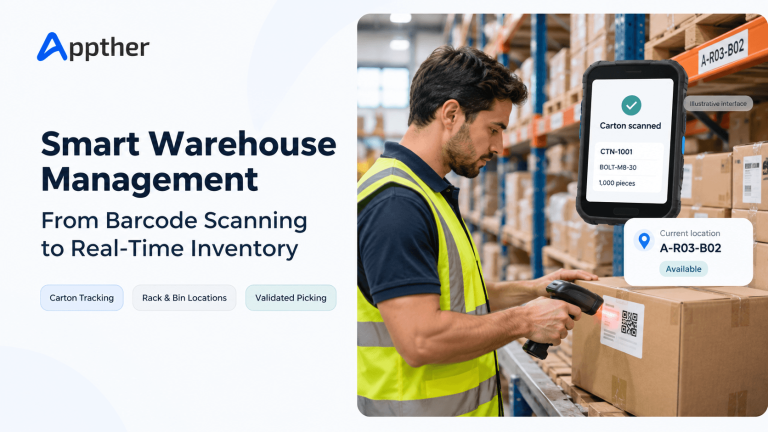
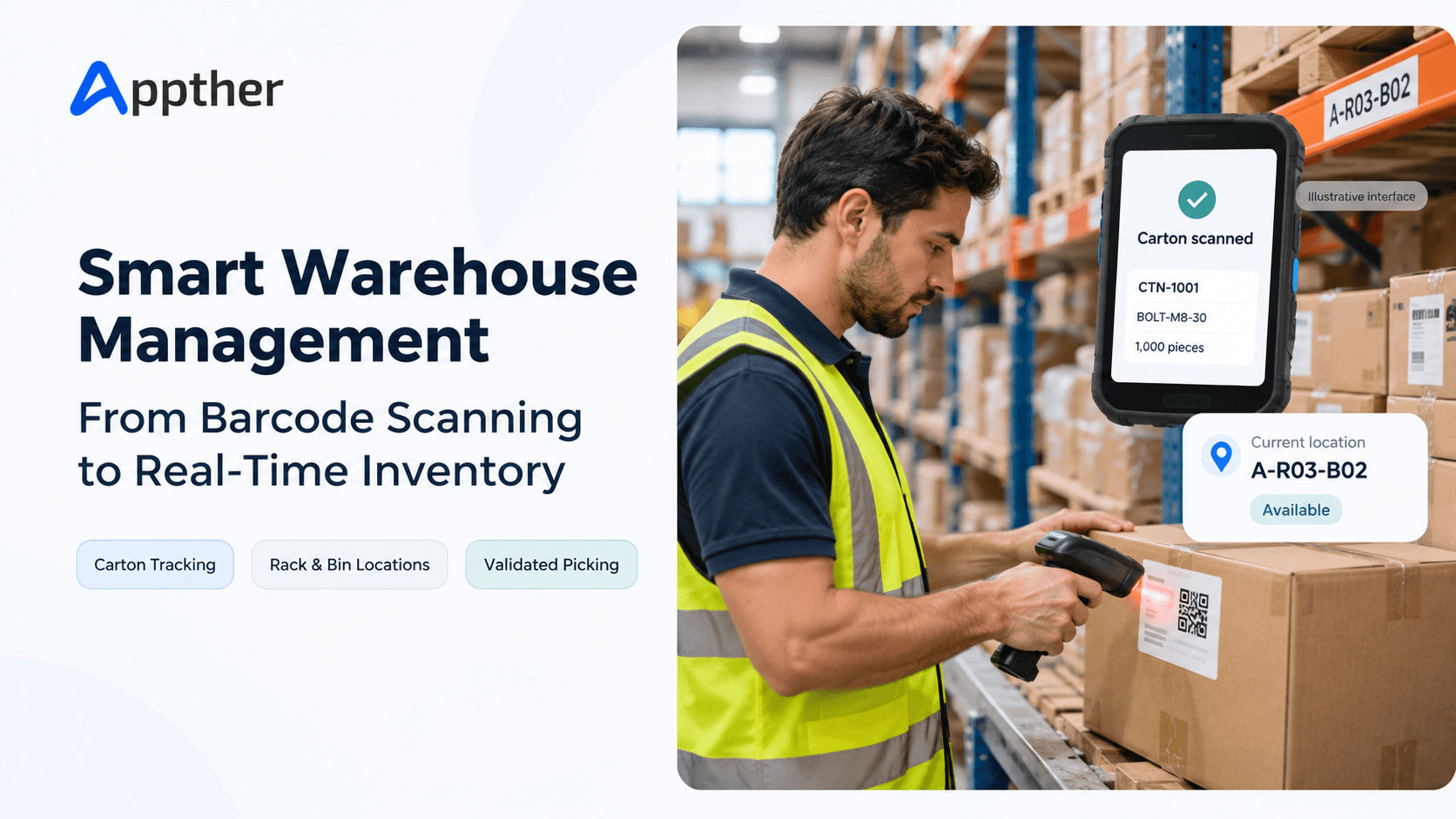
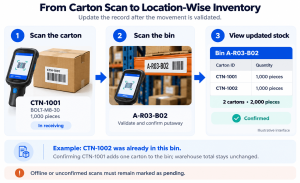
For example, a worker scans a carton and then its destination bin. After validation, the system records the carton at that location and makes the updated information available to authorized users.
“Real-time” visibility depends on transactions reaching the system successfully. If devices work offline, the interface should distinguish pending updates from confirmed stock movements.
Warehouse management vs. inventory management: what is the difference?
Inventory management focuses on stock quantities, availability and replenishment. Warehouse management focuses on how physical stock is received, stored, moved, picked and dispatched. The capabilities often overlap within one platform.
| Area | Inventory management focus | Warehouse management focus |
|---|---|---|
| Stock visibility | How much is on hand or available? | Where is each item, carton or pallet? |
| Receiving | What quantity arrived? | What arrived, was it checked, and where should it go? |
| Order fulfillment | Is sufficient stock available? | Which stock should the worker pick and verify? |
| Transfers | How do quantities change? | What moved, between which locations, and who confirmed it? |
| Replenishment | When should more stock be purchased? | When should a picking location be refilled? |
A business can have an accurate total stock count and still struggle to find the right goods. Location-level tracking closes that operational gap.
How does barcode warehouse management work?
Barcode warehouse management connects a scanned identifier to a product, package, location or transaction record. The system uses the current task to validate the scan and record an authorized action. A barcode identifies the record; the workflow determines what happens to it.
Four identifiers are particularly useful:
- SKU: Identifies the product type or variant.
- Carton or package ID: Identifies an individual physical handling unit.
- Location ID: Identifies a warehouse, zone, rack, shelf or bin.
- Order or transfer ID: Identifies the transaction being processed.
These identifiers serve different purposes. A product barcode shared by every carton of the same SKU cannot, by itself, distinguish one carton from another.
For logistics units exchanged across supply chains, GS1 provides the Serial Shipping Container Code, or SSCC. Its guidance describes using a unique logistics-unit identifier to connect physical movements with electronic information. An internal carton ID can serve an internal workflow, but it should not be presented as a GS1 identifier unless the applicable GS1 rules are followed. [1]
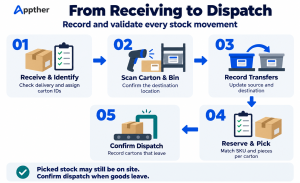
Step 1: Receive and identify the stock
The receiving worker opens the expected receipt and checks the delivered goods. The system records the SKU, received quantity, supplier reference and any required lot or expiry details.
For carton-level tracking, each physical carton receives a unique identity linked to its contents. Damaged or uncertain stock should enter a review status or designated inspection location rather than becoming immediately available for orders.
Step 2: Scan the carton and destination location
During putaway, the worker scans the carton label and the rack or bin label. The system checks that the destination is valid and, where configured, suitable for the goods.
Once confirmed, the movement updates the location record. This creates a direct link between the physical carton and the place where another worker can find it.
Step 3: Record internal movements
A move from storage to a picking area should be recorded as a transfer. Depending on the workflow, the worker confirms the source, carton and destination.
Skipping this step creates a common problem: the inventory exists, but the system points to yesterday’s location.
Step 4: Reserve and pick the correct stock
An order should reserve eligible stock before workers pick it. Eligibility can include SKU, carton quantity, lot, expiry date, ownership and quality status.
The worker follows the assigned location and scans the selected carton. A mismatch should produce a clear explanation, such as “This carton contains 500 pieces; the order requires 1,000 pieces per carton.”
Step 5: Confirm dispatch
Picking and dispatch are separate events when the business uses a staging area. Picked cartons may remain physically on site while awaiting loading.
The dispatch confirmation records what actually left and links those cartons to the delivery. Stock availability and physical location should reflect each stage without counting the same goods twice.
How do you track cartons with different quantities under the same SKU?
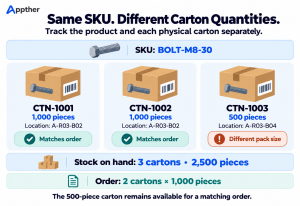
Keep the product SKU separate from the physical carton record. Store the actual piece quantity against each carton, give every carton a unique ID, and report both carton count and total pieces. Order allocation must also respect any required quantity per carton.
Consider this illustrative stock record for one bolt SKU:
| Carton ID | SKU | Pieces inside | Location | Status |
|---|---|---|---|---|
| CTN-1001 | BOLT-M8-30 | 1,000 | A-R03-B02 | Available |
| CTN-1002 | BOLT-M8-30 | 1,000 | A-R03-B02 | Available |
| CTN-1003 | BOLT-M8-30 | 500 | A-R03-B04 | Available |
The warehouse holds three cartons containing 2,500 pieces. However, an order for two cartons of 1,000 pieces each can only use CTN-1001 and CTN-1002.
The 500-piece carton is the same product, but it is not interchangeable for that order requirement.
A well-defined order line therefore captures the SKU, number of cartons and required pieces per carton. If the business dispatches only sealed cartons, the system should enforce whole-carton allocation and prevent workers from fulfilling an order with loose pieces.
Can a worker scan one carton and enter a carton count?
Yes, but the system must know which physical cartons the count represents. Scanning one unique carton and typing “10” does not identify nine additional cartons.
For individual carton traceability, scan each carton, select an explicitly identified set, or scan a parent pallet or group label with a maintained list of its member cartons. If workers remove cartons from that group, update its membership before relying on the group label again.
This distinction matters whenever quantities differ, cartons are reserved separately, or the business needs a movement history for every package.
Which features should a smart warehouse management system include?
The best feature set follows operational decisions: what must workers identify, what must the system validate, and which exceptions need supervisor attention?
| Feature | What it should support |
|---|---|
| Product and SKU records | Product variants, units of measure and consistent descriptions |
| Unique package tracking | Carton identity, contents, quantity, status and movement history |
| Warehouse location hierarchy | Warehouse, zone, rack, shelf and bin records |
| Barcode and QR labels | Readable identifiers for products, packages and locations |
| Receiving and putaway | Expected receipts, discrepancies and destination confirmation |
| Reservation and picking | Allocation rules, guided tasks and mismatch validation |
| Transfers and dispatch | Source/destination movements and confirmed goods issue |
| Cycle counting | Physical counts, discrepancy review and controlled adjustments |
| User permissions | Appropriate actions for workers, supervisors and administrators |
| Operational reporting | Available stock, reservations, blocked stock and exceptions |
Design the floor-worker interface around the task
A worker receiving stock needs different information from a supervisor reviewing discrepancies. Keep scanning screens focused on the current task, expected scan and confirmation result.
Show the product name and quantity alongside the identifier. Provide an audible or visible success signal and an actionable error message. Test label placement, lighting, gloves and scanning distance in the warehouse itself.
Give supervisors control over exceptions
Supervisors need to resolve damaged labels, unexpected receipts, missing cartons and count differences. Corrections should preserve the original history and record who changed what and why.
A label reprint should normally reproduce the existing carton identity. Creating a new identity for the same carton can introduce duplicate stock records.
Barcode or QR code: which should you choose?
Choose the label format based on device compatibility, scanning conditions, identifier requirements and trading-partner standards. QR codes are two-dimensional barcodes; conventional linear barcodes can also work well for short warehouse identifiers.
| Consideration | Linear barcode | QR code |
|---|---|---|
| Typical internal use | Short product, carton or location identifiers | Identifiers or supported links read by cameras or 2D scanners |
| Device requirement | Compatible linear or 2D scanner | Camera-based reader or compatible 2D scanner |
| Label layout | Often wider for longer values | Square format with required clear space |
| Selection test | Can the actual devices read it reliably? | Does the application interpret the scanned value correctly? |
Avoid putting changing stock quantities directly into a static label as the authoritative record. Store the identifier on the label and retrieve the current details from the system.
Include human-readable text so workers can identify the carton or location if a scanner is unavailable. Before printing thousands of labels, test samples on the actual packaging and racks.
Odoo’s official documentation describes product and location barcode configuration, including printing labels for warehouse locations. Exact workflow coverage should be checked against the selected version and installed applications. [2]
What makes real-time inventory reliable?
An attractive dashboard does not guarantee accurate stock. Reliability comes from complete transactions and clear inventory states.
A useful stock view separates physical stock from stock that can be promised to a customer. Reserved, damaged or inspection-held goods may be present in the warehouse without being available for a new order.
For a simple operation, available stock can be derived from on-hand stock minus reservations and blocked quantities, provided those categories do not overlap. More complex availability calculations may also consider incoming supplies and future commitments.
Build the following controls into the workflow:
- Prevent repeated scans or retries from posting the same movement twice.
- Prevent two simultaneous orders from reserving the same carton.
- Show whether offline transactions are pending, accepted or rejected.
- Record the user, time, source and destination for each movement.
- Reconcile physical counts with digital records regularly.
When integrations are involved, define which system owns each record. For example, the ERP may own sales orders while the warehouse application owns execution events. Failed updates should remain visible and recoverable.
Should you use Odoo, a ready-made WMS or a custom platform?
Choose an existing platform when its standard workflows fit your operation. Consider customization when important business rules are missing. Build a dedicated platform when the required workflows, integrations or product strategy justify the additional development and maintenance.
| Approach | Best evaluated when | Questions to resolve |
|---|---|---|
| Ready-made WMS | Operational processes are broadly standard | Does it support your carton, location and integration rules? |
| Odoo implementation | Warehouse operations need close alignment with broader business processes | Which edition, applications and extensions cover the approved scope? |
| Customized existing platform | Most needs fit, with a few important gaps | Can extensions remain maintainable through upgrades? |
| Dedicated custom platform | Workflows or interfaces require substantial differentiation | Who will own testing, support, integrations and future changes? |
Odoo documents Inventory as both an inventory application and a warehouse management system. [3] That makes it a candidate for evaluation, but it does not establish that every specialized workflow is available without configuration or development.
Ask for a demonstration of your hardest transaction: receiving cartons with different quantities, storing them across bins, and reserving only cartons that match an order’s pack-size requirement.
Appther’s Odoo warehouse management implementation services provide a relevant starting point for assessing the fit between warehouse operations and an Odoo rollout. For broader business-system requirements, explore ERP development and integration.
What affects warehouse management implementation cost?
Warehouse management implementation cost depends on process complexity, platform licensing, customization, integrations, hardware, data preparation, training and ongoing support. A useful estimate begins with agreed workflows and transaction volumes.
A single-site rollout with standard receipts and picking has a different scope from a multi-site operation with offline scanning, carton-specific reservation rules and several external systems.
| Cost driver | What to define before requesting a quote |
|---|---|
| Operational scope | Sites, locations, users, shifts and transaction volumes |
| Stock rules | Cartons, loose units, lots, expiry dates and ownership |
| Platform | Existing licenses, hosting approach and required applications |
| Custom workflows | Pack-size matching, approvals and worker interfaces |
| Integrations | ERP, commerce, accounting, carriers and automation equipment |
| Hardware | Scanners, printers, labels, charging and network coverage |
| Data and rollout | Cleaning, migration, opening counts and training |
| Ongoing ownership | Support, backups, upgrades and device replacement |
Compare proposals against the same scenarios and acceptance criteria. A low initial quote can exclude operational work such as label setup, opening-stock reconciliation or floor-team training.
How should you implement smart warehouse management?
Start with one complete operational flow and expand after the team can execute it reliably.
- Map the current process. Follow actual receiving, storage, picking and dispatch activities. Record exceptions as well as normal transactions.
- Define identifiers and stock rules. Agree on SKUs, carton IDs, location codes, units of measure and whole-carton restrictions.
- Clean the opening data. Remove duplicate records, validate quantities and physically confirm starting locations.
- Configure and test the workflows. Test wrong cartons, duplicate scans, unavailable stock, damaged labels and interrupted connections.
- Pilot in a controlled area. Use real workers, devices, labels and orders. Resolve friction before expanding.
- Train by role and go live. Give supervisors an exception process and workers a clear task sequence. Reconcile the pilot’s stock before wider rollout.
Agree on measurable acceptance conditions. For example, an order for 1,000-piece cartons must reject a 500-piece carton, and a transfer must update both the source and destination correctly.
Which warehouse KPIs should you track?
Use consistent definitions and collect a baseline before implementation. Otherwise, changes in measurement can look like changes in performance.
| KPI | Suggested definition |
|---|---|
| Inventory record accuracy | Exact-match counted records divided by counted records; define whether records represent SKU-location balances or individual cartons |
| Picking accuracy | Correctly picked order lines divided by checked order lines |
| Dock-to-stock time | Time from the agreed receipt event to stock being available in its storage location |
| Order dispatch lead time | Time from order release to confirmed dispatch |
| Location accuracy | Checked cartons found in their recorded location divided by checked cartons |
| Adjustment activity | Number and quantity of corrections, grouped by reason |
Review exceptions alongside averages. A few repeatedly inaccurate bins or products can reveal a labeling, training or workflow problem that an overall metric hides.
Where does AI fit in smart warehouse management?
AI is an optional extension to a dependable transaction system. Candidate uses include demand forecasting, unusual-movement alerts, slotting recommendations and natural-language queries over authorized inventory records.
Begin with a specific decision and measurable outcome. For example, a slotting recommendation should be evaluated against travel time, replenishment effort and storage constraints.
AI-generated answers about available stock should retrieve current authorized records. Stock adjustments and reservations should still pass deterministic business validations and permission checks.
Businesses exploring these extensions can review Appther’s Odoo AI integration services after defining the underlying inventory workflow and data responsibilities.
Frequently asked questions
What is a smart warehouse management system?
A smart warehouse management system connects inventory records, storage locations and warehouse tasks through digital workflows. Barcode or QR scanning helps workers identify goods and validate movements. Automation and AI can extend the system, but accurate records and consistent transaction capture are the foundation.
Can the same SKU have cartons with different quantities?
Yes. Each carton can reference the same SKU while storing its own piece quantity and unique carton ID. If orders require a specific quantity per carton, reservation and picking must enforce that requirement rather than treating all cartons as interchangeable.
Does every carton need a unique barcode?
Every carton needs a unique identifier when individual carton tracking is required. A shared product barcode identifies the product type. It does not independently identify each physical carton or provide a separate movement history for it.
Can I see inventory by rack and bin?
Yes, when rack and bin locations are configured and movements are recorded against them. A location report can show products, carton IDs, carton counts, piece quantities and stock status. Its accuracy depends on recording putaway and subsequent transfers consistently.
Can warehouse workers scan with a smartphone?
Yes, if the application supports camera scanning and the required barcode formats. Test performance with actual labels, lighting and network conditions. Dedicated handheld scanners may be more suitable for repetitive scanning or demanding warehouse environments.
Is QR code tracking better than barcode tracking?
QR codes are a type of barcode. The right choice depends on the devices, label layout, scanning distance and application support. Reliable identification and transaction validation matter more than choosing a format solely because it appears newer.
Can Odoo support warehouse management?
Yes. Odoo Inventory provides warehouse-management capabilities, and its documentation covers barcode-based inventory operations. Confirm the selected edition, applications and any extensions against your exact requirements, especially variable carton quantities, custom reservation rules and offline behavior. [2][3]
How long does implementation take?
The timeline depends on configuration, integrations, custom rules, data readiness, hardware testing and training. Agree on a schedule after a workflow assessment and pilot plan. Count preparation and rollout work as part of implementation, not just application configuration.
Build a warehouse workflow your team can trust
Smart warehouse management starts with a practical promise: workers should know what to move, where it belongs and whether the action has been recorded correctly.
Start by connecting the SKU, physical carton, storage location and customer order. Add clear validations, usable scanning screens and a controlled exception process. Those foundations make later automation easier to evaluate and operate.
Planning a new warehouse system or improving an existing Odoo setup? Share your receiving process, carton rules, location structure and dispatch requirements with Appther to define the right implementation scope.