Enterprise development teams spend considerable time turning business requirements into technical tasks.
A business analyst prepares a requirements document. A product owner identifies the features. Then, the development team breaks the work into epics and user stories.
Next come acceptance criteria, backlog reviews and development planning.
This process is essential. However, it often involves repeated manual work.
What if AI could help complete the first draft?
ServiceNow AI user story generation helps agile teams turn existing epics and features into structured user stories with testable acceptance criteria. With additional automation, teams can also analyse requirements documents, prepare draft epics and connect approved work to development tools.
ServiceNow offers native AI capabilities through Strategic Portfolio Management (SPM), Enterprise Agile Planning and ServiceNow Otto, previously known as Now Assist.
For more specialised requirements, organisations can design custom workflows using AI Agent Studio, integrations and development tools.
In this guide, we’ll explain how ServiceNow AI supports agile development, what can be automated and where custom AI agent development adds value.
What Is ServiceNow AI User Story Generation?
ServiceNow AI user story generation is an AI-assisted process that creates and refines user stories from existing epics, features and related business information within ServiceNow.
It helps product owners and agile teams prepare structured backlog items.
For example, consider this epic:
“Develop a customer self-service portal where users can submit support requests, check ticket status and receive notifications.”
AI can suggest several user stories based on that goal.
These might include:
- Submit a new support request.
- View the status of an existing ticket.
- Receive an update when a ticket changes.
- Search previous support requests.
- Access support information based on user permissions.
Each story can include a title, description and proposed acceptance criteria.
However, AI-generated stories are drafts.
The product owner must check whether they reflect the actual business requirements, scope and technical constraints.
ServiceNow’s native Enterprise Agile Planning capabilities support story generation and refinement. More advanced document-to-backlog workflows may need additional configuration or custom development.
For a broader introduction to the technology, explore Appther’s ServiceNow AI Agents guide.
Why Do Enterprise Teams Need AI-Powered Agile Automation?
Agile teams often struggle with the same recurring problems.
1. Requirements take time to organise
Business requirements may arrive through Word documents, PDFs, emails, workshops and meeting notes.
Someone must review these sources and identify the actual features.
2. User stories lack consistency
Different team members write stories in different formats.
Some provide detailed business context. Others include only a short description.
This makes backlog reviews more difficult.
3. Acceptance criteria are incomplete
A story might explain what the system should do without defining how to test it.
As a result, developers and testers may interpret the requirements differently.
4. Teams repeat information across tools
Requirements may begin in a document and later appear in ServiceNow, Jira or Azure DevOps.
Without suitable integrations, teams can end up copying information between systems.
5. Important dependencies are overlooked
One feature may depend on another service, API, approval or data source.
These relationships can be missed when a large backlog is prepared manually.
AI can help teams identify and organise this information earlier.
The goal is not to replace product owners or business analysts. It is to reduce repetitive drafting and give them more time to validate requirements.
How ServiceNow AI Can Automate Epics, Stories and Acceptance Criteria
An end-to-end solution can support several stages of agile planning.
However, native ServiceNow functionality and custom automation are not the same thing.
The table below explains the difference.
| Agile activity | Native ServiceNow capabilities | Additional automation opportunity |
|---|---|---|
| Requirements analysis | AI-assisted document and planning-item capabilities | Extract requirements from BRDs, PDFs and meeting notes |
| Epic preparation | AI-supported planning-item content refinement | Generate draft epic structures from business requirements |
| User story generation | Generate stories from epics and features | Apply custom templates, rules and integrations |
| Acceptance criteria | Native AI-assisted criteria generation | Add organisation-specific test scenarios |
| Story refinement | Interactive review and editing | Automated quality checks and duplicate detection |
| Backlog approval | Existing ServiceNow processes and controls | Custom approval and publishing workflow |
| Development handoff | Platform development capabilities | Integrate Jira, Azure DevOps or other tools |
| Application development | ServiceNow Build Agent | Custom build, testing and release processes |
The best implementation uses native features wherever they fit.
Custom development should address genuine gaps, not recreate functions already available within ServiceNow.
Step-by-Step: How to Automate Agile Requirements Using ServiceNow AI
Let’s explore a practical workflow for an enterprise development team.
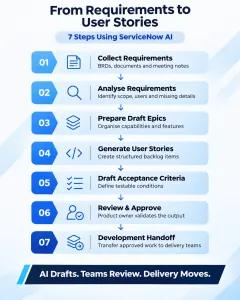
Step 1: Collect business requirements
The process starts with a source document or business request.
For example:
“Build an employee onboarding application that allows HR teams to initiate onboarding, assign equipment requests, track approvals and monitor completion.”
The input could be a BRD, user requirement specification or approved feature request.
In a custom solution, an AI agent can extract the key information and organise it into structured fields.
Step 2: Analyse the requirements
Next, the AI examines the business objectives.
It can identify potential users, functional requirements, business rules and missing information.
For the onboarding example, the main users might include HR administrators, hiring managers, IT support teams and new employees.
The agent may also identify questions such as:
- Who can initiate onboarding?
- Which approvals are required?
- Can equipment be assigned automatically?
- What happens if a request is rejected?
These questions should be answered before the backlog is finalised.
Step 3: Prepare draft epics
Once the requirements are clear, a custom workflow can propose an epic structure.
For example:
Epic 1: Employee Onboarding Request Management
Epic 2: Equipment and Access Provisioning
Epic 3: Onboarding Approvals
Epic 4: Progress Tracking and Notifications
These are suggested epics, not automatically approved requirements.
A product owner should confirm the scope before the system creates permanent planning records.
Step 4: Generate user stories
Next, ServiceNow’s AI-supported agile planning capabilities can help break epics into user stories.
For the onboarding request epic, a generated story might be:
Story: Create Employee Onboarding Request
As an HR administrator, I want to create an onboarding request for a new employee so that the required setup activities can begin before their joining date.
The team can review the description, adjust its scope and connect the story to the appropriate epic.
Step 5: Generate acceptance criteria
Once the user story is ready, AI can suggest testable acceptance criteria.
For example:
Acceptance Criterion 1
Given an authorised HR administrator is logged in, when they submit a valid onboarding form, then the system creates a new onboarding request.
Acceptance Criterion 2
Given a mandatory field is empty, when the administrator submits the form, then the system displays a validation message.
Acceptance Criterion 3
Given an onboarding request is created, when the record is saved, then the designated team receives a notification according to the approved workflow.
The product owner and QA team should review these criteria.
They should also confirm relevant security, error-handling and exception scenarios.
Step 6: Review and approve the backlog
Before saving or publishing work items, the team reviews the AI-generated output.
Reviewers should check:
- Whether each story supports the original requirement
- Whether important functionality is missing
- Whether stories contain unnecessary assumptions
- Whether acceptance criteria are testable
- Whether dependencies and permissions are clear
- Whether duplicate stories have been created
The system can then store the approved backlog in ServiceNow.
Step 7: Connect the backlog with development tools
Some enterprises use ServiceNow for portfolio planning while their engineering teams work in Jira or Azure DevOps.
In those cases, a custom integration can transfer approved stories between systems.
It can also maintain a mapping between related records.
However, the integration must define which platform owns each field.
For example, ServiceNow might own business approval status, while Jira owns sprint execution status.
This avoids conflicting updates.
Appther’s AI integration services can support the design of controlled workflows between ServiceNow and other enterprise applications.
Which ServiceNow AI Tools Support Agile Development?
ServiceNow provides several capabilities that serve different purposes.
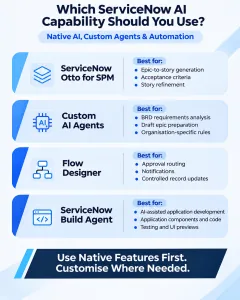
ServiceNow Otto for Strategic Portfolio Management
ServiceNow Otto for SPM, previously branded Now Assist for SPM, provides AI capabilities for planning and agile delivery.
Relevant features include:
- Quick story generation from epics
- AI-assisted acceptance criteria generation
- Interactive story creation and refinement
- Planning item content assistance
- Epic status assessment
These capabilities support existing ServiceNow planning processes.
However, availability depends on the organisation’s product entitlement, release and configuration.
According to ServiceNow documentation, Otto for SPM requires SPM Pro Plus licensing.
See ServiceNow’s official Enterprise Agile Planning AI documentation.
ServiceNow AI Agent Studio
AI Agent Studio helps organisations create and configure AI agents and agentic workflows.
For requirements automation, an agent could be designed to analyse an approved document, identify missing information or prepare structured output.
It could then use authorised tools to interact with ServiceNow records.
However, the agent must operate within defined permissions.
A business should not allow an AI agent to publish or change approved requirements without appropriate controls.
ServiceNow Build Agent
Build Agent supports AI-assisted application development.
ServiceNow documents capabilities for creating and updating applications from natural language instructions.
Depending on the configuration, it can assist with application components, flows, code, tests and UI previews.
However, Build Agent is not the same as the SPM story-generation capability.
One supports development work. The other helps organise agile planning.
An enterprise solution can connect these stages, but the handoff, approvals and testing requirements must be designed.
Read ServiceNow’s Build Agent documentation for further technical information.
ServiceNow Flow Designer and Workflow Studio
Flow Designer and Workflow Studio can coordinate predefined business processes.
For example, an approved story could trigger an assigned review task or a controlled integration.
ServiceNow also supports using AI agent actions within workflows.
This combination is useful because AI handles tasks such as analysis and drafting, while established rules manage approvals and system updates.
ServiceNow AI Agents vs Traditional Workflow Automation
Not every task requires an autonomous AI agent.
Some activities work better with ordinary workflow automation.
| Requirement | Better starting approach |
|---|---|
| Create a task after approval | Flow Designer |
| Send an approval notification | Workflow automation |
| Analyse a lengthy requirements document | AI-assisted document processing |
| Propose user stories from an epic | ServiceNow Otto for SPM |
| Identify missing requirement details | Configured AI agent |
| Generate application components | ServiceNow Build Agent |
| Synchronise approved records | Controlled API integration |
In many cases, the right solution combines both approaches.
Use AI for tasks that require understanding and drafting. Use defined workflows for actions that must follow predictable rules.
Can ServiceNow AI Generate Application Code and UI Previews?
Yes. ServiceNow Build Agent supports AI-assisted application creation and modification.
For example, a developer can describe a new internal application and request relevant components.
Build Agent can generate application code and help create the required functionality.
It also supports previewing the interface in ServiceNow Studio where applicable.
However, this does not mean every generated application is ready for production.
Developers still need to review architecture, permissions, business rules, code quality and integration behaviour.
Automated Test Framework tests and other quality controls can support that review.
A practical solution might therefore follow this sequence:
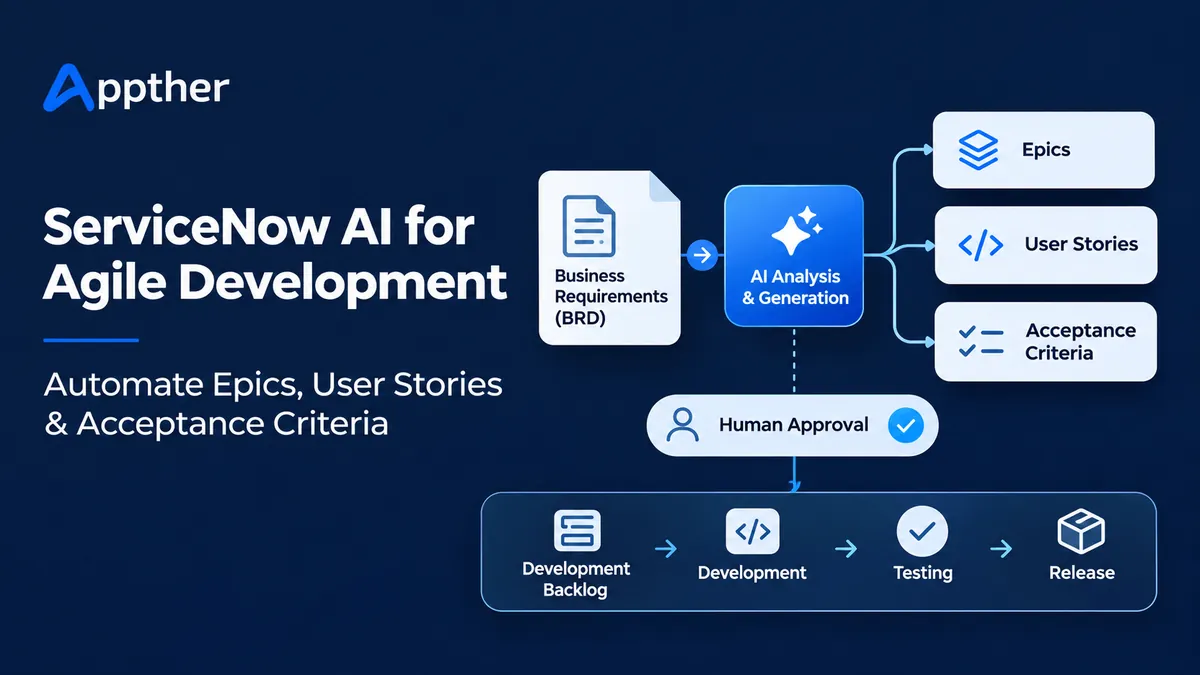
Business requirement → Approved epic → Reviewed user stories → Testable acceptance criteria → Development plan → AI-assisted build → Testing → Human-approved deployment
This is an architectural approach, not a claim that one standard ServiceNow feature performs the entire process automatically.
For businesses developing custom enterprise workflows, Appther’s ServiceNow AI Agent Development services can help assess the available platform capabilities and required customisations.
Can ServiceNow AI Support Multiple Languages?
International organisations often have product and development teams working in different languages.
For example, a company may collect business requirements in Japanese, Korean, Chinese and English.
An AI-assisted workflow could be designed to process multilingual documents and produce structured backlog items in an agreed language.
However, multilingual quality must be tested.
Technical terms, local business language and acceptance criteria can change meaning during translation.
A robust implementation should establish:
- The supported input and output languages
- Approved business terminology
- A preferred language for final development records
- Translation review requirements
- How conflicting terms are handled
- Which language versions are retained for audit
Native product language support and AI model language quality should be verified separately for the customer’s ServiceNow setup.
What Are the Benefits of Automating Agile Backlog Creation?
The most useful benefits are operational rather than cosmetic.
Less repetitive drafting
AI can prepare initial story descriptions and acceptance criteria.
This allows team members to focus on reviewing the business logic.
More consistent backlog formatting
Organisations can use standard templates for story descriptions, acceptance criteria and supporting information.
Earlier identification of missing requirements
An agent can highlight unanswered questions before the team starts development.
Better traceability
A well-designed workflow can connect requirements, epics, stories and associated approval decisions.
Easier collaboration
Teams can review a shared set of structured drafts instead of exchanging several document versions.
However, these benefits must be measured.
A faster drafting process is not useful if reviewers spend more time correcting inaccurate AI output.
How to Measure the ROI of ServiceNow AI Requirements Automation
Organisations should establish a baseline before introducing AI.
Useful measures include:
| KPI | What to measure |
|---|---|
| Story drafting time | Average time needed to prepare an initial user story |
| Acceptance criteria quality | Percentage of criteria accepted without major rewriting |
| Backlog review effort | Time spent clarifying and approving stories |
| Requirements coverage | Percentage of approved requirements linked to backlog items |
| Duplicate stories | Number of repeated or overlapping stories |
| Rework | Changes caused by missed or misunderstood requirements |
| AI operating cost | Licence, integration and usage costs |
| Team satisfaction | Feedback from product owners, developers and QA |
Example ROI calculation
Suppose a team prepares 100 stories each month.
If the average drafting time falls from 20 minutes to 12 minutes, the team saves 800 minutes, or about 13.3 hours of drafting effort.
That is a hypothetical illustration, not a guaranteed result.
The company should also measure additional review time, implementation costs and output quality before calculating net savings.
Security and Governance for ServiceNow AI Agents
Requirements documents often contain confidential business information.
They may also describe internal systems, customer data, workflows and security controls.
Therefore, enterprises should define how AI can access and process these documents.
Important safeguards include:
Role-based access: Only authorised users and agents should access the relevant requirements.
Data protection: Sensitive information should be handled according to organisational policies and approved service configurations.
Human approvals: Important requirements and development changes should pass through review.
Audit records: Maintain traceability between source requirements, generated drafts and approved outcomes.
Prompt and output testing: Check the system for inaccurate statements, invented requirements and attempts to manipulate its behaviour through untrusted documents.
Controlled integrations: Limit what AI-connected tools can read, create or modify.
Appther’s ServiceNow AI Control Tower article provides additional background on enterprise AI governance.
How Much Does ServiceNow AI Requirements Automation Cost?
There is no universal implementation price.
The cost depends on the existing ServiceNow environment and the workflow being automated.
Important factors include:
- Current ServiceNow products and subscriptions
- SPM and AI feature entitlements
- Number and complexity of source documents
- Custom AI agent requirements
- Jira, Azure DevOps or other integrations
- Multilingual requirements
- Data security and deployment constraints
- Testing, training and support
A company that already has the required ServiceNow capabilities may need configuration and workflow improvements.
Another company may require a custom document analysis layer, integration services and additional licensing.
Before committing to development, verify the customer’s actual entitlements and compare native capabilities with custom alternatives.
How to Implement ServiceNow AI User Story Generation
A phased approach can reduce risk.
Phase 1: Assess the current workflow
Review how requirements are received, analysed, approved and converted into stories.
Identify which ServiceNow products and AI features are available.
Phase 2: Select one business process
Choose a manageable use case.
For example, automate story drafting for employee onboarding or internal service applications.
Avoid starting with every department at once.
Phase 3: Define output standards
Agree on the epic structure, story format, acceptance criteria template and review rules.
Include examples of acceptable and unacceptable outputs.
Phase 4: Build and configure the solution
Enable suitable native capabilities.
Then, add custom agents or integrations where necessary.
Phase 5: Test against real requirements
Use authorised, appropriately protected sample documents.
Compare the AI-generated results with work prepared by experienced product owners.
Phase 6: Introduce human approvals
Make sure reviewers can edit, reject and approve generated items.
Do not automatically publish unverified requirements.
Phase 7: Measure and improve
Track drafting effort, accuracy, completeness and rework.
Use the findings to refine prompts, workflow rules and integrations before wider deployment.
How Appther Helps Enterprises Automate ServiceNow Agile Workflows
Enterprise requirements automation involves more than connecting an AI model to a document.
It requires an understanding of business analysis, agile delivery, ServiceNow architecture, data security and workflow integration.
At Appther Technologies, our ServiceNow AI Agent Development services focus on designing and implementing AI-powered workflows around enterprise requirements.
Our team can help businesses evaluate:
- AI-assisted requirements analysis
- Epic and user story generation workflows
- Acceptance criteria automation
- Custom AI Agent Studio implementations
- ServiceNow SPM workflow configuration
- Integration with Jira and Azure DevOps
- Human approval and governance controls
- AI-assisted application development workflows
- Multilingual requirements processing
- Testing and production rollout
We can also support teams that need additional ServiceNow engineers for configuration, development, testing and enterprise integrations.
The starting point should be a review of the existing ServiceNow setup and a small, measurable workflow.
Request a ServiceNow AI Requirements Automation Demo
Are your teams spending too much time converting business requirements into epics, stories and acceptance criteria?
Appther can help assess how native ServiceNow AI capabilities and custom agents could support your process.
Contact Appther Technologies to discuss a ServiceNow Requirements-to-Stories AI Feasibility Assessment.
The assessment can cover your current ServiceNow environment, sample requirements, expected outputs, integration needs and approval workflow.
Conclusion
ServiceNow AI is changing how enterprise teams prepare and manage agile delivery work.
Native capabilities can help generate stories from epics, prepare acceptance criteria and support backlog refinement.
Custom AI agents can extend those capabilities to requirements documents, business rules, approvals and other delivery systems.
However, the most effective approach is not full automation without supervision.
It is AI-assisted drafting combined with human verification, controlled workflows and clear traceability.
For organisations evaluating ServiceNow AI user story generation, a focused pilot is the best way to understand the actual benefits and technical requirements.
Frequently Asked Questions
Can ServiceNow AI automatically generate user stories?
Yes. ServiceNow Otto for Strategic Portfolio Management supports generating user stories from existing epics and features. Users can review and refine the suggested output.
Can ServiceNow create acceptance criteria using AI?
Yes. ServiceNow supports AI-assisted acceptance criteria generation for eligible agile planning workflows. Product owners should review the results for accuracy and testability.
Can ServiceNow AI convert a BRD into epics and user stories?
An end-to-end BRD-to-backlog process can be designed using document analysis, AI agents, SPM capabilities and controlled integrations. However, it should not be assumed to be a standard one-click native feature.
Can ServiceNow Build Agent generate code?
Yes. Build Agent supports AI-assisted application creation and modification within the ServiceNow platform. Generated code and configurations require developer review and testing.
Is ServiceNow AI Agent Studio the same as Now Assist?
No. AI Agent Studio is used to configure AI agents and workflows. Now Assist, now represented within the ServiceNow Otto branding, refers to AI capabilities available across supported ServiceNow products.
Can ServiceNow AI integrate with Jira and Azure DevOps?
Integration is possible through suitable APIs, connectors and custom workflows. The exact design depends on the products, permissions and data ownership requirements.
Does ServiceNow AI support Japanese, Korean and Chinese requirements?
Multilingual document processing may be possible in a configured solution. However, support and output quality depend on the selected AI capabilities and must be tested against the required languages.
Does ServiceNow AI replace business analysts?
No. AI can help draft, organise and refine requirements. Business analysts and product owners remain responsible for confirming scope, business rules and acceptance criteria.
What licence is required for ServiceNow AI story generation?
ServiceNow documents an SPM Pro Plus licence requirement for Otto for SPM. Customers should confirm current entitlements, dependencies and release compatibility with ServiceNow.
How can a business start implementing AI requirements automation?
Begin by reviewing existing requirements workflows and ServiceNow capabilities. Then, select a focused use case, configure the required AI features, test output quality and introduce human approvals before expanding the solution.