Every delivery business runs on one hard question. What is the best order and path to visit a set of stops, given traffic, time windows, vehicle limits, and driver shifts? Solve it well and you cut fuel, fit more drops into each shift, and hit delivery promises. Solve it badly and margins leak on every route. This is exactly the problem logistics route planning software is built to fix.
Off-the-shelf tools work for simple cases. But once you have real constraints, custom pricing, live tracking, and integrations with your own systems, a tailored platform pays for itself. This guide shows you how to build logistics route planning software from the ground up: the features that matter, the AI and optimization technology under the hood, a realistic cost and timeline, and how to choose the right build partner.
| Quick answer
Logistics route planning software plans and optimizes delivery routes across many stops and vehicles. To build it you need five layers: a data layer (orders, addresses, vehicles, drivers), a mapping and geocoding layer, an optimization engine that solves the vehicle routing problem under real constraints, a driver mobile app with live GPS, and a dispatcher dashboard. A focused MVP runs $15,000 to $50,000 in 8 to 14 weeks; a full AI-driven platform with live tracking and integrations runs $80,000 to $250,000+. |
What Is Logistics Route Planning Software?
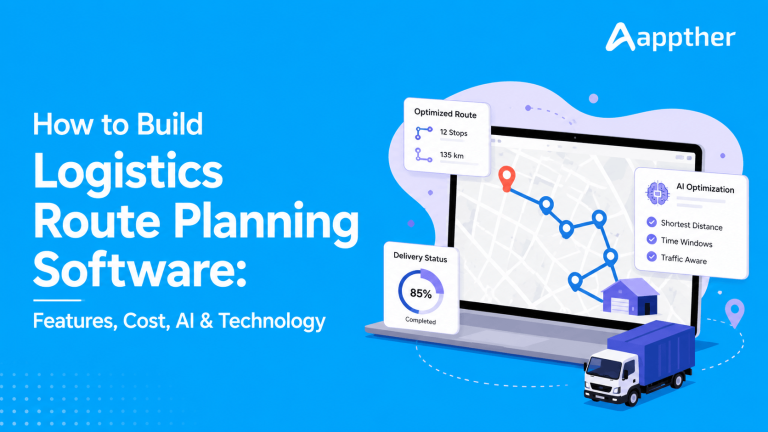
Logistics route planning software is a system that decides how vehicles should travel to complete a set of deliveries or service visits at the lowest cost. It takes your orders, addresses, vehicles, and rules, then produces optimized routes for each driver, plus a live view for dispatchers to track and adjust in real time.
It is more than a map with pins. A real platform models capacity, delivery time windows, driver working hours, vehicle types, service durations, priorities, and traffic. Then it searches millions of possible route combinations to find a strong plan in seconds. That search is the heart of the product.
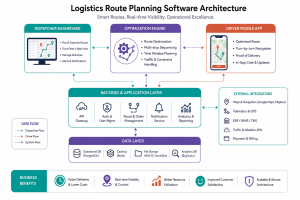
A complete route planning system usually has four working parts:
- Dispatcher dashboard, where planners import orders, run optimization, assign routes, and monitor progress
- Optimization engine, the algorithms that build the best routes under your constraints
- Driver mobile app, with turn-by-turn navigation, stop lists, proof of delivery, and live GPS
- Backend and integrations, connecting orders, maps, telematics, and your ERP or order system
Why Businesses Need Route Planning Software
Manual planning breaks down fast. A dispatcher juggling twenty vehicles and hundreds of stops on a whiteboard cannot test every option, so routes end up longer and costlier than they need to be. Good route planning software removes that guesswork and returns measurable savings.
The main business gains:
- Lower fuel and mileage, by cutting empty and overlapping travel
- More stops per shift, so the same fleet delivers more without extra cost
- Reliable ETAs, which improve customer trust and cut failed deliveries
- Faster planning, turning hours of manual work into a few clicks
- Live visibility, so dispatchers can react to delays and reassign work
- Proof of delivery, with photos, signatures, and timestamps that settle disputes
- Better data, turning every route into insight on cost, delay, and performance
For a delivery, courier, field service, or distribution business, the app often becomes the operational backbone. It touches dispatch, drivers, customers, and finance at once, which is why so many companies choose to build rather than rent.
Core Features of Logistics Route Planning Software
Features decide both the value and the cost of your build. Start with the core set that every serious logistics route planning software needs, then layer advanced capabilities as the product matures.
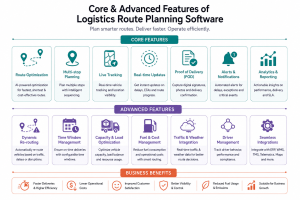
Must-have features
- Order and address import, from CSV, API, or a connected order system, with automatic address cleanup
- Geocoding, converting addresses into accurate map coordinates
- Multi-stop route optimization, building the best sequence and assignment across vehicles
- Constraints, including time windows, vehicle capacity, driver hours, and service times
- Dispatcher dashboard, with a live map, route list, drag-and-drop edits, and manual overrides
- Driver mobile app, with the stop list, turn-by-turn navigation, and status updates
- Live GPS tracking, showing where each vehicle is against its plan
- Proof of delivery, capturing signature, photo, notes, and barcode scan
- Notifications, keeping customers informed with ETAs and delivery alerts
Advanced features
- Dynamic re-routing, adjusting live routes when traffic, cancellations, or new orders appear
- Predictive ETAs, using historical and live data to forecast arrival times more accurately
- Auto-dispatch, assigning new orders to the best vehicle automatically
- Territory and zone planning, balancing workload across regions and teams
- Multi-depot support, planning across several warehouses or start points
- Cost and carbon reporting, tracking spend and emissions per route
- Customer tracking page, a live link so recipients follow their delivery
A smart build ships the must-have set first as an MVP, proves the savings, then adds advanced features from real usage. Trying to build everything at once inflates cost and delays launch.
The Role of AI in Route Planning
AI is what separates a basic route planner from a system that keeps improving. Classic optimization finds a strong plan from today’s inputs. AI learns from history and live signals to make that plan smarter and more adaptive.
Where AI adds real value in logistics route planning software:
- Predictive travel times, learning how long each road segment really takes by time of day, rather than trusting a static estimate
- Demand forecasting, predicting order volume by area and hour so you staff and position vehicles ahead of demand
- Dynamic optimization, re-solving routes on the fly as traffic, weather, and new orders change the picture
- Service-time learning, estimating how long each stop takes based on location type and past visits
- Anomaly detection, flagging routes that are running late or off-plan before they become failed deliveries
- AI agents, handling exceptions end to end: detect a delay, check options, reassign the stop, and notify the customer
The rule stays the same as with any AI feature. It must solve a real operational problem, not sit on the page as a badge. Appther builds AI into the workflow through its AI and product engineering work, so intelligence lives inside dispatch and driver flows rather than as a bolt-on. (See the internal link map for the exact AI services page to link here.)
Route Optimization Algorithms and Technology
Under the hood, route planning is a well-studied computer science problem. Understanding the basics helps you scope the build and judge a vendor’s depth.
The core problem: VRP and TSP
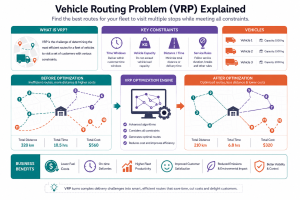
The classic version is the Traveling Salesman Problem, or TSP: find the shortest route that visits every stop once and returns to the start. Add multiple vehicles, capacity, and time windows and it becomes the Vehicle Routing Problem, or VRP. The VRP is the true model behind real logistics, and it is computationally hard. You cannot check every combination for hundreds of stops, so the software uses smart methods to find a near-optimal answer quickly.
How the engine solves it
- Construction heuristics, such as nearest-neighbor and the savings algorithm, build a good first route fast
- Metaheuristics, such as simulated annealing, genetic algorithms, and tabu search, then refine that route toward the best answer
- Constraint solvers, such as Google OR-Tools, model capacity, time windows, and driver rules directly
- Routing engines, such as OSRM, Valhalla, or a maps provider, supply real road distances and durations, not straight-line guesses
The mapping and data layer
Optimization is only as good as its map data. A production system needs geocoding to place addresses accurately, a distance and time matrix between stops, live traffic, and map matching to snap GPS points to roads. Common providers include the Google Maps Platform, Mapbox, and HERE, alongside open engines like OpenRouteService for cost control. Appther’s hardware and IoT app development experience matters here, because live routing leans on GPS trackers and telematics feeding accurate vehicle positions back into the engine.
The Technology Stack
There is no single correct stack. The right choice follows your scale, team, and integration needs. A typical, dependable setup looks like this:
| Layer | Common choices | Why |
|---|---|---|
| Driver app | Flutter or React Native | One codebase for Android and iOS, fast to ship, native GPS access |
| Dispatcher web | React or Next.js | Rich, real-time dashboard with live maps |
| Backend | Node.js or Python (FastAPI) | APIs, business logic, and the optimization service |
| Optimization | OR-Tools, OSRM, custom solver | Solves the VRP under real constraints |
| Database | PostgreSQL + PostGIS | Geospatial queries, routes, and history |
| Realtime | WebSockets, Redis | Live tracking and instant dispatch updates |
| Maps | Google Maps, Mapbox, HERE | Geocoding, traffic, and routing data |
| Cloud | AWS, Azure, or Google Cloud | Scalable hosting and managed services |
PostGIS deserves a special mention. It turns PostgreSQL into a geospatial database, so you can store routes, run distance queries, and manage zones inside your main database instead of bolting on a separate service.
Key Integrations
Route planning software rarely lives alone. Its value grows when it connects to the systems that already run your business.
- Order and eCommerce systems, pulling orders in automatically so planning starts without manual entry
- ERP and inventory, syncing stock, customers, and delivery data. Appther’s Odoo ERP services are a natural fit when logistics runs on Odoo
- Telematics and GPS hardware, feeding live vehicle location, speed, and fuel data into the platform
- Warehouse and TMS systems, aligning picking, loading, and dispatch
- Communication tools, sending SMS, email, and WhatsApp updates to customers
- Payment and COD, reconciling cash on delivery and digital payments per stop
Plan integrations early. Retrofitting them after launch is slow and expensive, and they often shape the data model your whole platform depends on.
How to Build Logistics Route Planning Software (Step by Step)
A dependable build follows a clear path from problem to live product.
Step 1: Define the routing problem
Pin down your exact constraints. How many vehicles and stops, what time windows, what vehicle types, and what counts as a good route for your business. This shapes the entire optimization design.
Step 2: Map requirements and roles
List the roles (dispatcher, driver, admin, customer) and the features each needs. Separate the must-have MVP from the advanced roadmap.
Step 3: Design the data model and integrations
Model orders, vehicles, drivers, and routes, and decide which systems feed data in. The geospatial data model is the foundation everything else sits on.
Step 4: Build the optimization engine
Choose your routing engine and solver, then encode your constraints. Validate results against known routes so planners trust the output from day one.
Step 5: Build the dispatcher dashboard and driver app
Ship a clean planner dashboard and a simple, reliable driver app. Drivers use it all day in poor signal, so speed and offline resilience beat visual polish.
Step 6: Add live tracking and notifications
Wire GPS, real-time updates, and customer ETAs. This is where the platform starts to feel alive to everyone involved.
Step 7: Test, launch, and iterate
Test with real routes and edge cases, launch with a pilot fleet, then improve from live data. Route quality and driver adoption are the metrics that matter most.
How Much Does Logistics Route Planning Software Cost?
Cost follows scope. Fleet size, feature depth, AI, integrations, and how custom the optimization needs to be all move the number. These ranges reflect blended agency build costs and are a planning guide, not a quote.
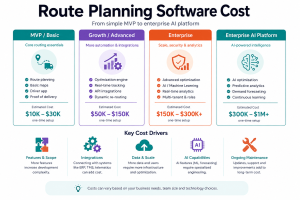
| Build tier | Typical scope | Indicative cost (USD) | Timeline |
| Simple MVP | Basic multi-stop optimization, dispatcher view, simple driver app, GPS | $15,000 – $50,000 | 8 – 14 weeks |
| Growth platform | Constraints, live tracking, proof of delivery, notifications, 2-3 integrations | $50,000 – $120,000 | 4 – 7 months |
| Advanced AI platform | Predictive ETAs, dynamic re-routing, auto-dispatch, telematics, multi-depot | $120,000 – $250,000 | 7 – 12 months |
| Enterprise system | Large fleets, deep ERP/TMS integration, custom solver, SSO, analytics | $250,000+ | 12+ months |
The biggest cost drivers are the optimization depth, the number of live and hardware integrations, AI features, and fleet scale. Map and traffic APIs also carry ongoing usage costs, so factor those into the running budget, not just the build.
When you compare quotes, ask for a breakdown across optimization, dispatcher dashboard, driver app, integrations, maps, testing, and support. A single lump figure hides the parts that actually vary between vendors.
How Long Does It Take to Build?
Timelines track the same tiers as cost:
| Scope | Typical duration |
|---|---|
| Simple MVP | 8 – 14 weeks |
| Growth platform | 4 – 7 months |
| Advanced AI platform | 7 – 12 months |
| Enterprise system | 12+ months |
The optimization engine and live tracking usually take the most engineering time, because both must be accurate and reliable under load. Integrations and mid-project scope changes are the most common causes of delay.
Common Challenges and How to Solve Them
- Messy address data. Solve it with strong geocoding, validation, and a manual fix flow for failures.
- Optimization that is too slow. Use proven solvers, cache distance matrices, and tune for near-optimal speed over perfect answers.
- Driver adoption. Keep the app simple, fast, and usable offline, or drivers route around it.
- Unreliable ETAs. Blend live traffic with learned travel times rather than static estimates.
- Rising map API costs. Cache results, batch requests, and consider open routing engines for heavy workloads.
- Real-time scale. Design tracking with efficient WebSockets and a cache layer from the start.
Security and Compliance
Route planning software holds sensitive data: customer addresses, live vehicle locations, and driver details. Treat security as a design decision, not a final step.
- Encryption in transit and at rest for location and personal data
- Role-based access, so drivers, dispatchers, and admins see only what they need
- Secure APIs, with authentication, rate limiting, and input validation
- Location data care, retaining GPS history only as long as it is genuinely needed
- Privacy compliance, aligned to the regulations of the markets you operate in
Industries That Use Route Planning Software
- Courier and parcel delivery, optimizing dense, high-volume drop routes
- Food and grocery delivery, planning tight time windows and fresh-goods constraints
- Field service, scheduling technicians by skill, location, and appointment slot
- Distribution and FMCG, planning multi-depot delivery to stores and outlets
- Waste and utilities, running fixed and dynamic collection routes
- eCommerce and 3PL, managing last-mile delivery at scale
Why Build With Appther
Building logistics route planning software needs three skills at once: real optimization know-how, solid mobile and backend engineering, and hardware and telematics experience for live tracking. Appther brings all three.
Appther has delivered fleet telematics work, including a 60-vehicle telematics deployment, plus hardware-connected apps that read live device and sensor data. That hardware and IoT app development background is exactly what live routing depends on. On the operations side, Appther’s Odoo ERP services connect route planning to inventory, orders, and finance, so the platform fits how your business already runs.
From product discovery and UX design to the optimization engine, driver app, AI features, and ongoing support, Appther builds the whole platform, not just one screen of it. Learn more about our AI product engineering work.
Frequently Asked Questions
What is logistics route planning software?
It is a system that plans and optimizes delivery routes across many stops and vehicles under real constraints like time windows, capacity, and driver hours. It includes a dispatcher dashboard, an optimization engine, a driver app, and live tracking.
How much does it cost to build route planning software?
A simple MVP runs roughly $15,000 to $50,000. A growth platform runs $50,000 to $120,000, and an advanced AI platform with telematics and dynamic re-routing runs $120,000 to $250,000 or more. Cost follows features, integrations, and fleet scale.
How long does it take to build?
A focused MVP takes about 8 to 14 weeks. A full platform with live tracking and integrations takes 4 to 12 months depending on scope. The optimization engine and real-time tracking take the most engineering time.
What algorithms does route planning use?
It solves the vehicle routing problem, a harder version of the traveling salesman problem. Engines use heuristics and metaheuristics such as the savings algorithm, simulated annealing, and genetic algorithms, often through tools like Google OR-Tools and routing engines like OSRM.
How does AI improve route planning?
AI predicts real travel and service times, forecasts demand, and re-optimizes routes dynamically as conditions change. It makes ETAs more accurate and helps handle exceptions like delays and new orders automatically.
Can it integrate with my ERP or order system?
Yes. Route planning software commonly integrates with ERP, eCommerce, WMS, TMS, telematics, and communication tools through APIs, so planning starts from live order data and syncs results back.
Should I build custom or buy off-the-shelf?
Off-the-shelf suits simple, standard needs. Build custom when you have unusual constraints, custom pricing, deep integrations, or want to own the platform and its data as a competitive advantage.
What technology stack is used?
A typical stack uses Flutter or React Native for the driver app, React for the dashboard, Node.js or Python on the backend, PostgreSQL with PostGIS for geospatial data, OR-Tools or OSRM for optimization, and a maps provider for geocoding and traffic.
Conclusion
Logistics route planning software turns one of the hardest daily problems in delivery into a fast, repeatable, data-driven decision. The winning platforms are not the ones with the most features. They are the ones with an optimization engine planners trust, a driver app teams actually use, and AI that keeps the whole system learning.
Start with a focused MVP that proves the savings, choose technology that fits your scale, and build with a partner who understands optimization, mobile, and telematics together. Do that, and your route planning software becomes a lasting operational advantage rather than just another tool.