Software development has always included more than writing code. A developer may spend the first hour of a task tracing an old service, locating the right database table, reading an API contract and working out why a test fails only on certain machines. The actual code change might take 20 minutes.
That is the gap AI coding agents are beginning to close.
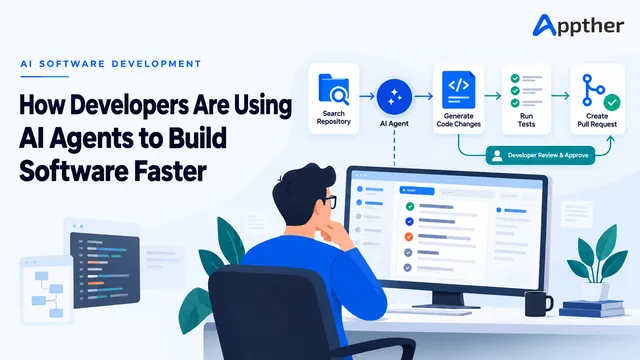
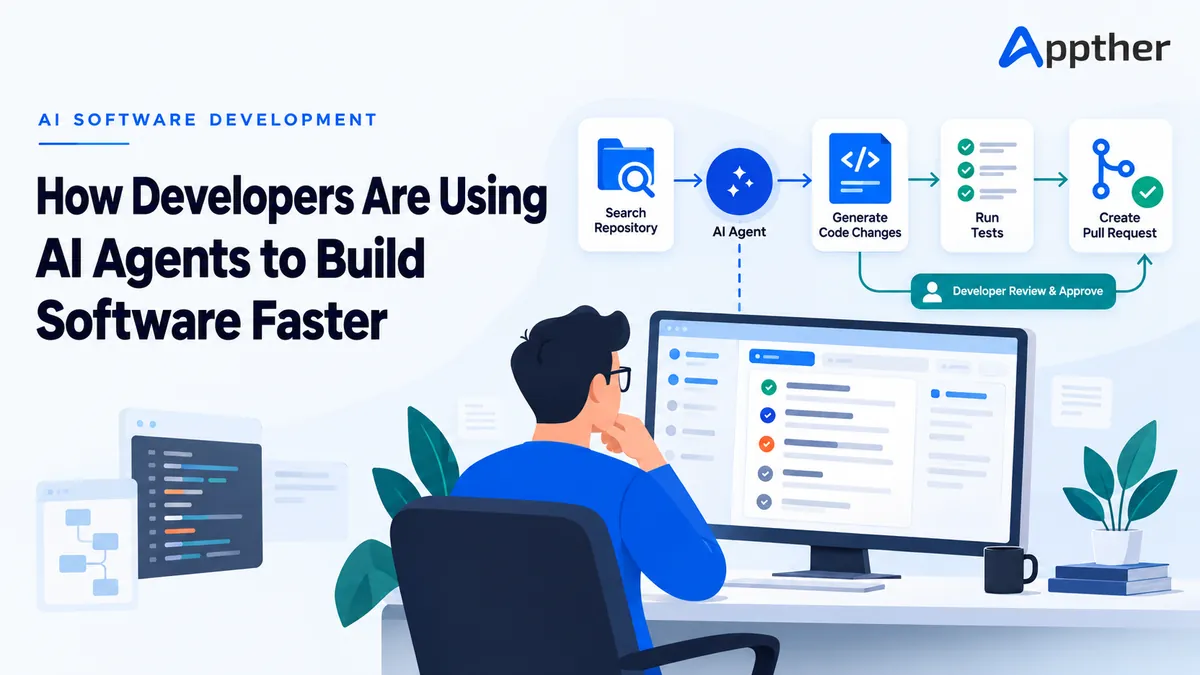
Unlike a conventional coding assistant that waits for a developer to type and suggests the next few lines, an agent can work toward a defined outcome. It can inspect a repository, search for related files, propose a plan, edit several components, run tests and report what changed. The developer still owns the decision, but no longer has to perform every mechanical step by hand.
Used well, AI agents do not turn software engineering into a one-click activity. They make the feedback loop shorter. A team can move from an issue to a testable implementation sooner, explore unfamiliar code with less friction and spend more time on architecture, product behaviour and the awkward edge cases that require judgement.
This article explains how developers are using AI agents for software development, where they deliver genuine value, where they still struggle and what teams should put in place before giving them access to a production codebase.
What is an AI coding agent?
An AI coding agent is a software tool that uses a language model to complete a development task through a sequence of actions. Depending on its permissions, it may be able to read files, search a repository, execute terminal commands, edit code, run a test suite and prepare a pull request.
The important word is sequence. A chat assistant can explain how to create an API endpoint or produce an isolated code sample. An agent can look at how endpoints are already built in a particular repository, follow that pattern, update the validation layer, add a migration, write tests and check whether the result passes the project’s existing quality gates.
Most coding agents work through a loop:
- Understand the task and available context.
- Inspect the relevant parts of the codebase.
- Form a plan and select the next action.
- Make a change or run a tool.
- Read the result, including errors and test output.
- Revise the approach until the task is complete or blocked.
- Present the work for human review.
That does not make the agent autonomous in the broad sense. A responsible setup limits which tools it can use, which directories it can change and which actions need approval. The most useful agents are not the ones with unlimited access. They are the ones given a clear task, good context and boundaries that match the risk.
How AI agents differ from code completion
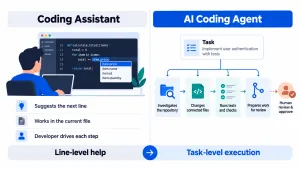
Autocomplete remains useful. It is quick, stays close to the code currently being written and reduces repetitive typing. But its unit of work is usually a line, function or small block.
An agent works at task level. A request might be: “Add an optional delivery note to checkout, persist it with the order and display it in the admin panel.” That change may touch a frontend form, an API schema, server-side validation, a database model, an admin component and several tests. A coding agent can trace those dependencies before making the edits.
The distinction matters because much of the time saved does not come from generating code faster. It comes from reducing the searching, switching and repetition around the code.
This is also why an agent needs more context than an autocomplete tool. It must understand repository conventions, commands, dependencies, architectural boundaries and the acceptance criteria for the task. Without that information, it can produce code that looks reasonable in isolation but does not belong in the system.
Seven ways developers are using AI agents today
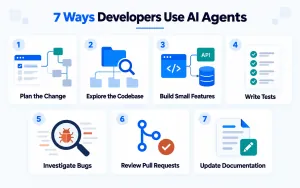
1. Turning a ticket into a technical plan
A good development task begins with a shared understanding of what needs to change. In practice, tickets are often incomplete. They describe the desired screen or behaviour without identifying affected services, permissions, validation rules or failure states.
Developers use agents to inspect the codebase and turn a product request into a proposed implementation plan. The agent can locate similar features, map the likely files, identify existing utilities and list questions that need an answer before coding begins.
This is useful during backlog refinement because the output gives the team something concrete to challenge. A senior developer can spot an incorrect assumption early, while a product owner can clarify a missed business rule before it becomes rework.
The plan should not be treated as authority. It is a first pass grounded in the repository, not a replacement for architectural ownership. Its value is speed: the team starts the discussion with evidence rather than a blank page.
2. Understanding unfamiliar and legacy code
Joining an established project can be slow. Names are inconsistent, documentation is incomplete and the reason behind an old design decision may be buried across commits and tests.
An agent can search for where a class is called, trace data from a user action to the database and summarise how a module interacts with the rest of the application. Developers can ask focused questions such as:
- Where is invoice status calculated?
- Which services write to this table?
- What happens when this webhook is received twice?
- Which tests describe the expected behaviour for a cancelled booking?
This does not eliminate the need to read code. It provides a map, allowing the developer to spend attention on the sections that matter. The benefit is especially noticeable in large repositories, inherited products and systems split across multiple services.
3. Implementing small, well-defined features
AI agents perform best when a task has a clear boundary and a verifiable finish line. Adding a form field, extending an existing API, creating a report export or applying an established component pattern are strong examples.
The agent can identify the existing convention and carry it across every affected layer. A developer then reviews the diff, checks the business behaviour and requests corrections where needed.
This approach is faster than asking for an entire feature in one vague prompt. Teams increasingly break work into reviewable slices: first the data model, then the API, then the interface. Smaller changes reduce the chance that the agent will make a plausible but incorrect architectural decision, and they make human review much easier.
4. Writing and maintaining tests
Test work contains many patterns an agent can follow. Once it sees how the repository creates fixtures, mocks services and names scenarios, it can draft unit and integration tests for a new change. It can also run those tests, read a failure and revise the implementation.
Developers are using agents to:
- Add regression tests before fixing a reported bug.
- Cover boundary conditions around validation and permissions.
- Create fixtures that match existing test conventions.
- Identify code paths that are not exercised.
- Update tests after an intentional interface change.
The developer still needs to judge whether a test proves the right thing. An agent may write a test that simply mirrors its own implementation, allowing the same misunderstanding to appear in both. Strong acceptance criteria and independent review remain important.
5. Investigating and fixing bugs
Bug fixing is a natural agent workflow because it has an observable target: reproduce the failure, find the cause, make a change and show that the relevant tests now pass.
A useful task includes the error message, steps to reproduce, expected behaviour, runtime details and any relevant logs. The agent can search for the failing path, compare it with similar working code and form a hypothesis. If it can execute the application or tests safely, it can validate that hypothesis rather than stopping at a confident explanation.
This is particularly effective for routine faults such as incorrect null handling, validation gaps, broken imports, mismatched types and regressions caused by a local change. Intermittent production issues, concurrency bugs and failures involving incomplete telemetry still demand experienced investigation.
6. Reviewing pull requests
AI-assisted review can give a developer a useful first pass before a colleague spends time on the pull request. An agent can check whether the change matches the ticket, look for missing error handling, flag duplicated logic and identify tests that should be added.
It can also summarise a large diff for the human reviewer: what changed, which components are affected and where the highest-risk decisions sit. This is valuable when a pull request includes generated files or repetitive changes that obscure the meaningful logic.
It should not become the only reviewer. Security decisions, product trade-offs, subtle data changes and maintainability still require accountable human judgement. The agent is best used as another layer, not the approval gate.
7. Handling documentation and release work
Documentation often falls behind because it competes with delivery. An agent can update API examples, draft migration notes, explain a configuration change and prepare a release summary from the merged work.
It can also help with repetitive delivery tasks: editing environment templates, updating CI configuration, checking a deployment runbook or drafting rollback steps. Any action that affects production should remain behind an explicit approval, but preparing the change can still save time.
At Appther, this fits a broader principle reflected in our technology stack: releases should be reproducible, staged and easy to roll back. Faster code has little value if the route to production becomes less controlled.
A practical agent-assisted development workflow
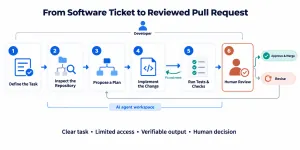
The strongest results come from fitting agents into an engineering process rather than letting each developer improvise. A typical workflow looks like this.
Start with an outcome, not a broad instruction
“Improve the dashboard” is too open. “Reduce the customer table’s initial load by removing the per-row profile request, without changing the API response” is testable. Include acceptance criteria, non-goals and constraints.
If the expected behaviour cannot be explained clearly, the team is not ready to delegate the task, whether to a developer or an agent.
Give the agent repository-level guidance
Document the commands used to install dependencies, run focused tests, lint code and build the application. Explain important directories, generated files that must not be edited, security rules and the project’s definition of done.
This small investment compounds. Instead of repeating the same context in every prompt, the repository teaches the agent how the team works.
Ask for investigation before implementation
For anything beyond a trivial change, have the agent inspect first and present a plan. This exposes misunderstandings while they are cheap. It also gives the developer a chance to narrow the task or point the agent toward an existing abstraction.
Keep changes small and observable
An agent should be able to verify its work through tests, type checks, linting or a reproducible manual check. Large changes create too many places for a hidden assumption to survive. Small commits and focused diffs remain good engineering practice, with or without AI.
Review the evidence, not only the summary
An agent’s final message may sound certain even when its implementation is incomplete. Review the actual diff. Check which commands ran, whether they passed and what was not tested. For user-facing changes, inspect the behaviour in the application.
Keep deployment under human control
Development teams may allow an agent to create a branch or open a pull request. Merging to a protected branch, changing infrastructure, accessing secrets or deploying to production should require explicit approval and established CI/CD checks.
Where AI agents save the most time
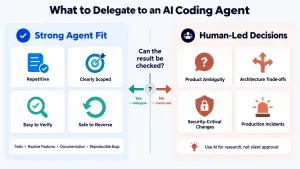
The best candidates tend to share four characteristics: the task is bounded, the repository contains patterns to follow, the result can be checked and mistakes are reversible.
Examples include routine CRUD changes, test generation, SDK upgrades with clear migration notes, internal tools, documentation, codebase exploration and well-reproduced bugs. Agents can also be effective in parallel: while a developer works on the main feature, an agent may investigate a failing test or draft documentation in a separate branch.
The weakest candidates are ambiguous product decisions, major architectural changes with long-term consequences, novel security mechanisms and incidents where the available evidence is incomplete. An agent can assist with research in these areas, but it should not silently make the call.
The goal is not maximum delegation. It is sensible delegation. Sometimes a script, template or IDE refactor is faster and safer than an agent. Mature teams choose the simplest tool that fits the job.
Common mistakes that make coding agents slower
The first is giving the agent a vague task and hoping it will discover the product requirements. It may fill the gaps, but those guesses become code the team must later unwind.
The second is accepting a large change because the tests are green. A test suite only checks what it contains. The agent may have changed an interface, weakened validation or missed a user journey that has no automated coverage.
The third is allowing broad permissions by default. A coding task rarely needs production credentials, unrestricted network access or permission to change deployment settings. Least-privilege access limits both accidental damage and the effect of malicious instructions hidden in external content.
The fourth is measuring output instead of outcomes. More commits or lines of code do not mean a team is faster. Useful measures include lead time for changes, review time, escaped defects, deployment frequency and the percentage of agent-generated changes that need substantial rework.
Finally, teams should avoid sending confidential client data, credentials or proprietary material to an unapproved model. Tool selection must account for data retention, access controls, deployment region and contractual obligations, not just model quality.
The developer’s role is changing, not disappearing
AI agents take on more implementation work, but they also increase the value of clear engineering judgement. Someone must decide what the software should do, identify unacceptable risk, choose the right boundary between services and recognise when a neat solution creates an operational problem later.
Developers are likely to spend less time producing predictable boilerplate and more time defining tasks, reviewing system behaviour, designing interfaces and validating results. Communication becomes a technical skill: vague requirements have always caused weak software, but an agent can turn ambiguity into code unusually quickly.
Junior developers can use agents to explore a codebase and receive immediate explanations, yet they still need to build fundamentals. Without an understanding of data structures, security, testing and system design, it is difficult to recognise a convincing mistake. Senior developers, meanwhile, can use agents to cover more ground, but remain accountable for the architecture and the release.
How companies can adopt agentic software development safely
Start with one team, one repository and a narrow set of tasks. Select work that is repetitive enough to show a benefit but safe enough to review and reverse. Establish a baseline for cycle time and defect rate before the pilot so the result can be measured honestly.
Next, define the operating rules:
- Which repositories and branches can the agent access?
- Can it execute code, use the network or install packages?
- Which files and systems are out of bounds?
- What checks must pass before a pull request can be merged?
- Where must a person approve the next action?
- How will agent activity be logged and audited?
Then improve the environment around the agent. Clean setup instructions, reliable tests, consistent architecture and useful error messages make both people and agents more productive. If an agent repeatedly fails to understand a repository, the problem may be poor project hygiene rather than the model alone.
Appther’s approach to AI agent development follows the same production discipline: scoped access, observable tool calls, evaluation and human approval for consequential actions. Companies considering a wider implementation can also review our AI development services and case studies to see how AI work connects with existing applications and business systems.
Final thoughts
AI coding agents are useful because software development contains thousands of small loops: search, edit, run, read, correct and repeat. An agent can complete many of those loops quickly while keeping the developer focused on the decision that matters.
The teams getting the most value are not asking an agent to “build the whole application.” They are giving it well-shaped tasks, useful context, reliable checks and limited authority. They inspect the work, learn where the tool performs well and expand its role gradually.
That is a less dramatic story than replacing developers, but it is far more practical. AI agents are becoming another part of the engineering toolchain, one that can reduce routine effort, shorten feedback cycles and help a capable team deliver reliable software faster.
If you are exploring where agents could fit into your product or development workflow, talk to Appther. We can help you identify a measurable pilot, connect the agent to the right tools and build the controls needed for production use.
Frequently asked questions
How do AI agents help developers build software faster?
AI agents reduce the time spent searching a codebase, applying repetitive changes, writing routine tests and moving between tools. They can work through a defined task, run checks and prepare a reviewable change while the developer retains control of technical and product decisions.
Are AI coding agents the same as code completion tools?
No. Code completion usually suggests the next line or block inside an editor. A coding agent can inspect multiple files, plan a change, execute commands, edit the repository and respond to test results. It works at task level rather than only at typing level.
Can an AI agent build a complete application?
An agent can accelerate many parts of an application build, particularly prototypes and standard features. A production application still needs clear requirements, architecture, security review, testing, user experience decisions, deployment planning and accountable human oversight.
What software tasks are best suited to AI agents?
Well-defined, verifiable and reversible tasks are the best fit. Examples include adding tests, fixing reproducible bugs, extending an existing API pattern, updating documentation and implementing small features with clear acceptance criteria.
What are the risks of using AI agents for software development?
Key risks include incorrect but plausible code, insecure changes, exposure of confidential information, excessive tool permissions and overreliance on incomplete tests. Teams can reduce these risks with restricted access, protected branches, automated checks, activity logs and mandatory human review.
Will AI coding agents replace software developers?
They are more likely to change how developers work than remove the need for them. Agents can handle routine execution, but people remain responsible for requirements, architecture, trade-offs, security, user needs and the decision to release software.