You’ve finished developing your Android app. The features are working, the interface is ready, and you’re looking forward to publishing it on Google Play.
Then you open Google Play Console and discover another requirement: 12 testers for 14 consecutive days.
For independent developers and small businesses, finding reliable testers can be surprisingly difficult. Even after recruiting enough people, you need to manage participation, collect meaningful feedback, fix problems, and explain your testing process to Google.
The good news is that the process becomes more manageable once you understand what Google actually requires.
This guide explains the Google Play 12 testers rule, how to configure closed testing, ways to recruit testers, common mistakes, and what to prepare before applying for production access.
What Is the Google Play 12 Testers for 14 Days Requirement?
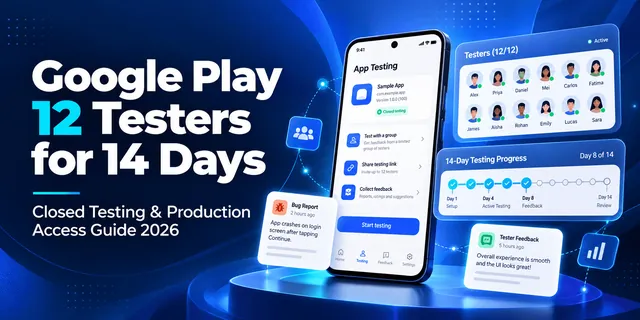
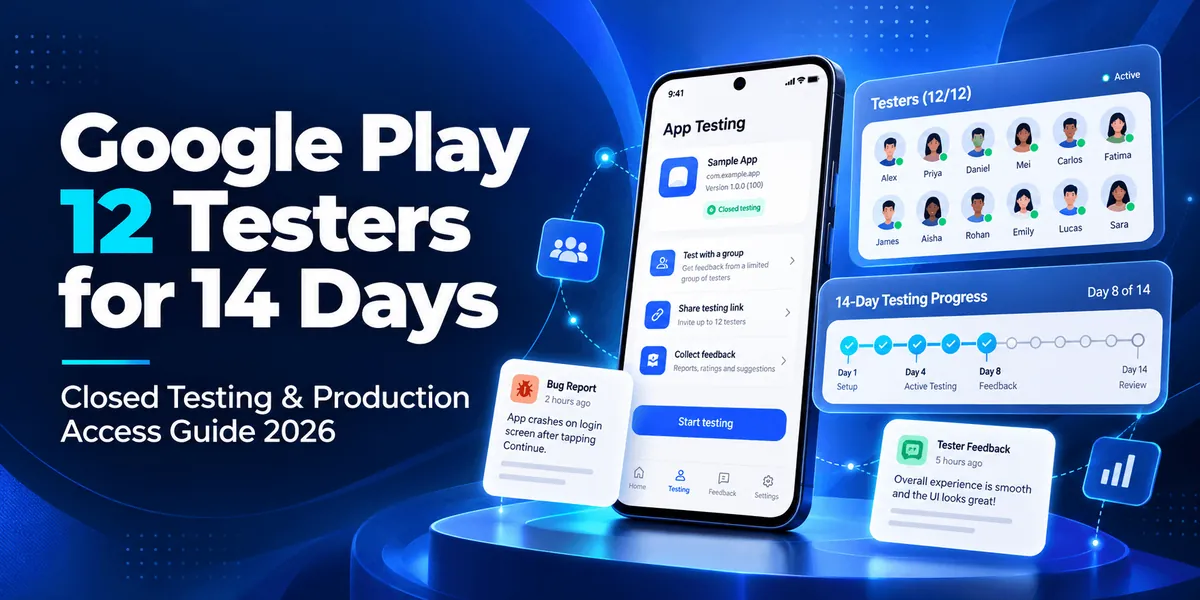
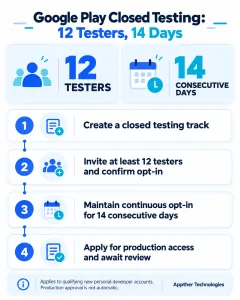
Google Play requires developers using personal Play Console accounts created after November 13, 2023, to complete a closed testing period before applying for production access.
Under this requirement:
- At least 12 testers must be opted in to the closed test.
- Those testers must remain opted in continuously for 14 consecutive days.
- Developers must complete the required application setup.
- After satisfying the testing criteria, developers can request production access through Google Play Console.
- Google reviews the application and determines whether the app is ready for production.
The requirement is designed to encourage developers to test their apps with real users before making them publicly available.
Importantly, finishing 14 days of testing does not automatically result in production approval.
Google considers the testing process, user feedback, app readiness, and information provided in the production access application.
Need reliable Android app testers? Explore Appther’s Google Play Closed Testing Service, which provides 12 dedicated QA testers and managed testing support throughout the 14-day period.
Why Does Google Play Require Closed Testing?
Releasing an Android application involves more than making sure its code compiles.
An app might run perfectly on a developer’s device but behave differently when installed on another phone with a different Android version, screen size, or network configuration.
Closed testing helps identify problems that are difficult to discover during development.
1. Identify Bugs Before Public Launch
Real-device testing can uncover crashes, navigation problems, broken forms, login issues, and unexpected application behavior.
Finding these problems before launch can reduce negative early user experiences.
2. Evaluate Real-World Usability
Developers know how their applications are supposed to work. First-time users do not.
Testing can reveal unclear navigation, confusing onboarding, missing instructions, or unnecessary steps.
3. Assess Performance Across Devices
Different Android devices can behave differently because of hardware capabilities, operating system versions, memory limitations, and manufacturer customizations.
Testing helps uncover device-specific issues.
4. Build Confidence in Production Readiness
A completed testing cycle gives developers an opportunity to review feedback, resolve critical problems, and explain why their app is suitable for a wider audience.
Who Needs to Complete the 12 Testers Requirement?
The mandatory closed testing requirement generally applies to newly created personal Google Play developer accounts.
| Developer account | Closed testing requirement |
|---|---|
| Personal account created after November 13, 2023 | At least 12 opted-in testers for 14 consecutive days before applying for production access |
| Older personal developer account | Not automatically subject to this specific new-account requirement |
| Organization developer account | Not subject to this specific personal-account requirement |
| Personal developer account already granted production access | Follow applicable Play Console requirements for subsequent releases |
Other Google Play policies, app reviews, and testing-related requirements may still apply.
Always check your Play Console dashboard for the requirements applicable to your account.
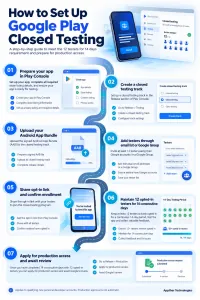
How to Set Up Google Play Closed Testing: Step-by-Step
Setting up closed testing involves preparing your application, defining a testing group, distributing the test build, and collecting feedback.
Step 1: Sign In to Google Play Console
Visit Google Play Console and select the Android application you want to test.
Complete the relevant app setup requirements before attempting to distribute a closed testing release.
Depending on your application, this may involve the store listing, content declarations, privacy policy, data safety information, and other required details.
Step 2: Create a Closed Testing Track
From your application dashboard, navigate to the closed testing section under the testing and release tools.
Create or configure your closed testing track.
This track allows you to distribute a prerelease version of your app to a specific group of testers rather than to the general public.
Step 3: Upload Your Android App Bundle
Prepare your release and upload the Android App Bundle (AAB).
Review the release details and address any errors or warnings that prevent the release from being submitted.
Make sure the uploaded build contains the features you want testers to evaluate.
Step 4: Add Your Testers
Google Play supports managing eligible testers through mechanisms such as email lists or Google Groups.
Invite your testers using the testing configuration in Play Console.
Each participant should use the appropriate Google account to join the test.
Important: Sending an invitation is not enough. Testers need to complete the opt-in process successfully.
Step 5: Share the Opt-In Link
Once the closed test is available, share the opt-in link with your invited testers.
Ask them to follow the enrollment instructions and install the test application.
Confirm that participants have successfully opted in rather than assuming they joined because they received the link.
Step 6: Maintain 12 Testers for 14 Consecutive Days
This is where many developers experience difficulty.
At least 12 testers must remain opted in continuously throughout the qualifying 14-day period.
If you recruit exactly 12 testers and one opts out, you may lose the continuous participation needed for that tester.
Recruiting more than the minimum can help protect your testing schedule.
During the test, encourage meaningful app usage and ask testers to explore the most important user journeys.
Step 7: Collect Feedback and Fix Problems
Ask testers to report issues they encounter, including:
- App crashes or freezes
- Registration and login failures
- Unexpected behavior during navigation
- Broken buttons or forms
- Slow-loading screens
- Problems with notifications or permissions
- Device-specific display issues
Maintain a testing log containing bug descriptions, screenshots, device information, fixes, and retesting results.
This information is useful both for improving the app and for preparing your production access application.
Step 8: Apply for Production Access
After your account meets the closed testing requirements, use the production access application available in your Play Console dashboard.
Google asks questions about your testing process, your application, and its readiness for public release.
Answer these questions accurately using the testing activities and feedback you actually collected.
Google reviews your submission and may approve production access or require additional testing.
How to Find 12 Testers for Google Play
Finding people who are willing to install an app is relatively easy. Finding people who will remain involved and provide helpful feedback can be much harder.
There are several approaches developers can consider.
Option 1: Friends and Family
You can invite people you already know to participate.
This is often the easiest starting point for independent developers.
However, friends or relatives may be unfamiliar with software testing, lose interest, or provide limited feedback.
Give them simple testing instructions to make participation easier.
Option 2: Developer Communities
Online developer groups, Android development communities, and relevant discussion forums may help you connect with potential testers.
Look for communities whose members have a genuine interest in the type of application you’re building.
Avoid unsolicited invitations and follow each community’s rules.
Option 3: Beta Testing Communities
Some communities connect developers with users interested in testing prerelease applications.
These can be useful for initial user feedback, although participation and feedback quality may vary.
Option 4: Recruit Existing Prospective Users
If your app serves a particular audience, invite people who are likely to use it once launched.
For example, a fitness application may benefit from feedback from people who regularly use workout-tracking tools.
Relevant testers can provide more meaningful usability insights.
Option 5: Hire a Professional QA Testing Team
For developers who have limited time or need structured feedback, a managed testing service is another option.
A dedicated QA team can help coordinate testers, maintain participation, document bugs, and prepare a testing summary.
Appther provides a Google Play 12 Testers and 14-Day Closed Testing Service using real Android devices and a managed testing process.
Professional testing does not guarantee Google Play approval, but it can reduce the administrative burden and help developers complete a more useful testing cycle.
What Should Testers Actually Test During the 14 Days?
Closed testing should be more than a group of people joining a test and leaving an application installed.
Although the formal participation threshold is based on continuous opt-in, developers should use the testing period to evaluate how their application performs.
Here is an illustrative testing schedule.
| Day | Suggested testing activity |
|---|---|
| 1 | Install the app and check onboarding |
| 2 | Test registration, login, and logout |
| 3 | Explore primary navigation |
| 4 | Test the app’s main feature |
| 5 | Check data entry and validation |
| 6 | Test error messages and recovery |
| 7 | Review performance and stability |
| 8 | Test different Android devices |
| 9 | Review permissions and notifications |
| 10 | Test network interruptions |
| 11 | Retest previously reported bugs |
| 12 | Evaluate usability and accessibility |
| 13 | Verify important fixes |
| 14 | Collect final feedback and summarize results |
This is a suggested QA schedule, not a testing schedule mandated by Google.
The actual test plan should reflect your application’s features, intended users, and risks.
For example, an e-commerce application should prioritize browsing, cart management, checkout, payment handling, and order confirmation.
A healthcare application may require additional attention to sensitive data handling, access controls, consent, and reliability.
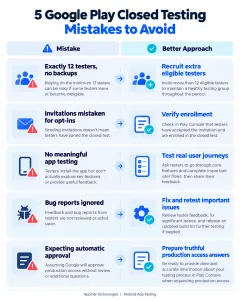
Common Google Play Closed Testing Mistakes
Developers sometimes complete substantial testing work but overlook details that affect production readiness.
Mistake 1: Recruiting Exactly 12 Testers Without Backup
If one tester opts out, your qualifying participant count may fall below the required minimum.
Better approach: Recruit additional eligible testers and monitor opt-in status throughout the test.
Mistake 2: Assuming Invitations Count as Participation
Inviting testers does not necessarily mean they have joined your closed test.
Better approach: Confirm successful opt-ins through Play Console.
Mistake 3: Focusing Only on Installations
Installing an app is not the same as evaluating it.
Better approach: Provide useful testing instructions and encourage participants to report actual experiences.
Mistake 4: Ignoring Reported Bugs
Collecting feedback without acting on critical issues reduces the value of closed testing.
Better approach: Categorize reported issues, prioritize important fixes, and retest changes.
Mistake 5: Submitting Weak Production Access Answers
Vague responses may not adequately explain what you tested, what users experienced, or how you improved the application.
Better approach: Maintain clear records of testing scenarios, feedback, resolved issues, and remaining limitations.
Mistake 6: Expecting Automatic Approval After 14 Days
The 14-day period is a prerequisite for eligible accounts, not a guarantee of approval.
Better approach: Review your production readiness before applying, and be prepared to conduct additional testing if Google requests it.
Google Play Closed Testing vs. Internal Testing vs. Open Testing
Google Play offers several ways to distribute applications during development.
Understanding the differences helps developers choose the right approach.
| Testing type | Purpose | Typical audience |
|---|---|---|
| Internal testing | Rapid feedback during development | Small group of trusted testers |
| Closed testing | Structured testing with a selected audience | Invited testers and beta users |
| Open testing | Broader prerelease feedback | Eligible users who choose to join |
| Production | Public application distribution | General Google Play audience |
For eligible new personal developer accounts, closed testing is a required step before requesting production access.
Internal testing can help you identify problems early, but it does not replace that mandatory closed test.
How to Prepare for Google Play Production Access Approval
Once the required testing period is complete, developers must explain their testing activities and application readiness.
Google’s application covers areas including:
- About your closed test
- About your app or game
- About your production readiness
You should be able to describe how testers were recruited, what parts of the app were evaluated, what feedback was collected, and what improvements were made.
For example, if testers discovered that a login error message was confusing, explain the issue and how the application was improved.
If testers identified a crash on a specific Android version, document the issue, corrective action, and verification results.
Keep your answers factual. Do not invent testing sessions, bug reports, user feedback, or improvements.
A useful testing summary might contain:
Application: [Your App Name]
Test period: [Start Date – End Date]
Test group: [Number of opted-in testers]
Devices tested: [Actual device details]
Features evaluated: [Actual features]
Issues discovered: [Observed defects]
Fixes implemented: [Completed improvements]
Remaining known issues: [Outstanding issues]
Production readiness assessment: [Your evidence-based conclusion]
The goal is to demonstrate that testing informed your decision to release the application.
What Happens if Google Play Rejects Your Production Access Request?
A production access rejection does not necessarily mean your application can never be published.
Google may require additional testing or improvements before granting access.
Review the information provided in Play Console and identify what needs attention.
Depending on the feedback, you may need to improve tester engagement, address important bugs, clarify your testing evidence, or continue testing before submitting another request.
Avoid immediately resubmitting the same explanations without addressing the concerns raised.
Is Hiring 12 Google Play Testers Worth It?
For developers with active user communities, recruiting testers independently can be practical.
However, organizing a reliable 14-day test can take time away from development, bug fixing, and launch preparation.
A managed QA service may be worthwhile when:
- You do not have enough reliable testers.
- Your testers are not providing meaningful feedback.
- You want testing across real Android devices.
- You need documented bug reports.
- You want support organizing the testing process.
- You are preparing for a commercial app launch.
The right decision depends on your available resources, application complexity, and launch priorities.
How Appther Helps With Google Play Closed Testing
At Appther Technologies, our approach to Google Play closed testing focuses on both tester participation and useful quality assurance.
Our service includes:
12 dedicated QA testers: Real testers using Android devices and individual Google accounts.
14 days of managed testing: Participation coordination throughout the consecutive testing period.
Daily application testing: Testing of important application workflows and user journeys.
Bug reporting: Documented issues with reproduction steps and supporting information.
Participation monitoring: Tracking tester opt-in status and addressing participation concerns.
Testing summary: A consolidated record to help developers prepare truthful production access application answers.
Our team can also assist with identifying technical issues that need developer attention before release.
If you’re preparing to publish an Android application but are having trouble recruiting or managing testers, explore our Google Play Closed Testing Service.
Google makes the final production access decision, so no testing provider can guarantee approval.
Final Thoughts
Google Play’s 12 testers for 14 days requirement can feel like an additional obstacle when you’re eager to launch your Android app.
But it is also an opportunity to discover problems before those issues reach your first public users.
The most effective approach is to recruit reliable testers, verify continuous opt-in participation, define meaningful test scenarios, document feedback, and address important issues before requesting production access.
Whether you organize the process yourself or work with a QA team, focus on producing an application that is genuinely ready for its users.
Need Help Completing Google Play’s 14-Day Closed Testing Requirement?
Appther Technologies offers 12 dedicated testers, daily application testing, participation management, and documented feedback.
Book Your 14-Day Google Play Closed Testing
Frequently Asked Questions
Does Google Play require 12 testers for 14 days in 2026?
Yes. Under Google’s published requirements, personal developer accounts created after November 13, 2023, must complete a closed test involving at least 12 continuously opted-in testers for 14 days before applying for production access.
Do all 12 testers need to use the app every day?
Google’s formal minimum concerns continuous opt-in participation. Its production access review also considers the quality of testing and app readiness. Meaningful use and feedback are recommended; Google’s published rule does not state a blanket requirement that every tester launch the app daily.
Can I use friends and family as Google Play testers?
Yes. Friends, family members, and colleagues can participate if they meet the relevant testing requirements. Encourage them to evaluate the app and provide useful feedback.
What happens if one tester leaves during the 14 days?
If the number of qualifying continuously opted-in testers drops below 12, you may need to continue testing until at least 12 testers meet the full 14-day requirement.
Can I publish my app immediately after 14 days?
Not necessarily. You must apply for production access and receive Google’s approval before publishing through the production track.
Can I hire testers for Google Play closed testing?
Yes. Developers may use professional testing services to recruit and coordinate genuine testers. Testing must remain legitimate, and hiring testers does not guarantee production approval.
What if Google asks me to continue testing?
Review the feedback in Play Console, address identified weaknesses, and continue testing as instructed before applying again.
How do I know whether my Google Play closed test is complete?
Check the applicable testing and production access information in your Play Console dashboard. You should have at least 12 qualifying testers who have remained opted in for the required 14 consecutive days.
Is the 12 testers requirement applicable to organization accounts?
The specific mandatory 12-testers-for-14-days rule is described by Google for qualifying new personal developer accounts, not generally for organization developer accounts. Other review and policy requirements still apply.